StatusBotByBanan-1.1.0.jar
13 Mar 2026
Client Not supported Server Required Dependencies No extras listed Listed on Project page
Check the setup 
CurseForge · Hytale mod
StatusBot is a Hytale server plugin that connects your server to Discord and dynamically updates the bot’s status with the current player count
Quick answer
StatusBot / PlayerCounter / StatusBotByBanan-1.1.0.jar targets Hytale. Do not install it as a separate client mod. Enable it on the world host—the local server in singleplayer or the dedicated server in multiplayer. No required dependencies listed for this file.
Where it goes
Do not install it as a separate client mod. Enable it on the world host—the local server in singleplayer or the dedicated server in multiplayer.
Put Hytale mods on the world host or dedicated server. Singleplayer runs a local server too; Hytale does not use separate client mods.
StatusBotByBanan-1.1.0.jar. Change the file and its required mods may change too.
This file does not list any required mods. Do not add a library just because a different file uses it.
This file does not list any required or optional project dependencies. Check the creator notes before changing an existing world.
Before you install it
Built for StatusBot / PlayerCounter / StatusBotByBanan-1.1.0.jar. Pick another file and the loader, install side or required mods may change.
Use StatusBotByBanan-1.1.0.jar. It targets Hytale; another release may target a different game build or dependency set.
This file does not list any required mods. Do not add a library just because a different file uses it.
Do not install it as a separate client mod. Enable it on the world host—the local server in singleplayer or the dedicated server in multiplayer.
Use the “Get this file” button beside StatusBotByBanan-1.1.0.jar. It opens that exact file at the source.
About this project
Discord Status & Server Information Bot for Hytale
StatusBot is a Hytale server plugin that connects your server directly to Discord.
It automatically updates the bot’s status with live player counts and provides a beautiful /status slash command showing detailed server information in a rich embed.
Designed with stability, customization, and rate-limit safety in mind.
For support, suggestions on features and complaints please join our discord https://discord.gg/f3WsEF6UNE.
Want to see how the bot works in real time?
Join our discord at https://discord.gg/f3WsEF6UNE
If you want to use the simple version with only the status on the bot, download the earliest version.


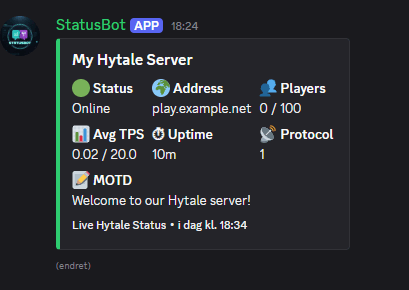
✅ Live Discord status updates
✅ /status slash command with rich embed
✅ Player count tracking (join / leave aware)
✅ Server uptime tracking
✅ Fully configurable embed (colors, text, logo, footer)
✅ Rotating Discord activity messages
✅ Safe Discord rate-limit handling
✅ Java 21 compatible (runs on Java 21–25)
Go to the Discord Developer Portal
https://discord.com/developers/applications
Click “New Application” and give it a name.
Open the application → Bot tab
Click “Add Bot”
Choose a profile icon and name
Copy the Bot Token (keep this secret!)
Enable Presence Intent, MESSAGE CONTENT INTENT and Server member intent
Go to "OAuth2"
Enable "Bot and administrator"
Go to the bottom and copy the link and paste it in your browser to invite it to your server.
⚠️⚠️ Do not share your bot token.⚠️⚠️ Anyone with this token can fully control your bot.
Install "StatusBotByBanan.jar and paste it in your mods folder
A new config file will be generated in the same folder where you can change the following:
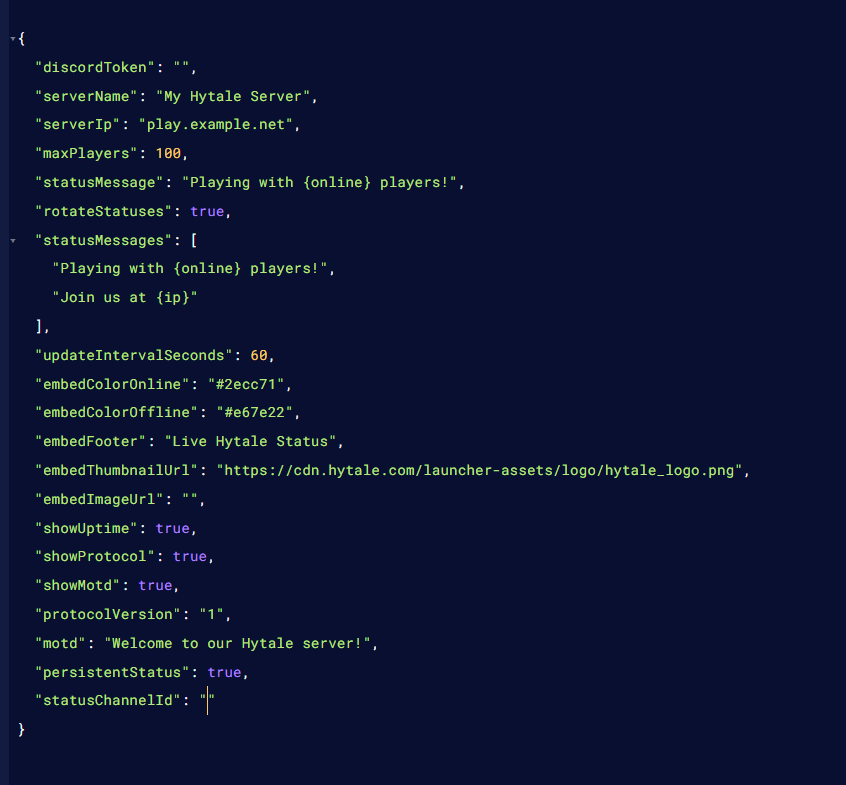
There is now a Statusbotdata.json file in the statusbot folder
This is only generated when persistent embed is set to true and channelID is provided.
Language support added, change language to: en, es or fr
discordToken🏷️ serverName – Name shown as the embed title
🌍 serverIp – Displayed in /status and rotating messages
👥 maxPlayers – Maximum player count shown in the embed
🟢 statusMessage – Default bot status message
🔁 rotateStatuses – Enable rotating status messages (true / false)
📝 statusMessages – List of rotating messages
⏱ updateIntervalSeconds – How often status updates
{online} → current online players
{ip} → server IP from config
🟩 embedColorOnline – Embed color when server is online
🟧 embedColorOffline – Embed color when server is starting/offline
#2ecc71)🧾 embedFooter – Text shown at the bottom of the embed
embedThumbnailUrl – Small logo (top-right corner)
embedImageUrl – Large banner image (optional)
⚠️ Image URL rules (VERY IMPORTANT):
Must start with https://
Must end with .png, .jpg, .jpeg, .webp, or .gif
Must be a direct image link
✅ Example:
https://i.imgur.com/PLLLb9m.png
❌ Invalid (will break /status):
https://imgur.com/PLLLb9m https://imgur.com/a/xxxx
🚨 If invalid, StatusBot prints a warning in console and safely skips the image.
⏱ showUptime – Shows server uptime
📡 showProtocol – Shows protocol version
📝 showMotd – Shows MOTD text
🔢 protocolVersion – Manual protocol value
💬 motd – Message of the day shown in embed
Shows how long the server has been running
Examples:
5m
2h 15m
1d 4h 20m
Helps players see server stability.
(If enabled)
📍 Bot posts one embed in a channel
🔄 Embed updates automatically
🚫 No spam
📢 Perfect for #server-status channels
Remove /status command and only keep persistent embed (build with /status will still be available but not supported)
Startup Status
More game integration/chat-to-discord
Project description from CurseForge.
Recent files
13 Mar 2026
11 Mar 2026
21 Feb 2026
11 Feb 2026
5 Feb 2026
30 Jan 2026
23 Jan 2026
17 Jan 2026
Looking for an older file? The official CurseForge project page is in Resources.
 mod
modMake your Hytale Factory dream come true using technology through a tiered discovery system. Mostly Single block machines (this is not for the faint of heart, they are expensive). Tech, furnace, crusher, plant, fuel, alloy, miner, crop, farm, ore
 mod
modMob taming framework and asset patcher. Breeding, traits, leveling, tame management UI, easier interaction chains, capture/spawn items that store metadata, ownership/tamed status, lots of behavior components and more!
 mod
modOrbitech is an automation mod for Hytale that combines kinetic, magic and other systems together to bring an immersive, technology to automate your world