Redstone-0.0.9.jar
22 Feb 2026
Client Not supported Server Required Dependencies No extras listed Listed on Project page
Check the setup 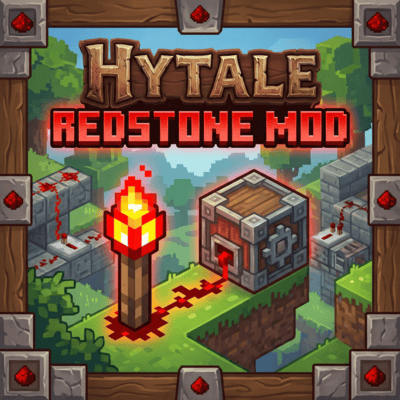
CurseForge · Hytale mod
Introducing Redstone – bringing classic engineering and mechanical logic to Hytale. You can now go beyond simple building and create your own logic circuits, automated door systems, and advanced lighting setups.
Quick answer
Redstone-0.0.9.jar targets Hytale. Do not install it as a separate client mod. Enable it on the world host—the local server in singleplayer or the dedicated server in multiplayer. No required dependencies listed for this file.
Where it goes
Do not install it as a separate client mod. Enable it on the world host—the local server in singleplayer or the dedicated server in multiplayer.
Put Hytale mods on the world host or dedicated server. Singleplayer runs a local server too; Hytale does not use separate client mods.
Redstone-0.0.9.jar. Change the file and its required mods may change too.
This file does not list any required mods. Do not add a library just because a different file uses it.
This file does not list any required or optional project dependencies. Check the creator notes before changing an existing world.
Before you install it
Built for Redstone-0.0.9.jar. Pick another file and the loader, install side or required mods may change.
Use Redstone-0.0.9.jar. It targets Hytale; another release may target a different game build or dependency set.
This file does not list any required mods. Do not add a library just because a different file uses it.
Do not install it as a separate client mod. Enable it on the world host—the local server in singleplayer or the dedicated server in multiplayer.
Use the “Get this file” button beside Redstone-0.0.9.jar. It opens that exact file at the source.
About this project

BETA WARNING: This mod is currently in Beta. While core systems are functional, I am actively working on updates. If you encounter bugs, please report them on our Discord.
Join the Community: For bug reports, feature requests, and to chat with other engineering enthusiasts, join our official Discord server: 🔗 https://discord.gg/B3bSYyWP43
We have just deployed a major update to the signal logic!
Redstone brings classic engineering and mechanical logic to Hytale. You can now go beyond simple building and create your own logic circuits, automated door systems, and advanced lighting setups.
For those who love complex machinery, this mod fills the missing piece in Hytale.
The Redstone Torch behavior changes based on placement:
We are actively developing new features to expand the mechanical possibilities:
You will need the following materials to craft components:
Redstone Dust
Redstone Torch
Redstone Block
Redstone Repeater
Want your blocks to work with redstone? Use the API:
import org.pfc.redstone.api.RedstoneAPI;
import org.pfc.redstone.api.listeners.RedstonePoweredBlock;
import org.pfc.redstone.api.types.BlockPos;
Example - Piston:
RedstoneAPI.getInstance().registerPoweredBlock("piston_block", new RedstonePoweredBlock() {
    @Override
    public void onPowered(World world, int x, int y, int z, BlockPos source) {
        extendPiston(world, x, y, z);
    }

    @Override
    public void onUnpowered(World world, int x, int y, int z) {
        retractPiston(world, x, y, z);
    }
});
Example - Pressure Plate:
// Pressed
RedstoneAPI.getInstance().activateSignalAt(x, y, z);

// Released
RedstoneAPI.getInstance().deactivateSignalAt(x, y, z);
| Method | Description |
|---|---|
registerPoweredBlock(blockId, listener) |
Register a block to receive power events |
activateSignalAt(x, y, z) |
Activate a dynamic signal source |
deactivateSignalAt(x, y, z) |
Deactivate a dynamic signal source |
hasSignalAt(x, y, z) |
Check if position has an active signal |
Looking for the Pressure Plates mod? Click here to visit the mod page.
Project description from CurseForge.
Recent files
22 Feb 2026
7 Feb 2026
7 Feb 2026
23 Jan 2026
22 Jan 2026
21 Jan 2026
20 Jan 2026
Looking for an older file? The official CurseForge project page is in Resources.
 mod
modPlace a pen in your world, add your twitch or youtube info, take a seat, and watch your viewers become sprouts.
 mod
modDynamic AI battle engine enabling Free-For-All and friendly-fire combat for NPCs
 mod
modOptional Java plugin for Elemental Knights Pack that migrates legacy v2.0.0 item IDs to the new IDs in player inventories and loaded chest/container inventories. Pick up placed benches before updating; placed benches are not migrated.