LootChestPlugin-0.0.1.jar
21 Jan 2026
Client Not supported Server Required Dependencies No extras listed Listed on Project page
Check the setup 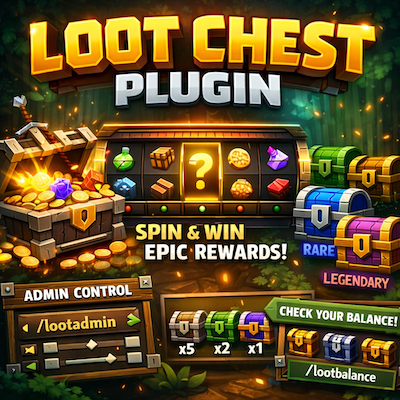
CurseForge · Hytale mod
A complete loot chest system with roulette-style animations, five rarity tiers, and full admin controls for Hytale servers
Quick answer
Loot Chest LootChestPlugin-0.0.1.jar targets Hytale. Do not install it as a separate client mod. Enable it on the world host—the local server in singleplayer or the dedicated server in multiplayer. No required dependencies listed for this file.
Where it goes
Do not install it as a separate client mod. Enable it on the world host—the local server in singleplayer or the dedicated server in multiplayer.
Put Hytale mods on the world host or dedicated server. Singleplayer runs a local server too; Hytale does not use separate client mods.
LootChestPlugin-0.0.1.jar. Change the file and its required mods may change too.
This file does not list any required mods. Do not add a library just because a different file uses it.
This file does not list any required or optional project dependencies. Check the creator notes before changing an existing world.
Before you install it
Built for Loot Chest LootChestPlugin-0.0.1.jar. Pick another file and the loader, install side or required mods may change.
Use LootChestPlugin-0.0.1.jar. It targets Hytale; another release may target a different game build or dependency set.
This file does not list any required mods. Do not add a library just because a different file uses it.
Do not install it as a separate client mod. Enable it on the world host—the local server in singleplayer or the dedicated server in multiplayer.
Use the “Get this file” button beside LootChestPlugin-0.0.1.jar. It opens that exact file at the source.
About this project
Loot Chest Plugin brings an exciting reward system to your Hytale server! Players can open virtual loot chests with a satisfying casino-style roulette animation that scrolls through potential rewards before landing on their prize.
Server administrators have full control over:
Perfect for minigames, survival servers, reward systems, or any server looking to add an engaging loot mechanic!
Each tier has its own separate loot table with customizable rewards:
| Tier | Color | Description |
|---|---|---|
| Common | Gray | Basic items, higher drop rates |
| Uncommon | Green | Intermediate items |
| Rare | Blue | Less common items |
| Epic | Purple | Valuable items |
| Legendary | Gold | The rarest and most valuable rewards |
| Command | Description |
|---|---|
/lootchest <rarity> |
Opens a loot chest of the specified rarity |
/lc <rarity> |
Alias for /lootchest |
/lootbalance |
Shows your loot chest balance for all rarities |
/lb |
Alias for /lootbalance |
| Command | Permission | Description |
|---|---|---|
/lootgive <player> <rarity> <amount> |
lootchest.admin |
Give loot chests to a player |
/lg <player> <rarity> <amount> |
lootchest.admin |
Alias for /lootgive |
/lootadmin <rarity> |
lootchest.admin |
Open the loot table configuration UI |
/lootbalances |
lootchest.admin |
View all player balances in a UI |
/lbs |
lootchest.admin |
Alias for /lootbalances |
/lootbalance <player> |
lootchest.admin |
View another player's balance |
| Permission | Description |
|---|---|
lootchest.admin |
Access to all admin commands (give chests, configure loot tables, view all balances) |
Note: Opening loot chests (/lootchest) requires no permission - players just need to have chests in their balance.
Located in plugins/LootChestPlugin/:
lootchest_common.json
lootchest_uncommon.json
lootchest_rare.json
lootchest_epic.json
lootchest_legendary.json
{
  "rewards": [
    {
      "itemId": "Food_Bread",
      "minQuantity": 1,
      "maxQuantity": 5,
      "chance": 15.0
    },
    {
      "itemId": "Ore_Iron",
      "minQuantity": 1,
      "maxQuantity": 3,
      "chance": 10.0
    }
  ]
}
Located in plugins/LootChestPlugin/balances/:
<player-uuid>.json
Each file stores the player's username and their chest count per rarity.
plugins folder/lootadmin <rarity> or edit the JSON files directly/lootgive <player> <rarity> <amount>As an admin:
/lootgive Steve common 10      → Gives Steve 10 Common loot chests
/lootgive Steve legendary 1    → Gives Steve 1 Legendary loot chest
/lootadmin rare                → Opens the Rare tier configuration UI
/lootbalances                  → View all player balances
As a player:
/lootbalance                   → Check your chest balance
/lootchest common              → Open a Common loot chest
/lc legendary                  → Open a Legendary loot chest
Found a bug or have a suggestion? Feel free to reach out!
Project description from CurseForge.
Recent files
21 Jan 2026
Looking for an older file? The official CurseForge project page is in Resources.
 mod
modAdds new armor, weapons, and soldier variants. Soldiers will patrol and fight off any hostile mobs.
 mod
modAuthentic Japanese props and items for Creative and Exploration mode
 mod
modLink, name, share and manage your teleporters your way. No config files. No complexity. Just warp.