Hytale version
Back to mods 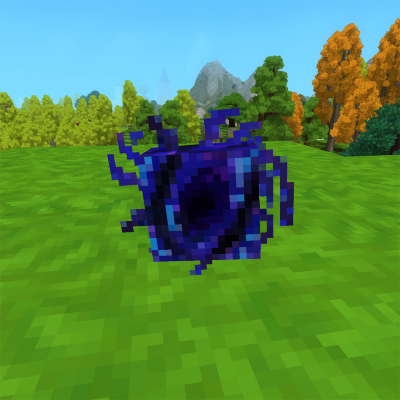
CurseForge · Hytale mod
PortalHome
Close the distance between your adventures and home by warping inbetween
Choose a version Pick your version below, then grab the matching file.
Quick answer
Which PortalHome release should I use?
Latest stable file PortalHome-1.0.8+0.5.7
Game version 0.5
Mod system Built-in Hytale mod system
PortalHome-1.0.8+0.5.7 targets 0.5. Do not install it as a separate client mod. Enable it on the world host—the local server in singleplayer or the dedicated server in multiplayer. No required dependencies listed for this file.
Where it goes
Where should PortalHome be installed in Hytale?
Do not install it as a separate client mod. Enable it on the world host—the local server in singleplayer or the dedicated server in multiplayer.
Separate client mod Not supported
World host / dedicated server Required
Mod system for this release Built-in Hytale mod system
Required install it here Optional supported, not mandatory Not supported do not install here Source doesn’t say do not assume
Put Hytale mods on the world host or dedicated server. Singleplayer runs a local server too; Hytale does not use separate client mods.
What else does PortalHome-1.0.8+0.5.7 need?
PortalHome-1.0.8+0.5.7. Change the file and its required mods may change too.
This file does not list any required mods. Do not add a library just because a different file uses it.
This file does not list any required or optional project dependencies. Check the creator notes before changing an existing world.
Before you install it
Add PortalHome without breaking your instance.
Built for PortalHome-1.0.8+0.5.7. Pick another file and the loader, install side or required mods may change.
- 01
Stick to this file
Use PortalHome-1.0.8+0.5.7. It targets 0.5; another release may target a different game build or dependency set.
- 02
Bring the mods it needs
This file does not list any required mods. Do not add a library just because a different file uses it.
- 03
Enable it on the world host
Do not install it as a separate client mod. Enable it on the world host—the local server in singleplayer or the dedicated server in multiplayer.
- 04
Pick the file you checked
Use the “Get this file” button beside PortalHome-1.0.8+0.5.7. It opens that exact file at the source.
About this project
What does PortalHome add?
PortalHome - Your Dimensional Tether
Never lose your way back home again.
PortalHome introduces the Pocket Portal, a legendary mystical artifact that serves as your personal waypoint network in the world of Hytale. This isn't just another teleportation item—it's a full named-location system that lets you bookmark any spot in the world and jump between them instantly. Save as many locations as you need, teleport back to spawn on demand, and manage your waypoints through a clean in-game UI.
How It Works
Hold either interaction for 2.5 seconds (while standing—crouching blocks activation) to trigger the portal. Blue particles and a custom animation play during the charge-up.
Hold Primary Interaction (Open Teleport Menu): Opens the destination picker, showing your world spawn point and every saved named location. Pick any destination and teleport instantly. You can also delete saved locations directly from this screen.
Hold Secondary Interaction (Save Current Location): Opens the save menu with your current coordinates displayed. Type a custom name and confirm to bookmark the spot for future teleports.
A custom HUD indicator appears whenever the Pocket Portal is in your hand, so you always know the item is ready.
Features
- Multi-Location Waypoint System: Save unlimited named locations and manage them from the teleport menu
- Spawn Teleport: Always-available shortcut to your world spawn point—no save required
- Named Locations: Every saved waypoint has a custom name and displays its exact coordinates
- Delete from UI: Remove waypoints directly from the teleport menu
- HUD Indicator: A subtle UI element appears while holding the portal
- Visual Polish: Custom 3D model, animations, and blue particle effects during activation
🔮 Crafting Recipe
Befitting its legendary status, the Pocket Portal requires rare essences:
- 15x Life Essence
- 15x Fire Essence
- 15x Void Essence
Crafted at a Survival Workbench in just 3.5 seconds—once you have the ingredients, of course.
💡 Perfect For
- Explorers who venture far but need quick access to home storage
- Miners who want to deposit resources without losing their mining spot
- Adventurers tackling dangerous dungeons with a reliable escape route
- Builders working on distant projects who need to return to spawn for supplies
Note: The Pocket Portal is unique—you can only carry one at a time, and it is kept on death. Choose your waypoints wisely!
Project description from CurseForge.
Pick your setup
PortalHome releases for each Hytale build.
Choose the version and loader you play, then open the matching release.
Check the dependencies, then try the file in a copied instance before changing a world you care about.
Recent files
PortalHome releases and Hytale builds
PortalHome-1.0.8+0.5.7
21 Jul 2026
Client Not supported Server Required Dependencies No extras listed Listed on Project page
Check the 0.5 setup 0.5 release
PortalHome-1.0.8+0.5.6
21 Jun 2026
Client Not supported Server Required Dependencies No extras listed Listed on Project page
Check the 0.5 setup 0.5 release
PortalHome-1.0.7+0.5.6
18 Jun 2026
Client Not supported Server Required Dependencies No extras listed Listed on Project page
Check the 0.5 setup 0.5 release
PortalHome-1.0.7+0.5.0-pre.8
14 May 2026
Client Not supported Server Required Dependencies No extras listed Listed on Project page
Check the setup PortalHome-1.0.7+2026.05.07-5efa15f6d
10 May 2026
Client Not supported Server Required Dependencies No extras listed Listed on Project page
Check the setup PortalHome-1.0.6
10 May 2026
Client Not supported Server Required Dependencies No extras listed Listed on Project page
Check the setup PortalHome-1.0.5.jar
24 Apr 2026
Client Not supported Server Required Dependencies No extras listed Listed on Project page
Check the setup PortalHome-1.0.4.jar
17 Apr 2026
Client Not supported Server Required Dependencies No extras listed Listed on Project page
Check the setup PortalHome-1.0.3.jar
18 Feb 2026
Client Not supported Server Required Dependencies No extras listed Listed on Project page
Check the setup PortalHome-1.0.1.jar
28 Jan 2026
Client Not supported Server Required Dependencies No extras listed Listed on Project page
Check the setup PortalHome
23 Jan 2026
Client Not supported Server Required Dependencies No extras listed Listed on Project page
Check the setup Looking for an older file? The official CurseForge project page is in Resources.
 mod
mod CurseForge · Hytale
Capy Friend
Your own capybara companion! Automatically joins your adventures, carries your items, and protects you from hostile creatures.
 mod
mod CurseForge · Hytale
HyZ
Zombie apocalypse for Hytale: configurable night hordes, tougher heavy zombies and fully native NPC behavior. Lightweight, server-side and compatible with vanilla mobs.
 mod
mod CurseForge · Hytale
[MGG] Life Totem
Life Totem saves players from fatal damage, restores health, clears negative effects, grants regeneration, and provides temporary protection. Includes configurable crafting, mob drops, chest loot, and multi-language support.