
Hytale version
Back to mods 
CurseForge · Hytale mod
Socket Reforge
SocketReforge is a Hytale mod that adds RPG-style weapon reforging with upgrade levels and gem socketing for enhanced weapon customization.
Choose a version Pick your version below, then grab the matching file.
Quick answer
Which Socket Reforge release should I use?
Latest stable file SocketReforge-1.4.4-U7.jar
Game version 0.7
Mod system Built-in Hytale mod system
Socket Reforge SocketReforge-1.4.4-U7.jar targets 0.7. Do not install it as a separate client mod. Enable it on the world host—the local server in singleplayer or the dedicated server in multiplayer. No required dependencies listed for this file.
Where it goes
Where should Socket Reforge be installed in Hytale?
Do not install it as a separate client mod. Enable it on the world host—the local server in singleplayer or the dedicated server in multiplayer.
Separate client mod Not supported
World host / dedicated server Required
Mod system for this release Built-in Hytale mod system
Required install it here Optional supported, not mandatory Not supported do not install here Source doesn’t say do not assume
Put Hytale mods on the world host or dedicated server. Singleplayer runs a local server too; Hytale does not use separate client mods.
What else does Socket Reforge SocketReforge-1.4.4-U7.jar need?
SocketReforge-1.4.4-U7.jar. Change the file and its required mods may change too.
This file does not list any required mods. Do not add a library just because a different file uses it.
This file does not list any required or optional project dependencies. Check the creator notes before changing an existing world.
Before you install it
Add Socket Reforge without breaking your instance.
Built for Socket Reforge SocketReforge-1.4.4-U7.jar. Pick another file and the loader, install side or required mods may change.
- 01
Stick to this file
Use SocketReforge-1.4.4-U7.jar. It targets 0.7; another release may target a different game build or dependency set.
- 02
Bring the mods it needs
This file does not list any required mods. Do not add a library just because a different file uses it.
- 03
Enable it on the world host
Do not install it as a separate client mod. Enable it on the world host—the local server in singleplayer or the dedicated server in multiplayer.
- 04
Pick the file you checked
Use the “Get this file” button beside SocketReforge-1.4.4-U7.jar. It opens that exact file at the source.
About this project
What does Socket Reforge add?
Socket Reforge — Weapon & Armor Refinement for Hytale
Upgrade, enhance, socket, and risk it all. Socket Reforge brings a deep RPG equipment refinement system to Hytale, letting players upgrade their weapons and armor through a risk-reward reforging mechanic, punch sockets into equipment, and enhance them with powerful essences — all with configurable rates, sound effects, and custom UIs.
⚔️ Weapon & Armor Reforging
Craft Refinement Anvil from Workbench.
Take your equipment to a Reforge Bench and spend Refinement Globs (Refinement Glob + and Resonant Glob at higher tiers) to attempt upgrades up to a configurable cap (default +15). But be careful — every attempt carries risk!
Take Iron Ore to Salvage Station to get 15x Refinement Globs.
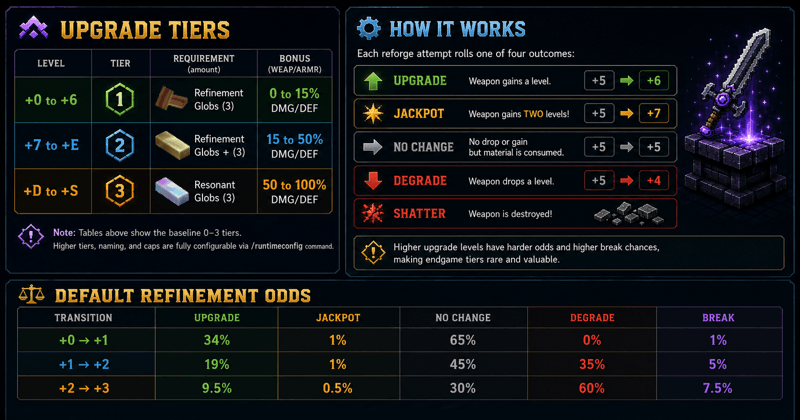
🔷 Socket Punching System
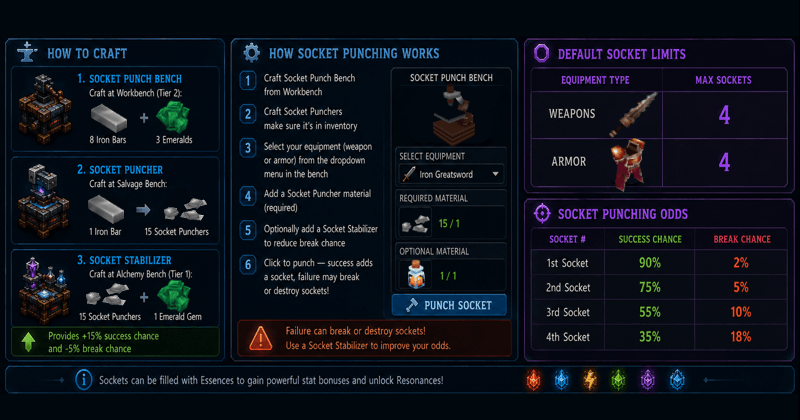
🔨 Socket Management Tools
New tools for managing your socketed equipment!
Iron Building Hammer
Manage socketed essences from your equipment with Iron Building Hammer:
- Clears socketed essences without deleting the socket layout
- Useful for re-configuring your build
- Failure can break a random socket
- Hammer durability is consumed on each clear process
💎 Essence System
Fill your sockets with Essences to gain powerful stat bonuses! Each essence type provides unique effects based on its element and tier.
How to Craft
Essence Socket Bench — Craft at Workbench (Tier 2):
- 8 Iron Bars + 3 Wood
Usage
- Punch Socket: Make sure a socket is punched using Socket Punch Bench
- Socket Essence: Select slot to socket an essence into an empty socket at Essence Socket Bench to gain its effects
- Remove/Clear Essence: Use Iron Building hammer as support to clear socketed essences
- On failure, durability is still reduced and a random socket can break
- Hammer Wear: Clearing uses 10% hammer durability per process and consumes the hammer at 0 durability
- Repair Broken Sockets: Select Voidheart as a support to repair broken sockets
Essence Types
| Type | Theme | Primary Effects |
|---|---|---|
| 🔥 Fire | Burns with intense heat | Damage, Fire Damage |
| ❄️ Ice | Glows with frost | Cold Damage, Slow Effect |
| ⚡ Lightning | Crackles with energy | Attack Speed, Crit Chance, Evasion (Armor) |
| 💚 Life | Pulses with vitality | Health, Life Steal |
| 🌑 Void | Shimmers with darkness | Crit Damage |
| 💧 Water | Flows with clarity | Damage (Weapon), Regeneration (Armor) |
Essence Tiers
Essences gain power based on consecutive count of the same type. For example: Life, Life, Life, Fire = Tier 3 Life, Tier 1 Fire. Higher tiers provide stronger effects!
| Essence Type | Tier 1 | Tier 3 | Tier 5 |
|---|---|---|---|
| Fire | +2% Damage, +3 Flat DMG | +6% Damage, +8 Flat DMG | +12% Damage, +15 Flat DMG |
| Ice | +2% Slow, +2 Cold DMG | +5% Slow, +6 Cold DMG | +5% Freeze, +12 Cold DMG |
| Lightning | Weapon: +3% ATK Speed, +2% Crit Armor: +1% Evasion |
Weapon: +7% ATK Speed, +4% Crit Armor: +3% Evasion |
Weapon: +15% ATK Speed, +8% Crit Armor: +5% Evasion |
| Life (Weapon) | +2% Lifesteal | +5% Lifesteal | +10% Lifesteal |
| Life (Armor) | +10 HP | +25 HP | +50 HP |
| Void | +5% Crit DMG | +12% Crit DMG | +25% Crit DMG |
| Water (Armor) | +1 Regeneration | +3 Regeneration | +5 Regeneration |
Available Stats
Essences can provide bonuses to the following stats:
- Offensive: Attack Speed, Damage, Crit Chance, Crit Damage
- Defensive: Health, Defense, Evasion
- Utility: Life Steal, Movement Speed, Luck
- Elemental: Cold Damage, Slow Effect, Fire Damage, Lightning Damage
Greater Essences
In addition to regular essences, Greater (Concentrated) Essences are available with enhanced power:
- Stronger stat bonuses than regular essences
- Available for all 6 essence types
- Craftable through the Essence Socket Bench
✨ Resonance System
Unlock powerful hidden effects by socketting specific essence combinations! The Resonance System is inspired by runewords — certain essence orders trigger unique bonuses that aren't available from individual essences alone.
How Resonance Works
- Fill All Sockets: Resonance only activates when every socket on your equipment contains an essence
- Order Matters: The sequence of essences determines which resonance effect you get
- Quality Tiers: Higher socket counts can unlock rarer resonance qualities
- Free Power: Once discovered, resonance effects require no extra materials!
- Multiple Weapons: Works with swords, daggers, bows, crossbows, and more!
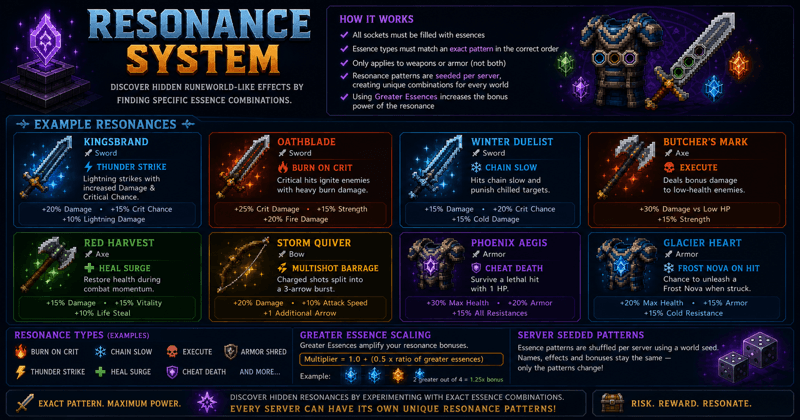
Hint: Recipes are obtainable throughout the world via kill or chest loots, rates are configurable via /runtimeconfig command
📜 Lore System (Spirits & Lore Sockets)
The Lore System adds spirit-bound abilities that can proc in combat when your weapon is aligned with the right gem and lore socket colors.
Core Loop
- Punch a lore socket: Use Ghastly Essence in the Socket Punch bench to add a lore socket to eligible equipment.
- Socket a Spirit gem: Use the Lore Socket bench to place a Spirit gem into that lore socket (the gem defines the socket color).
- Bind the Spirit: Defeat an NPC bound to that Spirit while holding the gem-matched weapon — the first eligible kill binds the Spirit and unlocks its proc.
- Grow the lore: Lore abilities gain XP each time they proc. Feed Resonant Essence at each feed threshold to keep leveling.
Binding & Proc Rules
- First kill binds: Binding only happens on the first eligible kill while the matching gem is socketed.
- Spirit selection: If the NPC is a known Spirit, that Spirit binds. Otherwise a Spirit is selected from the configured pool for that gem color.
- Color gates: Socket color must match the gem’s color. Use Resonant Essence to reroll lore socket colors if needed.
- Leveling: Each proc grants XP; leveling and feed costs scale from config.
Configuration Files
- LoreConfig.json — lore socket drop chances, min/max sockets, XP per proc, feed interval/cost, and feed/clear item IDs.
- LoreMappingConfig.json — gem color matches (e.g., rock_gem_*), spirit pools per color, core colors, and ability mappings.
Tip: Match your lore socket colors to the spirit’s gem alignment to enable its combat procs.
💎 Socket Loot System
Socketed equipment can now be found throughout the game world! No need to punch sockets yourself — find them as loot!
Loot Sources
- Enemy Drops — Defeated NPCs have a chance to drop equipment with sockets
- Treasure Chests — Found chests may contain socketed gear as rewards
Loot Rarity
- Higher socket counts are rarer to find
- Essence-filled sockets are more valuable
- All looted equipment have broken sockets that can be repaired in order to be used
Explore the world to find the best socketed equipment!
🛠️ HyUI Required
Get HyUI from CurseForge
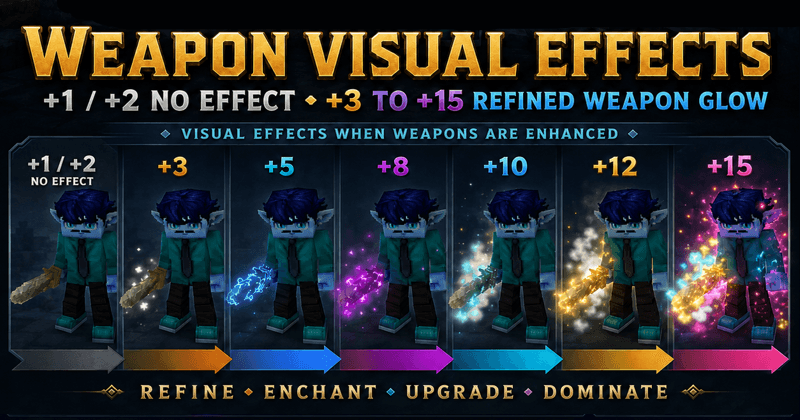
Get Weapon-Visualization for the best experience!
🔐 Server Commands (OP Only)
/socketpunch— Open Socket Punch bench UI directly/essence— Open Essence Socket bench UI directly/rfadmin refine <0-max>— Set held item refinement level/rfadmin sockets <current> [max]— Set held item sockets/rfadmin addmax <amount>— Increase held item max sockets/runtimeconfig— Mod configurations UI/spawnequipchest— Spawns loot chest for testing chest drop rates/spawnequipenemy— Spawns random enemy for testing npc drop rates
🔧 Fully Configurable
Everything is customizable through /runtimeconfig command
✨ Features at a Glance
- Risk-reward reforging with configurable outcomes + shatter for both weapons and armor
- Scalable upgrade tiers (default +15) with configurable names/labels
- Socket punching system — add up to 4-5 sockets to weapons and armor
- 6 essence types (Fire, Ice, Lightning, Life, Void, Water) with tier-based effects
- Greater Essences — Concentrated higher-tier essence variants
- Consecutive tier system — stack same-type essences for higher bonuses
- Resonance System — discover hidden runeword-like effects by finding specific essence combinations obtainable through drops or chest loots.
- Socket Loot System — enemies and chests can now drop socketed equipment!
- Average Damage Tooltips — see true weapon damage output in tooltips
- Extended T5 effects — includes Void Blood Pact bonus-damage behavior and armor prefixes
- Regeneration system — Life and Water essences grant HP regen on armor
- Iron Building Hammer support — used in both Essence and Reforge benches with durability wear
- HyUI Support — Optional enhanced UI when HyUI mod is installed
- ECS damage & defense system that applies multipliers in real-time combat
- Bench preview UIs with detailed refinement/socket outcome information
- Socket Punching UI for adding sockets with risk/reward mechanics
- Essence Socketing UI for managing socketed essences
- Configurable sound effects for every reforge event
- Smart item detection via item ID, categories, and structure checks
- Metadata-based refinement — no item duplication or patching required
- Fully configurable rates, weights, multipliers, and sounds via
/runtimeconfigcommand
🎮 For Server Operators
Socket Reforge is designed to be drop-in and configurable. Default values provide a balanced experience out of the box, but every rate can be tuned:
- Want easier upgrades? Increase upgrade weights and lower break chances
- Want a hardcore experience? Crank up degrade and shatter rates
- Want easier socketing? Increase success chances and reduce break rates
- Custom weapons? Just follow the categorization Category: Items.Weapon
🔗 Links
Found any bugs? please post it here: https://legacy.curseforge.com/hytale/mods/socket-reforge/settings/issues
Made by iRaiden
Project description from CurseForge.
Pick your setup
Socket Reforge releases for each Hytale build.
Choose the version and loader you play, then open the matching release.
Hytale version
0.6
1 loader buildHytale version
0.5
1 loader buildCheck the dependencies, then try the file in a copied instance before changing a world you care about.
Recent files
Socket Reforge releases and Hytale builds
SocketReforge-1.4.4-U7.jar
14 Oct 2026
Client Not supported Server Required Dependencies No extras listed Listed on Project page
Check the 0.7 setup 0.7 release
SocketReforge-1.4.3-U6.jar
29 Aug 2026
Client Not supported Server Required Dependencies No extras listed Listed on Project page
Check the 0.6 setup 0.6 release
SocketReforge-1.4.2-U6.jar
27 Aug 2026
Client Not supported Server Required Dependencies No extras listed Listed on Project page
Check the 0.6 setup 0.6 release
SocketReforge-1.4.1.jar
16 Aug 2026
Client Not supported Server Required Dependencies No extras listed Listed on Project page
Check the 0.5 setup 0.5 release
SocketReforge-1.4.0.jar
29 Jul 2026
Client Not supported Server Required Dependencies No extras listed Listed on Project page
Check the 0.5 setup 0.5 release
SocketReforge-1.3.9.alpha.3.jar
19 Jul 2026
Client Not supported Server Required Dependencies No extras listed Listed on Project page
Check the 0.5 setup 0.5 release
SocketReforge-1.3.9-alpha.2.jar
16 Jul 2026
Client Not supported Server Required Dependencies No extras listed Listed on Project page
Check the 0.5 setup 0.5 release
SocketReforge-1.3.9-alpha.1.jar
14 Jul 2026
Client Not supported Server Required Dependencies No extras listed Listed on Project page
Check the 0.5 setup 0.5 release
SocketReforge-1.3.9.jar
5 Jul 2026
Client Not supported Server Required Dependencies No extras listed Listed on Project page
Check the 0.5 setup 0.5 release
SocketReforge-1.3.8-beta.1-Hotfix.jar
1 Jun 2026
Client Not supported Server Required Dependencies No extras listed Listed on Project page
Check the 0.5 setup 0.5 release
SocketReforge-1.3.8 Update 5.jar
26 May 2026
Client Not supported Server Required Dependencies No extras listed Listed on Project page
Check the 0.5 setup 0.5 release
SocketReforge-1.3.7c.jar
9 May 2026
Client Not supported Server Required Dependencies No extras listed Listed on Project page
Check the setup Looking for an older file? The official CurseForge project page is in Resources.
 mod
mod CurseForge · Hytale
HyThief
Stealth pickpocketing and witnessed theft from owned containers, with native NPC reactions. HyThief 1.4.0 for Hytale 0.7.2.
 mod
mod CurseForge · Hytale
Endless Ember
Endless Ember adds tiered fuels, Ember crafting stations, mineral soils, and magical ore flowers to Hytale—grow, harvest, and press pollen into resources while progressing from MK1 fuel to near-infinite endgame power.
 mod
mod CurseForge · Hytale
SoulStone
Defeat elite enemies to claim their souls, bind their power to Soul Stones, and call on it when you need it.