DynamicFloatingDamageFormatterCoreAPI-1.0.1.jar
29 Mar 2026
Client Not supported Server Required Dependencies No extras listed Listed on Project page
Check the setup 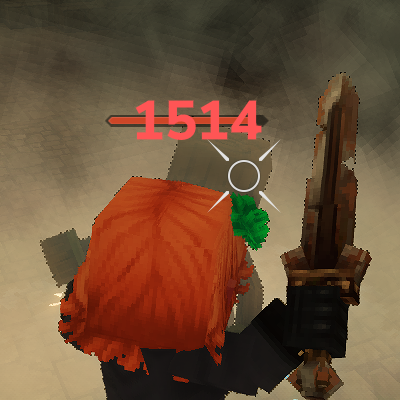
CurseForge · Hytale mod
Standalone, configurable floating damage number API for Hytale mods.
Quick answer
Dynamic Floating Numbers Lib DynamicFloatingDamageFormatterCoreAPI-1.0.1.jar targets Hytale. Do not install it as a separate client mod. Enable it on the world host—the local server in singleplayer or the dedicated server in multiplayer. No required dependencies listed for this file.
Where it goes
Do not install it as a separate client mod. Enable it on the world host—the local server in singleplayer or the dedicated server in multiplayer.
Put Hytale mods on the world host or dedicated server. Singleplayer runs a local server too; Hytale does not use separate client mods.
DynamicFloatingDamageFormatterCoreAPI-1.0.1.jar. Change the file and its required mods may change too.
This file does not list any required mods. Do not add a library just because a different file uses it.
This file does not list any required or optional project dependencies. Check the creator notes before changing an existing world.
Before you install it
Built for Dynamic Floating Numbers Lib DynamicFloatingDamageFormatterCoreAPI-1.0.1.jar. Pick another file and the loader, install side or required mods may change.
Use DynamicFloatingDamageFormatterCoreAPI-1.0.1.jar. It targets Hytale; another release may target a different game build or dependency set.
This file does not list any required mods. Do not add a library just because a different file uses it.
Do not install it as a separate client mod. Enable it on the world host—the local server in singleplayer or the dedicated server in multiplayer.
Use the “Get this file” button beside DynamicFloatingDamageFormatterCoreAPI-1.0.1.jar. It opens that exact file at the source.
About this project
Standalone, configurable floating damage number API for Hytale mods.
This package can be shipped as a plugin (with adapter) or used as a pure API (core) that other mods call directly.
DynamicFloatingDamageFormatter-core.jar
API only. Other mods call DamageNumbers.emit(...) themselves.
DynamicFloatingDamageFormatter-with-adapter.jar
API + adapter (DamageNumberEST) that auto-hooks damage events and spawns combat text.
DynamicFloatingDamageFormatter-with-adapter.jar into your server mods/.examples/Server/Entity/UI/ into your asset pack.examples/Server/Config/DamageNumberConfig.json into your asset pack.This immediately replaces/augments combat text based on the configured kinds.
Add the core jar as a dependency and emit damage numbers when your own damage code runs.
import irai.mod.DynamicFloatingDamageFormatter.DamageNumbers;

DamageNumbers.kind("POISON")
    .label("Poison")
    .ui("SocketReforge_CombatText_Poison")
    .dot(true)
    .register();
DamageNumbers.emit(store, targetRef, amount, "POISON");
DamageNumbers.attachTarget(damage, targetRef);
DamageNumbers.emit(damage);
DamageNumbers.markSkipCombatText(damage);
This is a practical, end-to-end guide for using the formatter in your own mod. It covers:
Quick Install (No Code)
Use the adapter build if you want it to automatically hook damage events.
DynamicFloatingDamageFormatter-with-adapter.jar into your server mods/ folder.examples/Server/Entity/UI/*.json into your asset pack.examples/Server/Config/DamageNumberConfig.json into your asset pack.That’s it. The adapter will emit combat text for any damage that matches your config.
Hook & Register (Plugin Setup)
If you want the formatter to hook damage automatically, your plugin needs to:
DamageNumberConfig.json.DamageEventSystem that emits the numbers (adapter system).Example plugin setup:
import javax.annotation.Nonnull;

import com.hypixel.hytale.server.core.plugin.JavaPlugin;
import com.hypixel.hytale.server.core.plugin.JavaPluginInit;
import com.hypixel.hytale.server.core.util.Config;
import com.hypixel.hytale.server.core.modules.entity.damage.DamageEventSystem;

import irai.mod.DynamicFloatingDamageFormatter.DamageNumberConfig;
import irai.mod.DynamicFloatingDamageFormatter.DamageNumbers;

public final class MyPlugin extends JavaPlugin {
    private final Config<DamageNumberConfig> damageConfig;

    public MyPlugin(@Nonnull JavaPluginInit init) {
        super(init);
        this.damageConfig = this.withConfig("DamageNumberConfig", DamageNumberConfig.CODEC);
    }

    @Override
    protected void setup() {
        // Load config and apply it.
        damageConfig.save().join();
        DamageNumbers.applyConfig(damageConfig.get());

        // Register your adapter system (extends DamageEventSystem).
        this.getEntityStoreRegistry().registerSystem(new MyDamageNumberEST());
    }
}
Core API Usage (Code Integration)
If you want full control, depend on the core jar and emit numbers yourself.
Example: emit a custom kind when your damage code runs.
import irai.mod.DynamicFloatingDamageFormatter.DamageNumbers;
import com.hypixel.hytale.component.Ref;
import com.hypixel.hytale.component.Store;
import com.hypixel.hytale.server.core.universe.world.storage.EntityStore;

public void onMyDamage(Store<EntityStore> store, Ref<EntityStore> target, float amount) {
    DamageNumbers.emit(store, target, amount, "POISON");
}
If you already have a Damage object and want the formatter to pick a kind:
import irai.mod.DynamicFloatingDamageFormatter.DamageNumbers;
import com.hypixel.hytale.server.core.modules.entity.damage.Damage;
import com.hypixel.hytale.component.Ref;
import com.hypixel.hytale.server.core.universe.world.storage.EntityStore;

public void onDamage(Damage damage, Ref<EntityStore> target) {
    DamageNumbers.attachTarget(damage, target);
    DamageNumbers.emit(damage);
}
Marking Damage Metadata
You can guide the formatter by attaching metadata to the Damage object.
DamageNumbers.markKind(damage, "BLEED");      // Force a kind
DamageNumbers.markCritical(damage);           // Force CRITICAL kind
DamageNumbers.markSkipCombatText(damage);     // Suppress base combat text
This is especially useful if you already use DamageCause but want custom styling.
Config Basics
Config lives at:
Server/Config/DamageNumberConfig.json
It uses three arrays:
DEFAULTS – global formatting rulesKINDS – per-kind stylingALIASES – map damage cause ids to kindsExample:
{
  "DEFAULTS": [
    "format={label} {amount}",
    "rounding=ROUND",
    "min=1",
    "precision=2",
    "style=PLAIN",
    "labelByDefault=true"
  ],
  "KINDS": [
    "POISON|label=Poison|icon=<item is=\"Ingredient_Poison\"/>|format={icon}{label} {amount}|color=#008700|ui=SocketReforge_CombatText_Poison|dot=true"
  ],
  "ALIASES": [
    "poison=POISON",
    "toxic=POISON"
  ]
}
Supported KINDS keys:
labelicon (raw markup inserted into {icon})iconBg (background markup inserted into {iconBg})iconOverlay (overlay markup inserted into {iconOverlay})format (supports {iconBg}, {icon}, {iconOverlay}, {label}, {amount}, {kind})colorui (primary UI component id)uiAlt (alternate UI id, toggles every hit)dot (treat as DoT for angle/randomization)rounding (ROUND, FLOOR, CEIL, NONE)precisionminstyle (PLAIN, MESSAGE, TOOLTIP)labelByDefaultAliases match DamageCause.getId() by substring.
UI Asset Basics
Each ui=... points to a Server/Entity/UI/*.json asset with "Type": "CombatText".
Key fields you can tweak:
RandomPositionOffsetRange – random X/Y offset on each hitHitboxOffset – base offsetAnimationEvents – scale, fade, and timingHitAngleModifierStrength – how much the hit angle affects motionIf you set uiAlt, the formatter alternates between primary and alt components to reduce overlap.
Icon strings are injected verbatim into the combat text. If your client supports it, you can use:
<item is="Item_Id"/> for item icons<img src="texture.png" width="16" height="16"/> for image tagsTo layer background/overlay with the icon, include {iconBg} and {iconOverlay} in your format string, e.g.:
format={iconBg}{icon}{iconOverlay}{label} {amount}
DoT Example
On each tick of a DoT, emit the number directly:
DamageNumbers.emit(store, targetRef, perTickDamage, "BURN");
Set dot=true in config to allow wider angle randomization for DoT ticks.
Formatting Only (No Combat Text)
If you just want the formatted string:
String text = DamageNumbers.format(amount, "POISON");
Particle Usage (Optional)
If you want particle-based digits and icons instead of UI CombatText, add particle keys to your KINDS entries:
particleFont=FloatingDamage_<KIND> (digits)particleIcon=FloatingDamage_Icon_<Kind> (icon)particleBackground=FloatingDamage_Background (optional)Example (particle digits + icon):
POISON|label=|color=#008700|ui=SocketReforge_CombatText_Poison|dot=true|particleFont=FloatingDamage_POISON|particleIcon=FloatingDamage_Icon_Poison
Example (UI only, no particles):
POISON|label=|color=#008700|ui=SocketReforge_CombatText_Poison|dot=true
Notes:
Common/Particles/FloatingDamage/ and Server/Particles/FloatingDamage/.particleFont is not set, the formatter falls back to CombatText UI.Troubleshooting
DamageNumbers.markSkipCombatText(damage) or disable base combat text.RandomPositionOffsetRange and your dot=true kinds are actually tagged as DoT.Source: GitHub
Discord: Discord
Support: 
Made by iRaiden
Project description from CurseForge.
Recent files
29 Mar 2026
29 Mar 2026
28 Mar 2026
28 Mar 2026
Looking for an older file? The official CurseForge project page is in Resources.
 mod
modTake full control of how mobs spawn in your world. Define where they appear, how many, when, and under what conditions.
 mod
modA Hytale mod adding craftable runic guns and shotguns with tiered materials, dedicated ammunition, special abilities, and an admin HUD for gameplay configuration.
 mod
modAetherhaven is a town-building add-on built around laying out plots, growing a settlement with named locals, and following quests that push your town forward.