Architectury API Needed by Attributification [Attribute Unification] attributification-forge-2.0.5+1.20.1.jar
requiredMatching file found Matched file: [Forge 1.20(.1)] v9.2.14
CurseForge · Minecraft mod
Unifies similar attributes from different mods with configurable conversion coefficients to prevent duplication and improve compatibility.
Quick answer
Attributification [Attribute Unification] attributification-forge-2.0.5+1.20.1.jar targets 1.20.1 with Forge. The project page does not say whether this file belongs on the client, dedicated server, or both. All 4 required mods have matching files.
Where it goes
The project page does not say whether this file belongs on the client, dedicated server, or both.
The source does not explicitly classify this release as client-only or server-only.
attributification-forge-2.0.5+1.20.1.jar on 1.20.1 Forge. Every mod below is checked against that same setup.
Install Architectury API, Fzzy Config, Fzzy Config, Kotlin for Forge first. We found matching files for this game-version and loader setup. 1 comes through another mod in the chain.
1 extra mod was pulled in by another dependency. Indented rows show who needs each one. We only count dependency files that match this setup. A file for another loader does not fill the gap.
Before you install it
Built for Attributification [Attribute Unification] attributification-forge-2.0.5+1.20.1.jar on 1.20.1 Forge. Pick another file and the loader, install side or required mods may change.
Use attributification-forge-2.0.5+1.20.1.jar. It targets 1.20.1 with Forge; another release may have different loader, side or dependency requirements.
Install Architectury API, Fzzy Config, Fzzy Config, Kotlin for Forge first. We found matching files for this game-version and loader setup. 1 comes through another mod in the chain.
The project page does not say whether this file belongs on the client, dedicated server, or both.
Use the “Get this file” button beside attributification-forge-2.0.5+1.20.1.jar. It opens that exact file at the source.
About this project
Unlike effects which use boolean checks, attributes store numeric values. Attributification handles this by:
/attribute get commands show virtual values calculated from the target (when unidirectional=false)Unidirectional = false (default):
source = target × equivalence/attribute get source returns calculated value from targetUnidirectional = true:
Note: Pre-configured mappings are included only in the Forge version. Fabric users start with an empty config because most target mods in the default mappings are not available on Fabric. You can add your own mappings for Fabric-compatible mods via the in-game GUI or config file.
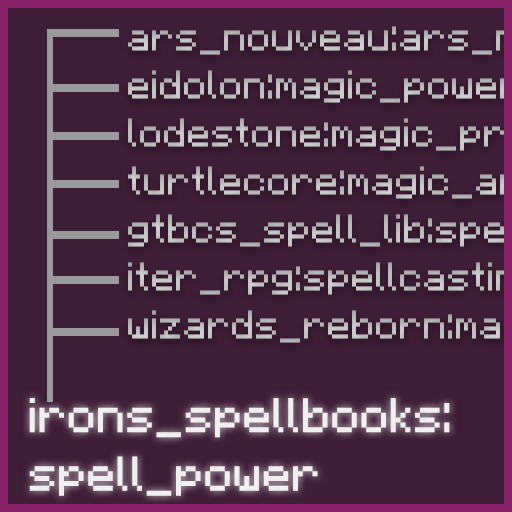
Magic & Spells: Iron's Spells 'n Spellbooks ↔ Spell Power Attributes, Ars Nouveau, Eidolon, Goety, Wizard's Reborn
Core Libraries: Apothic Attributes ↔ Obscure API, Turtleboi's Core Library, GTBC's SpellLib/API, Lodestone
All modids involved: spell_power, irons_spellbooks, traveloptics, gtbcs_geomancy_plus, attributeslib, ranged_weapon, eidolon, more_rpg_classes, obscure_api, turtlecore, gtbcs_spell_lib, goety, ars_nouveau, lodestone, wizards_reborn, iter_rpg
Access the configuration GUI through:
The GUI provides:
Config location: config/attributification/attributification.toml
The configuration system supports:
"primary, fallback1, fallback2"When upgrading:
.old extensionExample 1: Static Mapping (Registry Aliasing)
[[staticMappings]]
sourceAttribute = "spell_power:haste"
targetAttribute = "irons_spellbooks:cast_time_reduction"
**What happens:** - Registry-level aliasing: spell_power:haste becomes an alias for irons_spellbooks:cast_time_reduction - Simple 1:1 mapping without conversion options - Requires game restart to apply changes - Use only when attributes have identical scales (1:1 ratio) - For attributes with different scales (e.g., 100:1), use dynamic mappings instead
Example 2: Dynamic Mapping with Operation Conversion
[[dynamicMappings]]
sourceAttribute = "spell_power:earth"
targetAttribute = "gtbcs_geomancy_plus:geo_spell_power, irons_spellbooks:nature_spell_power"
equivalence = 3.0
conversionEquivalence = 20.0
unidirectional = false
onlyVisualChange = false
fullReplacement = false
subtractValue = 0.0
operationConversion = "ADDITION_TO_MULTIPLY_BASE"
**What happens:** - Item with +6 spell_power:earth ADDITION → converted to +0.3 geo_spell_power MULTIPLY_BASE (30% increase) - /attribute get spell_power:earth shows virtual value: geo_spell_power × 3.0 - If GTBC's Geomancy Plus is not installed, falls back to irons_spellbooks:nature_spell_power - Unidirectional=false: source shows virtual value calculated from target - Changes apply with relog (no restart needed)
Example 3: Full Replacement to Prevent Double-Dipping
[[dynamicMappings]]
sourceAttribute = "obscure_api:critical_hit"
targetAttribute = "attributeslib:crit_chance"
equivalence = 1.0
conversionEquivalence = 0.0
unidirectional = false
onlyVisualChange = false
fullReplacement = true
subtractValue = 0.0
operationConversion = "DEFAULT"
**What happens:** - Source attribute is "frozen" at base value (modifiers are blocked) - Only target attribute works, preventing both from stacking - /attribute get obscure_api:critical_hit shows base value only - Solves balance issues where both attributes would stack for double effect
Example 4: Visual Change Only
[[dynamicMappings]]
sourceAttribute = "some_mod:visual_attribute"
targetAttribute = "minecraft:generic.attack_damage"
equivalence = 1.0
conversionEquivalence = 0.0
unidirectional = false
onlyVisualChange = true
fullReplacement = false
subtractValue = 0.0
operationConversion = "DEFAULT"
**What happens:** - Source attribute is renamed to target without value conversion - Item with +10 some_mod:visual_attribute shows as +10 minecraft:generic.attack_damage - No modifier conversion, only display name changes - Useful for cosmetic unification
Project description from CurseForge.
Pick your setup
Choose the version and loader you play, then open the matching release.
Check the dependencies, then try the file in a copied instance before changing a world you care about.
Recent files
9 Apr 2026
14 Mar 2026
28 Feb 2026
28 Feb 2026
25 Feb 2026
25 Feb 2026
22 Feb 2026
22 Feb 2026
18 Feb 2026
Looking for an older file? The official CurseForge project page is in Resources.
 mod
A soulslike RPG overhaul: earn runes, level eight attributes at Ember Shrines, wield 74 scaling armaments and hunt seven Sovereigns.
 mod
Complete overhaul of the minecraft inventory
 mod
Roulette mini-game for Minecraft! Risk your items to get better gear. Features dynamic recipe valuation, stat scaling, and anti-dupe protection. Test your luck!