Minecraft version
Back to mods 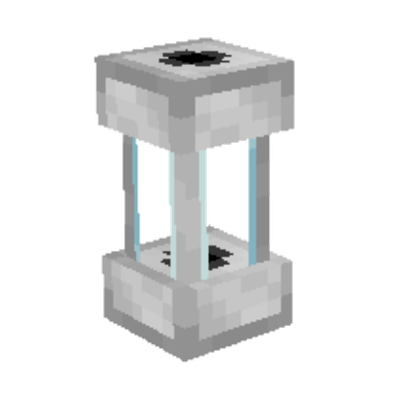
CurseForge · Minecraft mod
Another Dynamics
A mod that introduces simple Ducts with the most extensive logic possible.
Choose a version Pick your version below, then grab the matching file.
Quick answer
Which Another Dynamics release should I use?
Latest stable file another_dynamics-1.1.0.0.0-neoforge-1.21.1.jar
Game version 1.21.1
Loader NeoForge
Another Dynamics another_dynamics-1.1.0.0.0-neoforge-1.21.1.jar targets 1.21.1 with NeoForge. The project page does not say whether this file belongs on the client, dedicated server, or both. No extra mods listed for this file.
Where it goes
Is Another Dynamics required on the client, server, or both?
The project page does not say whether this file belongs on the client, dedicated server, or both.
Client Source doesn’t say
Dedicated server Source doesn’t say
Loader for this release NeoForge
Required install it here Optional supported, not mandatory Not supported do not install here Source doesn’t say do not assume
The source does not explicitly classify this release as client-only or server-only.
What else does Another Dynamics another_dynamics-1.1.0.0.0-neoforge-1.21.1.jar need?
another_dynamics-1.1.0.0.0-neoforge-1.21.1.jar. Change the file and its required mods may change too.
This file does not list any required mods. Do not add a library just because a different file uses it.
This file does not list any required or optional mods.
Before you install it
Add Another Dynamics without breaking your instance.
Built for Another Dynamics another_dynamics-1.1.0.0.0-neoforge-1.21.1.jar. Pick another file and the loader, install side or required mods may change.
- 01
Stick to this file
Use another_dynamics-1.1.0.0.0-neoforge-1.21.1.jar. It targets 1.21.1 with NeoForge; another release may have different loader, side or dependency requirements.
- 02
Bring the mods it needs
This file does not list any required mods. Do not add a library just because a different file uses it.
- 03
Put it on the correct side
The project page does not say whether this file belongs on the client, dedicated server, or both.
- 04
Pick the file you checked
Use the “Get this file” button beside another_dynamics-1.1.0.0.0-neoforge-1.21.1.jar. It opens that exact file at the source.
About this project
What does Another Dynamics add?
Another Dynamics
Another Dynamics is a NeoForge logistics mod built around duct networks: pipes that move items, fluids, Forge Energy (FE), Mekanism chemicals, and Mekanism heat. Each face that touches a machine is a full node—extract, filter, retrieve, or hybrids—with routing, redstone, channels, and upgrade modules.
It is designed for factories that outgrow basic hoppers, with optional soft compatibility for other logistics mods when installed.
What the mod does
- Typed ducts for items, fluids, FE, gas, heat, plus a Universal Duct that carries several kinds on one network (per-lane hub).
- Per-face nodes with modes (None, Extraction, Filtering, Retrieving, and hybrids), allow/deny filters, routing, and redstone.
- Increment Modules I–V socketed into faces to raise batch size, speed, filter slots, and energy/heat throughput (including Mekanism heat when available).
- Project Ducts to sketch a network, then convert the layout into a real duct type.
- Settings Copier to copy/paste node configs and edit filter lists offline. With Pipez installed, it can optionally import whole-pipe settings (one-way).
- Soft compat with Cable Facades, JEI, and FTB Ultimine.
How to use (quick guide)
- Place Item / Fluid / Flux ducts between inventories, tanks, or machines.
- Right-click a node face (where the duct touches a block) to open the GUI.
- Set one side to Extraction and the other to Filtering (or None if you accept everything).
- Optionally Shift+right-click an Increment Module onto a node face (or use the module slot).
- For layout work: build with Project Ducts, then Shift+use a real duct item to convert the network.
- With Pipez (optional): Shift+right-click a Pipez pipe with a Settings Copier to import settings, then paste onto Another Dynamics nodes.
- If you disable opaque mode, you can see what’s passing through the duct; you can re-enable it either for all ducts or for a single duct network only.
Ducts
| Duct | Description |
|---|---|
| Item / Fluid / Flux | Core logistics for stacks, mB, and FE. |
| Gas Duct | Mekanism chemicals (when Mekanism is loaded). |
| Heat Duct | Mekanism heat; scale with Increment Modules. |
| Universal Duct | Multi-transport hub: enable lanes, configure each. |
| Project Duct | Planning / ghost network; convert in place to a real type. |
All duct items appear in the Another Dynamics Ducts creative tab.
Nodes & filters (main features)
- Modes: None, Extraction, Filtering, Extr/Filt, Retrieving, Retr/Extr.
- Routing: nearest, farthest, middlest, round-robin, random.
- Filters: allow/deny lists with deny-first or allow-first logic; concat letters (AND within a letter, OR across).
- Syntax:
-id,#tag,@mod,?nbt, macros like&enchanted,&damaged>0, fluid&temperature…, gas&radioactive…, and&anything_else. - Caps: Insert Limit / Keep in Storage on allow lines; remote destinations via Remote Node Selector.
- Wrench: disconnect/reconnect arms (Bulky Wrench or any common wrench tag).
Modules
| Module | Role |
|---|---|
| Increment Module I–V | Stronger batches, faster rate/travel, more filter slots, higher FE/heat throughput. Mutually exclusive. |
Use Increment Modules I–V to scale item, fluid, FE, gas, and heat faces.
Tools
| Item | Use |
|---|---|
| Bulky Wrench | Disconnect a duct arm; reconnect from the core. Other wrenches in #c:wrench / #c:wrenches work too. |
| Settings Copier | Modes: All settings / Filter list / Whole pipe. Copy & paste via GUI or Shift+right-click. Right-click air to open the editor. Crafting grid resets it. |
| Remote Node Selector | Bind a block face for advanced filter destinations. |
Optional mods
| Mod | What you get |
|---|---|
| Mekanism | Gas and heat ducts (1.21.1). On 26.1.2 these are temporarily gated until Mekanism is available. |
| Pipez | Optional: import whole-pipe settings and upgrade filters into the Settings Copier (one-way; does not modify Pipez). |
| Pipez Retriever | Optional: retriever-side mapping on import (1.21.1; gated on 26.1.2). |
| Cable Facades | Cover ducts; facades kept on Project → duct conversion. |
| JEI | Ghost-drag into filter lines. |
| FTB Ultimine | Select connected ducts of the same type. |
The mod works without any of these.
ModPack makers
Duct and module balance is datapack-driven (declare_duct / declare_module under data/*/load/). See the GitHub wiki for developer documentation.
Project description from CurseForge.
Pick your setup
Another Dynamics by Minecraft version and loader
Choose the version and loader you play, then open the matching release.
Minecraft version
1.21.1
1 loader buildCheck the dependencies, then try the file in a copied instance before changing a world you care about.
Recent files
Another Dynamics versions and loaders
another_dynamics-1.1.0.0.0-neoforge-1.21.1.jar
31 Aug 2026
Client Source doesn’t say Server Source doesn’t say Dependencies No extras listed Listed on Release listing
Check the 1.21.1 · NeoForge setup 1.21.1NeoForge release
another_dynamics-1.0.0.0.0-neoforge-26.1.2.jar
11 Aug 2026
Client Source doesn’t say Server Source doesn’t say Dependencies No extras listed Listed on Release listing
Check the 26.1.2 · NeoForge setup NeoForge26.1.2 release
Looking for an older file? The official CurseForge project page is in Resources.
 mod
mod CurseForge + Modrinth · Minecraft
Traveler's Backpack
Unique and upgradeable backpacks with customisation, Curios API/Trinkets integration and more!
 mod
mod CurseForge + Modrinth · Minecraft
Gouge
Slam your pickaxe into a wall mid-fall to slow your descent or lock yourself in place before you hit the ground.
 mod
mod CurseForge + Modrinth · Minecraft
Reconnectible Chains
A multiloader fork of Connectible Chains: Connect your fences/walls with a decorative chain!