Mekanism Needed by Mek Digital Miner Settings mekdigitalminer_setting-1.0.0.jar
requiredMatching file found Matched file: Mekanism-1.21.1-10.7.19.85.jar
CurseForge · Minecraft mod
Make Mekanism's Digital Miner fuel configurable via config.
Quick answer
Mek Digital Miner Settings mekdigitalminer_setting-1.0.0.jar targets 1.21.1 with NeoForge. The project page does not say whether this file belongs on the client, dedicated server, or both. All 1 required mods have matching files.
Where it goes
The project page does not say whether this file belongs on the client, dedicated server, or both.
The source does not explicitly classify this release as client-only or server-only.
mekdigitalminer_setting-1.0.0.jar. Change the file and its required mods may change too.
Install Mekanism first. We found matching files for this game-version and loader setup. 23 come through another mod in the chain.
23 extra mods were pulled in by other dependencies. Indented rows show who needs each one. We only count dependency files that match this setup. A file for another loader does not fill the gap.
Before you install it
Built for Mek Digital Miner Settings mekdigitalminer_setting-1.0.0.jar. Pick another file and the loader, install side or required mods may change.
Use mekdigitalminer_setting-1.0.0.jar. It targets 1.21.1 with NeoForge; another release may have different loader, side or dependency requirements.
Install Mekanism first. We found matching files for this game-version and loader setup. 23 come through another mod in the chain.
The project page does not say whether this file belongs on the client, dedicated server, or both.
Use the “Get this file” button beside mekdigitalminer_setting-1.0.0.jar. It opens that exact file at the source.
About this project
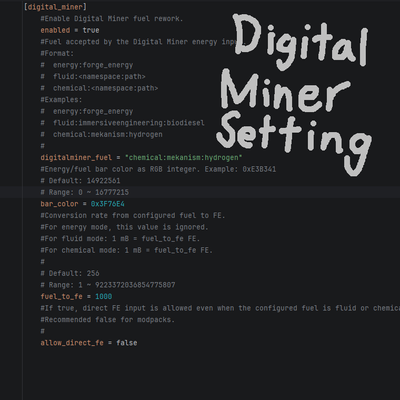
MekDigitalMiner Setting allows Mekanism's Digital Miner to use configurable fuels instead of relying solely on direct FE input.
Configure the Digital Miner's fuel through the config file
Supports FE, fluids, and Mekanism chemicals
Customizable fuel-to-FE conversion rate
Optional direct FE input blocking
Fuel information displayed in GUI tooltips
Customizable energy bar color
digitalminer_fuel = "fluid:minecraft:lava"
fuel_to_fe = 256
allow_direct_fe = false
With this configuration, the Digital Miner consumes Lava as fuel instead of accepting direct FE input.
This mod is primarily intended for modpack creators who want to integrate the Digital Miner into custom progression, logistics, or fuel systems.
Examples:
Immersive Engineering Biodiesel
Mekanism Hydrogen
Custom KubeJS fluids or chemicals
Project description from CurseForge.
Pick your setup
Choose the version and loader you play, then open the matching release.
Check the dependencies, then try the file in a copied instance before changing a world you care about.
Recent files
8 Jun 2026
Looking for an older file? The official CurseForge project page is in Resources.
 mod
modA mob farming automation mod. Yup
 mod
modUse our beautiful Teleportals to travel across your world, See your destination before you leave. Take your Pet too!
 mod
modStill struggling with MineColonies’ AI? Bothered by weird Courier / Farmer / Nether Miner AI, or citizens’ eating AI? Install this addon to greatly improve your city-building experience!