Puzzles Lib Needed by Reach Behind v26.3.0-mc26.3.x+fabric
requiredMatching file found Matched file: v26.3.17-mc26.3.x+fabric
CurseForge · Minecraft mod
Click through decorations and interact with the blocks behind them.
Quick answer
Reach Behind v26.3.0-mc26.3.x+fabric targets 26.3 with Fabric. The project page does not say whether this file belongs on the client, dedicated server, or both. All 3 required mods have matching files.
Where it goes
The project page does not say whether this file belongs on the client, dedicated server, or both.
The source does not explicitly classify this release as client-only or server-only.
v26.3.0-mc26.3.x+fabric. Change the file and its required mods may change too.
Install Puzzles Lib, Forge Config API Port, Fabric API first. We found matching files for this game-version and loader setup. 4 come through another mod in the chain.
4 extra mods were pulled in by other dependencies. Indented rows show who needs each one. We only count dependency files that match this setup. A file for another loader does not fill the gap.
Before you install it
Built for Reach Behind v26.3.0-mc26.3.x+fabric. Pick another file and the loader, install side or required mods may change.
Use v26.3.0-mc26.3.x+fabric. It targets 26.3 with Fabric; another release may have different loader, side or dependency requirements.
Install Puzzles Lib, Forge Config API Port, Fabric API first. We found matching files for this game-version and loader setup. 4 come through another mod in the chain.
The project page does not say whether this file belongs on the client, dedicated server, or both.
Use the “Get this file” button beside v26.3.0-mc26.3.x+fabric. It opens that exact file at the source.
About this project




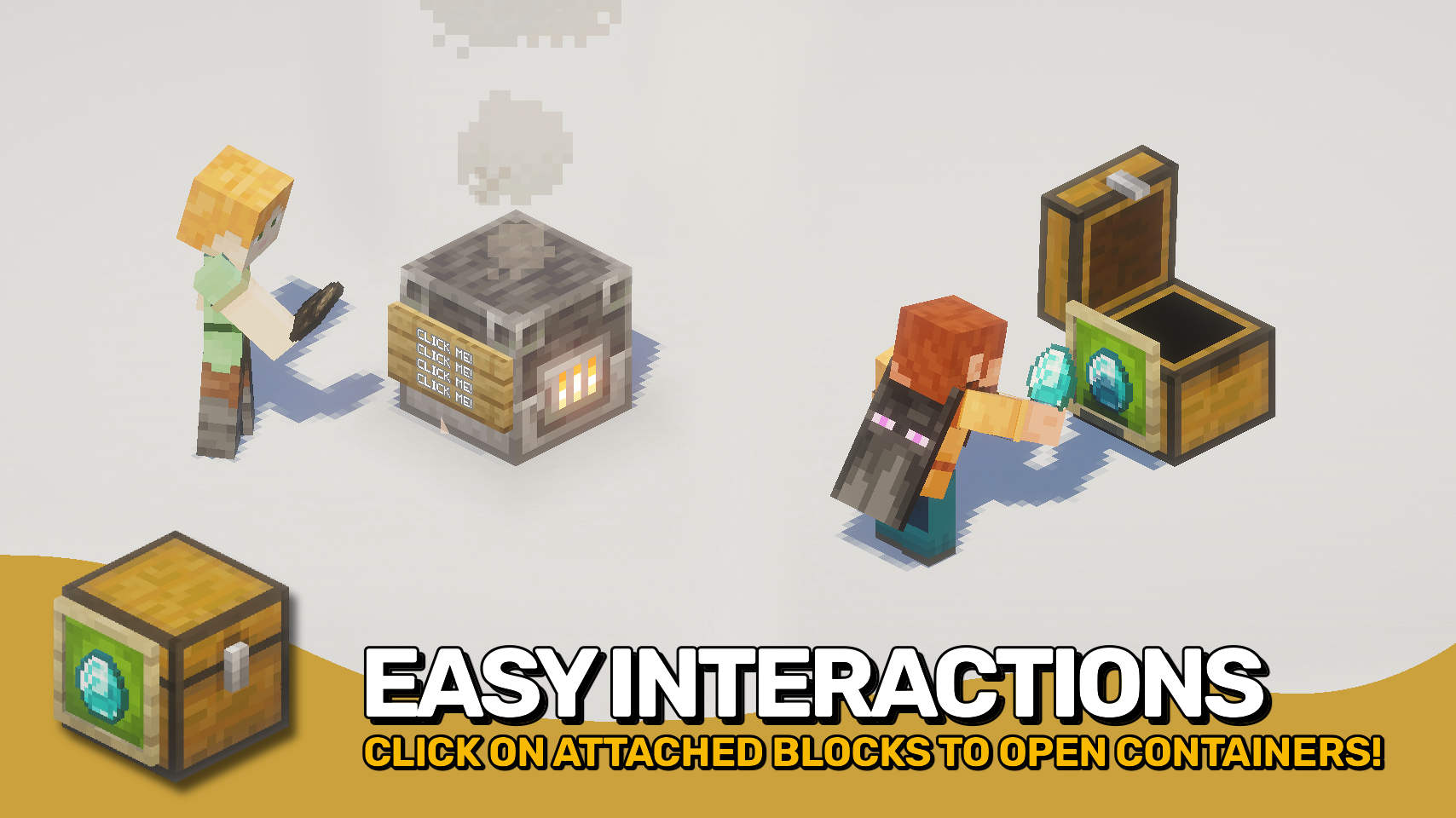
Reach Behind lets you interact with usable blocks hidden behind decorations such as item frames, signs, banners, and other supported attachments. Open a chest, use a crafting table, or access other blocks without needing to aim around the decorations you've placed. 🖱️
The mod makes decorated builds more practical by removing a common source of frustration while preserving normal decoration interactions. An optional empty hand mode helps prevent accidental edits, item placement, and other unwanted interactions. 🧰
It works in singleplayer, on dedicated servers, and even in multiplayer when the server does not have the mod installed. For the most complete and consistent experience, install the mod on both client and server. 🌐



⏩ INSTALLATION OPTIONAL ON CLIENT & OPTIONAL ON SERVER
⏩ REQUIRES PUZZLES LIB TO BE INSTALLED (FABRIC & NEOFORGE)
⏩ REQUIRES FABRIC API TO BE INSTALLED (FABRIC)
⏩ REQUIRES FORGE CONFIG API PORT TO BE INSTALLED (FABRIC)

If available for a mod, configuration is possible directly from in-game using the mod menu (requires Mod Menu by Prospector to be installed on Fabric).
For manual configuration using an external text editor all files are found at .minecraft/config, named as MOD_ID-client.toml, MOD_ID-common.toml, or MOD_ID-server.toml, depending on the type of config. Not all types might exist for a mod, if any at all.
 |
 |
|
|---|---|---|
 |
 |
|
 |
 |
|
 |
 |
|
 |
 |
|

© 2026 @heyitsfuzs. All rights reserved. This page was last edited on 11 September 2026, at 06:44 (UTC).
Project description from CurseForge.
Pick your setup
Choose the version and loader you play, then open the matching release.
Check the dependencies, then try the file in a copied instance before changing a world you care about.
Recent files
reachbehind-v26.3.0-mc26.3.x+fabric.jar
23 Sept 2026
reachbehind-v26.3.0-mc26.3.x+neoforge.jar
23 Sept 2026
ReachBehind-v26.2.1-mc26.2.x-Fabric.jar
10 Sept 2026
ReachBehind-v26.2.1-mc26.2.x-NeoForge.jar
10 Sept 2026
ReachBehind-v26.1.1-mc26.1.x-Fabric.jar
10 Sept 2026
ReachBehind-v26.1.1-mc26.1.x-NeoForge.jar
10 Sept 2026
ReachBehind-v26.2.0-mc26.2.x-Fabric.jar
17 Jun 2026
ReachBehind-v26.2.0-mc26.2.x-NeoForge.jar
17 Jun 2026
ReachBehind-v21.1.0-mc1.21.1-Fabric.jar
17 Jun 2026
ReachBehind-v21.1.0-mc1.21.1-NeoForge.jar
17 Jun 2026
ReachBehind-v21.11.0-mc1.21.11-Fabric.jar
12 Jun 2026
ReachBehind-v21.11.0-mc1.21.11-NeoForge.jar
12 Jun 2026
Looking for an older file? The official CurseForge project page is in Resources.
 mod
A multiloader fork of Domestication Innovation: improving upon and complimenting tameable mobs!
 mod
This mod adds more content for Minecraft gold ingots. It features various building blocks including doors, lanterns and fences, alongside a brand‑new sturdygold material with its full set of tools and building blocks.
 mod
Shows the territories from the Recruits mod on JourneyMap
