
Minecraft version
Back to mods 
CurseForge · Minecraft mod
My Picture Frame
An ultra-optimized, native multi-loader image frame mod with zero external dependencies. Supports WebP, PNG, JPEG, and GIFs via URLs with advanced async caching, occlusion culling, glow filters, and server security.
Choose a version Pick your version below, then grab the matching file.
Quick answer
Which My Picture Frame release should I use?
Latest stable file mypictureframe-neoforge-1.21.1-1.5.0.jar
Game version 1.21.1
Loader NeoForge
My Picture Frame mypictureframe-neoforge-1.21.1-1.5.0.jar targets 1.21.1 with NeoForge. The project page does not say whether this file belongs on the client, dedicated server, or both. No extra mods listed for this file.
Where it goes
Is My Picture Frame required on the client, server, or both?
The project page does not say whether this file belongs on the client, dedicated server, or both.
Client Source doesn’t say
Dedicated server Source doesn’t say
Loader for this release NeoForge
Required install it here Optional supported, not mandatory Not supported do not install here Source doesn’t say do not assume
The source does not explicitly classify this release as client-only or server-only.
What else does My Picture Frame mypictureframe-neoforge-1.21.1-1.5.0.jar need?
mypictureframe-neoforge-1.21.1-1.5.0.jar. Change the file and its required mods may change too.
This file does not list any required mods. Do not add a library just because a different file uses it.
This file does not list any required or optional mods.
Before you install it
Add My Picture Frame without breaking your instance.
Built for My Picture Frame mypictureframe-neoforge-1.21.1-1.5.0.jar. Pick another file and the loader, install side or required mods may change.
- 01
Stick to this file
Use mypictureframe-neoforge-1.21.1-1.5.0.jar. It targets 1.21.1 with NeoForge; another release may have different loader, side or dependency requirements.
- 02
Bring the mods it needs
This file does not list any required mods. Do not add a library just because a different file uses it.
- 03
Put it on the correct side
The project page does not say whether this file belongs on the client, dedicated server, or both.
- 04
Pick the file you checked
Use the “Get this file” button beside mypictureframe-neoforge-1.21.1-1.5.0.jar. It opens that exact file at the source.
About this project
What does My Picture Frame add?



My Pictures Frames: Native & Ultra-Optimized is a high-performance, lightweight utility system built completely from scratch to project external web images natively into your Minecraft world. Designed strictly with zero external dependencies and multiplayer efficiency in mind, it completely eliminates laggy, entity-based frames to deliver absolute creative control for server administrators, creators, and mapmakers.
🌐 Supported Languages / Idiomas Soportados:
EN | ES (es, cl, ar, mx) | PT (br)

🔄 What's New in the Latest Update
- Local Image Support: Load offline images directly from the customizable /mypictureframe_local directory (fully configurable for dedicated servers).
- Frame Lock Security: Added a lock protection toggle to restrict who can modify or break your frames.
- Precision Scale Steps: Scale sliders now adjust by 0.5 increments for cleaner aspect ratios and refined dimension fitting.
- Enhanced URL Handling: Improved web URL parsing and direct link resolutions.
- Format & Rendering Fixes: Resolved parsing issues for .webp files and fixed multi-axis alignment placement bugs.
- Drop Fix: Fixed item drops failing to trigger correctly when breaking the frame block.

🚀 Key Features
- Native Modern Performance: Built natively for Minecraft 1.21.1 and Java 21. Compiles independently for Fabric and NeoForge using lightweight vanilla code.
- Zero Library Dependencies: Just drag, drop, and play. No heavy setup APIs like CreativeCore or Architectury are required. It utilizes the game's built-in JOML library for high-speed matrix calculations.
- Cero Item Frames: Images are projected directly onto blocks via a highly optimized BlockEntityRenderer layout, completely getting rid of traditional entity-induced client FPS drops.

🧱 Crafting Recipe & In-Game Preview
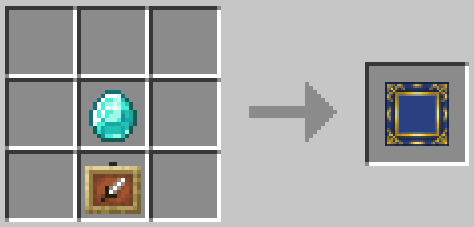
My Pictures Frames Crafting Recipe
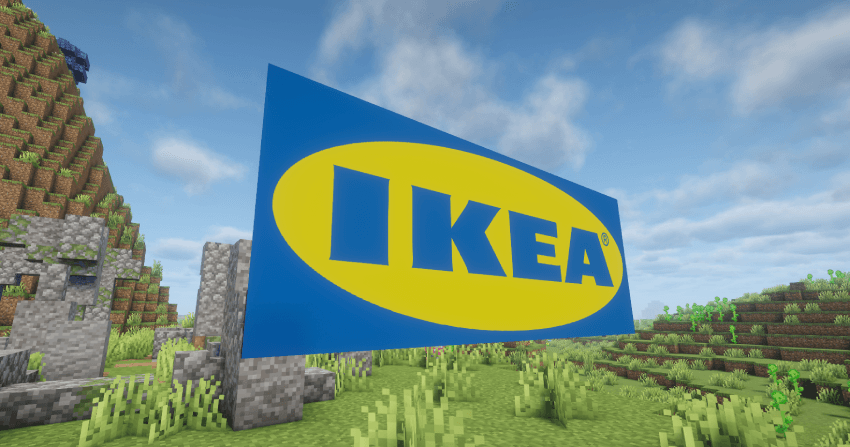
In-game overview of native picture projection.

🎨 Advanced Rendering & GUI Customization
Take absolute control over your canvas. Right-clicking a frame opens a comprehensive, pixel-perfect user interface featuring advanced transformation utilities:
| 📐 Layout & Formats | 🔧 Transformations |
|---|---|
|
|

🚀 Performance & Extreme Optimization
Built straight with enterprise server environments in mind, the mod runs a series of advanced client-side micro-optimizations:
- Asynchronous Threading: Network HTTP downloads and complex GIF frame decoding run completely isolated from Minecraft's main loop, keeping your frame rates buttery smooth.
- Distance & Occlusion Culling: Automatically unloads and stops processing image frames or animations when a player moves past the maximum config distance or behind solid occlusion walls.
- Pre-decoded RAM Buffer: Assets are cached into native graphics memory (NativeImage) asynchronously, optimizing GPU interaction and preventing micro-stutters.
📂 Smart Portable Cache System
Never worry about broken links or missing images ever again:
- Singleplayer Maps: Assets save directly into your world file (saves/<world>/mypictureframe_cache/). Perfect for exporting custom maps; other players will see your frames instantly without internet downloads.
- Multiplayer Security: Isolates client disk caches cleanly based on the server's IP address. If an external URL goes offline, the mod falls back and renders the cached local image automatically.
💡 Glow-in-the-Dark Filters
An absolute aesthetic game-changer for neon signs, movie theaters, and cyber decorations. Features a multi-state selector:
- Disabled: Normal ambient shading. Frames darken naturally when night falls.
- Low / Medium / High: Adjustable luminosity values. At high intensity, the canvas completely ignores the world lighting environment to glow brilliantly in full darkness (light value 15, matching Endermen eyes).
🔒 Server Security & Commands
Keep total oversight over your multiplayer server infrastructure using the centralized config/mypicturesframes.properties panel:
- Domain Whitelisting: Block malicious links instantly. The server monitors packets and drops connections to any external site not explicitly listed in your trusted domain list (e.g., imgur.com, discordapp.com).
- Persistent Player Limits: Restrict frames per non-OP player (default: 3) utilizing the native SavedData (.dat) framework. Fully immune to chunk unloads or unexpected reboots.
- Brigadier Admin Commands: Direct ununified command lines using the shorthand alias /mpf:
• /mypictureframe setImage <x y z> <url>
• /mypictureframe setSize <x y z> <width> <height>
📦 Modpacks & Community Redistribution
You are fully welcome to include My Pictures Frames in any public or private modpack network! No explicit permission or token request is required. We only ask that you provide a clear link back to this official CurseForge project page.
 🧡 Support My Work and Unlock Exclusive Perks on Patreon!

📦 Explore the Rest of My Ecosystem
Discover more lightweight, high-performance standalone vanilla expansions built natively for modern server environments.

Project description from CurseForge.
Pick your setup
My Picture Frame by Minecraft version and loader
Choose the version and loader you play, then open the matching release.
Check the dependencies, then try the file in a copied instance before changing a world you care about.
Recent files
My Picture Frame versions and loaders
mypictureframe-neoforge-1.21.1-1.5.0.jar
19 Aug 2026
Client Source doesn’t say Server Source doesn’t say Dependencies No extras listed Listed on Release listing
Check the 1.21.1 · NeoForge setup 1.21.1NeoForge release
mypictureframe-fabric-1.21.1-1.5.0.jar
19 Aug 2026
Client Source doesn’t say Server Source doesn’t say Dependencies No extras listed Listed on Release listing
Check the 1.21.1 · Fabric setup Fabric1.21.1 release
mypictureframe-fabric-1.21.1-1.0.0.jar
20 Jun 2026
Client Source doesn’t say Server Source doesn’t say Dependencies No extras listed Listed on Release listing
Check the 1.21.1 · Fabric setup Fabric1.21.1 release
mypictureframe-neoforge-1.21.1-1.0.0.jar
20 Jun 2026
Client Source doesn’t say Server Source doesn’t say Dependencies No extras listed Listed on Release listing
Check the 1.21.1 · NeoForge setup 1.21.1NeoForge release
Looking for an older file? The official CurseForge project page is in Resources.
 mod
mod CurseForge + Modrinth · Minecraft
Enchantment Shifter
Enchantment Shifter is a Minecraft mod that allows players to freely move enchantments between items using the anvil. Transfer enchantments to books for storage, shift enchantments between tools, and customize XP costs and limits.
 mod
mod CurseForge + Modrinth · Minecraft
Carpet-FGA-Addition
An AI-powered Carpet extension mod packed with practical utilities, including longer player name support and fake-player area mining.
 mod
mod CurseForge · Minecraft
Expensive Zombies
This mod improves Zombies and the interaction with them in the vanilla world!