Minecraft version
Back to mods 
CurseForge · Minecraft mod
World Painter
In-game terrain editor for Minecraft inspired by WorldPainter. Features an interactive GUI, height sculpting, materials and biome painting, custom brushes, and undo history.
Choose a version Pick your version below, then grab the matching file.
Quick answer
Which World Painter release matches 1.12.2 Forge?
Best match for your filters WorldPainter-0.0.4.jar
Game version 1.12.2
Loader Forge
World Painter WorldPainter-0.0.4.jar targets 1.12.2 with Forge. The project page does not say whether this file belongs on the client, dedicated server, or both. No extra mods listed for this file.
Where it goes
Is World Painter required on the client, server, or both?
The project page does not say whether this file belongs on the client, dedicated server, or both.
Client Source doesn’t say
Dedicated server Source doesn’t say
Loader for this release Forge
Required install it here Optional supported, not mandatory Not supported do not install here Source doesn’t say do not assume
The source does not explicitly classify this release as client-only or server-only.
What else does World Painter WorldPainter-0.0.4.jar need?
WorldPainter-0.0.4.jar on 1.12.2 Forge. Every mod below is checked against that same setup.
This file does not list any required mods. Do not add a library just because a different file uses it.
This file does not list any required or optional mods.
Before you install it
Add World Painter without breaking your instance.
Built for World Painter WorldPainter-0.0.4.jar on 1.12.2 Forge. Pick another file and the loader, install side or required mods may change.
- 01
Stick to this file
Use WorldPainter-0.0.4.jar. It targets 1.12.2 with Forge; another release may have different loader, side or dependency requirements.
- 02
Bring the mods it needs
This file does not list any required mods. Do not add a library just because a different file uses it.
- 03
Put it on the correct side
The project page does not say whether this file belongs on the client, dedicated server, or both.
- 04
Pick the file you checked
Use the “Get this file” button beside WorldPainter-0.0.4.jar. It opens that exact file at the source.
About this project
What does World Painter add?
WorldPainter (In-Game Terrain Editor)
An in-game world editing and terrain sculpting suite for Minecraft. It replicates the layout, tools, and workflows of the standalone WorldPainter application directly inside Minecraft through a dedicated interface.
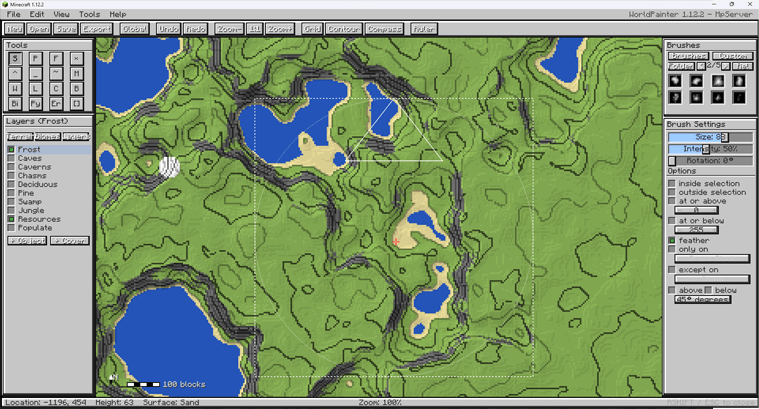
Getting Started & Controls
- Open / Close GUI:
Right Shift(configurable in Controls) - Pan Map: Click and drag with
Middle Mouse ButtonorRight Mouse Button - Zoom Map:
Ctrl+Mouse Wheel - Adjust Brush Size:
Mouse Wheel - Paint / Sculpt:
Left Mouse Button(apply / raise),Right Mouse Button(erase / lower)
Tools & Sculpting Suite
- Height (Raise / Lower): Raise terrain with left-click, lower with right-click.
- Flatten: Level terrain toward a target elevation (Modes: Normal, Raise Only, Lower Only).
- Smooth: Smooth elevation differences across terrain.
- Mountain: Sculpt steep peaks and ridges.
- Pyramid: Form sharp, geometric elevations.
- Erode: Apply erosion-style terrain smoothing.
- Spray Paint: Scatter materials, biomes, or layers using brush intensity.
- Pencil: Solid placement of materials and biomes.
- Fill (Bucket): Contiguous surface flood fill for blocks and biomes.
- Biome Painter: Paint biome IDs directly onto terrain columns.
- Water / Lava: Place surface water or lava bodies.
- Sponge: Remove water and lava within the brush radius.
- Flood Basin: Fill enclosed basins with water or lava up to a target level.
- Select: Create rectangular selections for filtering and global operations.
- Spawn Point: Set the world spawn coordinates.
Brushes & Filtering
Brush Engine
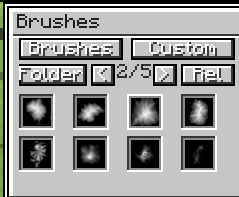
- Built-in Brush Shapes: Circle, Dome, Cone, Plateau, Mountain, Noise, Square, Ring.
- Custom Bitmap Brushes: Load grayscale
.pngbrushes placed in.minecraft/worldpainter/brushes/. - Adjustable Parameters: Radius (Size), Intensity (0–100%), and Rotation angle.
Constraints & Mask Filters
- Height Constraints: Restrict application to
At or Above/At or Belowspecific Y-levels with optional edge feathering. - Slope Constraints: Limit application based on surface angle (
Slope Above/Slope Belowdegrees). - Block Masking: Restrict painting to
Only OnorExcept Onselected block types. - Selection Mask: Apply operations only
InsideorOutsidethe active selection.
Layers & Palettes
- Terrain Palette: Surface blocks (Grass, Dirt, Sand, Stone variants, Clay, Snow, Ice, etc.) with custom block picker support.
- Biome Palette: Standard Minecraft biomes.
- Built-in Layers:
- Frost: Places snow layers and freezes water.
- Caves / Caverns / Chasms: Subterranean cave carving.
- Resources: Places underground ore clusters.
- Tree Layers: Deciduous, Pine, Swamp, and Jungle tree placement.
- Custom Layers:
- Custom Objects: Spawns
.schematicstructures placed in.minecraft/worldpainter/schematics/. - Custom Ground Cover: Configurable block state and surface thickness.
- Custom Objects: Spawns
Generator, Heightmaps & History
- Procedural World Generation: Generate terrain using presets (Island, Hills, Alpine) with custom seed and size settings.
- Heightmap Import / Export: Import grayscale PNG images directly into world height, or export terrain to PNG heightmaps.
- Global Operations: Apply fill, raise/lower, biome changes, or layer applications across entire selections.
- Undo / Redo: Multi-step history system for terrain modifications.
Project description from CurseForge.
Pick your setup
World Painter by Minecraft version and loader
Choose the version and loader you play, then open the matching release.
Minecraft version
1.12.2
1 loader buildCheck the dependencies, then try the file in a copied instance before changing a world you care about.
Recent files
World Painter versions and loaders
WorldPainter-0.0.4.jar
3 Sept 2026
Client Source doesn’t say Server Source doesn’t say Dependencies No extras listed Listed on Release listing
Check the 1.12.2 · Forge setup Forge1.12.2 release
Looking for an older file? The official CurseForge project page is in Resources.