Minecraft version
Back to mods 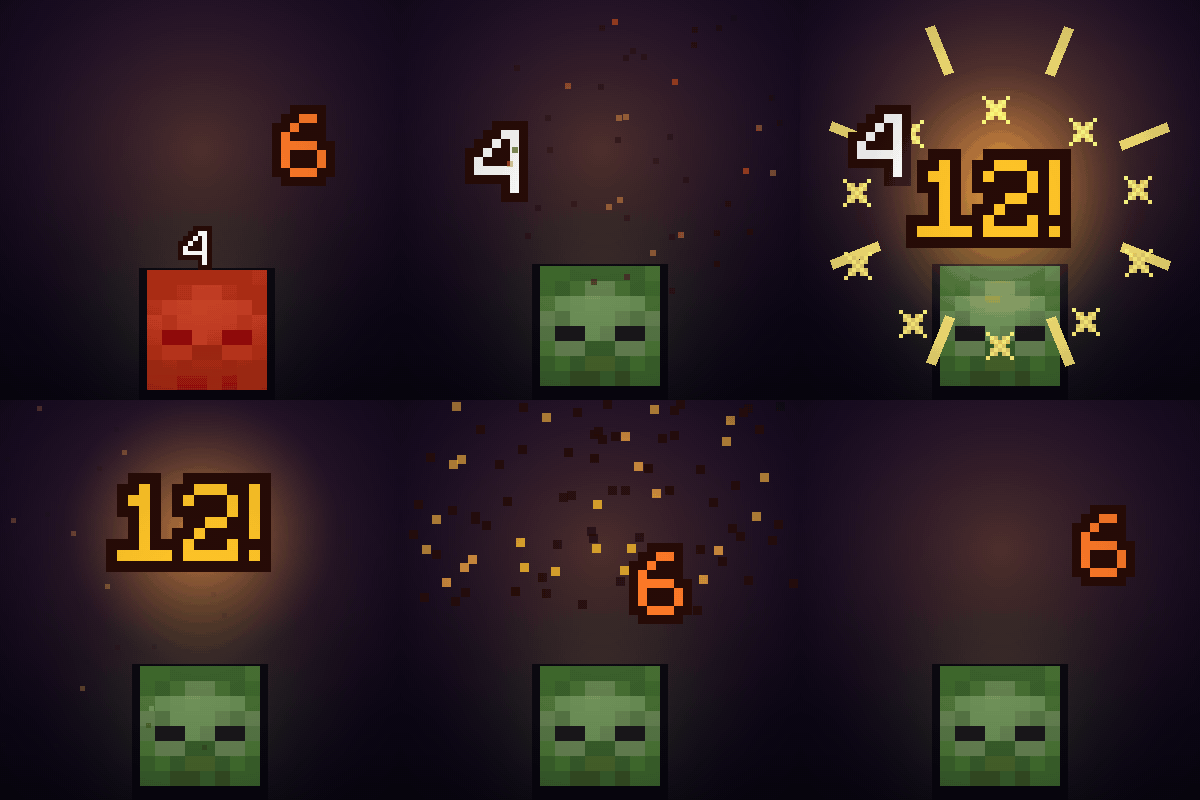
CurseForge · Minecraft mod
Damage Numbers: Floating Damage Indicators & Crits
Floating damage numbers pop off every mob you hit and break into pixels. Gold crits with a hit marker, a colour for each kind of damage, green healing, red killing blows and combos. Client-side.
Choose a version Pick your version below, then grab the matching file.
Quick answer
Which Damage Numbers: Floating Damage Indicators & Crits release should I use?
Latest stable file Damage Numbers 0.1.3 for Minecraft 1.20.1 (Forge)
Game version 1.20.1
Loader Forge
Damage Numbers: Floating Damage Indicators & Crits Damage Numbers 0.1.3 for Minecraft 1.20.1 (Forge) targets 1.20.1 with Forge. The project page does not say whether this file belongs on the client, dedicated server, or both. No extra mods listed for this file.
Where it goes
Is Damage Numbers: Floating Damage Indicators & Crits required on the client, server, or both?
The project page does not say whether this file belongs on the client, dedicated server, or both.
Client Source doesn’t say
Dedicated server Source doesn’t say
Loader for this release Forge
Required install it here Optional supported, not mandatory Not supported do not install here Source doesn’t say do not assume
The source does not explicitly classify this release as client-only or server-only.
What else does Damage Numbers: Floating Damage Indicators & Crits Damage Numbers 0.1.3 for Minecraft 1.20.1 (Forge) need?
Damage Numbers 0.1.3 for Minecraft 1.20.1 (Forge). Change the file and its required mods may change too.
This file does not list any required mods. Do not add a library just because a different file uses it.
This file does not list any required or optional mods.
Before you install it
Add Damage Numbers: Floating Damage Indicators & Crits without breaking your instance.
Built for Damage Numbers: Floating Damage Indicators & Crits Damage Numbers 0.1.3 for Minecraft 1.20.1 (Forge). Pick another file and the loader, install side or required mods may change.
- 01
Stick to this file
Use Damage Numbers 0.1.3 for Minecraft 1.20.1 (Forge). It targets 1.20.1 with Forge; another release may have different loader, side or dependency requirements.
- 02
Bring the mods it needs
This file does not list any required mods. Do not add a library just because a different file uses it.
- 03
Put it on the correct side
The project page does not say whether this file belongs on the client, dedicated server, or both.
- 04
Pick the file you checked
Use the “Get this file” button beside Damage Numbers 0.1.3 for Minecraft 1.20.1 (Forge). It opens that exact file at the source.
About this project
What does Damage Numbers: Floating Damage Indicators & Crits add?
Every hit shows its number: it pops off the mob, rises, and breaks into pixels.
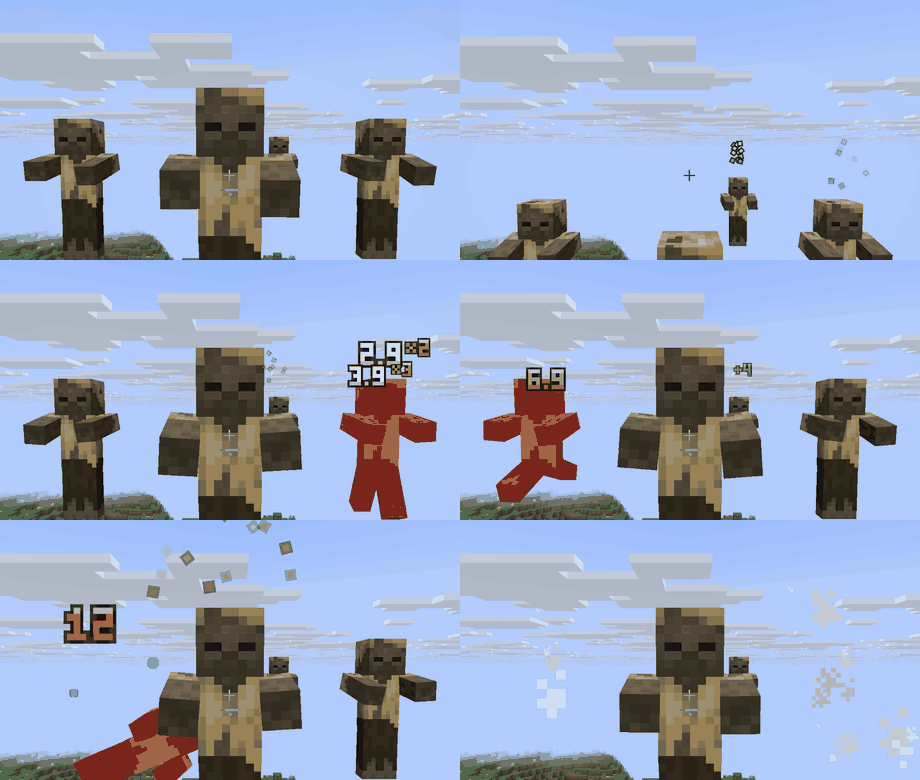
- Critical hits are gold and bigger, with a "!" and a hit marker.
- A colour for each kind of damage: fire, frost, magic, wither, lightning, falling, drowning, explosions. A plain hit is white.
- Healing shows as a green +number.
- The killing blow is red and shatters harder.
- Combos: your own quick hits on one mob count up (x2, x3, x4...), and the numbers stack instead of piling on top of each other.
New: hearts instead of numbers
Set Show as to Heart row or Heart burst and every hit shows the hearts the mob lost, drawn with Minecraft's own heart sprites (half hearts too). Numbers stay the default.
- Heart row: the lost hearts in a row, in rows of ten.
- Heart burst: the hearts fly off the mob. Three styles: Fountain (up and falling), Float (rising slowly, swaying) and Break (each heart shakes, cracks in two and the halves drop).
- Poisoned, withered and frozen mobs get the green, black and blue hearts, like your own.
- Big hits show the count and one heart ("15" + heart), or every heart if you set Most hearts to All.
- Show number puts the damage number next to the hearts too.
- Works next to Health Indicators: numbers and hearts start under its bars, never on top of them.
Honest numbers
The number is the health the mob really lost, after armour. Nothing is guessed: the game already tells every player the health of the mobs around them, the kind of damage, and when a hit was critical.
Options
Change them in game: Mods > Damage Numbers > Config, or type /damagenumbers. Everything is saved in config/vitral_damagenumbers.properties, so a modpack can ship its own setup:
- Show as: Numbers, Heart row or Heart burst. Show number (with hearts), Most hearts (a limit, or All)
- Ending: Shatter (break into pixels), Fade or Vanish. Duration: 0.25x to 4x
- Start at: Auto, Above head, Face, Chest or Above Health Indicators' bars. Height, Size, Distance
- Burst style, Spinning hearts, Hit flash (hearts flash white like your own)
- Healing numbers, other players, yourself in third person, through walls
The game's Screen Effects slider also calms the shaking and the flying pieces.
Client-side
Nothing to install on the server. Works on any server, in single player and on Realms. No texture or font of the game is touched: the numbers are drawn by code.
Versions
- Minecraft 26.3 and 26.2: Fabric (needs Fabric API)
- Minecraft 26.2 and 1.21.1: NeoForge
- Minecraft 1.20.1: Forge
Crits from Apotheosis also show in gold (1.20.1 and 1.21.1).
More mods
- Kill Shatter: mobs shatter into shards of their own skin instead of the white-smoke death. Four styles.
- Immersive Screens: every screen of the game in a theme (Halloween, Hologram, Winter, Space, Retro Arcade), with small animations.
- Boss Intros: cinematic boss titles and a victory card when you win.
- Boss Bars: animated health bars for every boss.
- Loot Beams: light beams over valuable drops.
Made by an indie dev with help from AI tools; every version is tested in game.
Like the mod? You can support future updates and new mods on Ko-fi. Totally optional, everything stays free.
Project description from CurseForge.
Pick your setup
Damage Numbers: Floating Damage Indicators & Crits by Minecraft version and loader
Choose the version and loader you play, then open the matching release.
Minecraft version
26.2
2 loader buildsMinecraft version
1.21.1
1 loader buildMinecraft version
1.20.1
1 loader buildCheck the dependencies, then try the file in a copied instance before changing a world you care about.
Recent files
Damage Numbers: Floating Damage Indicators & Crits versions and loaders
Damage Numbers 0.1.3 for Minecraft 1.20.1 (Forge)
damagenumbers-forge-mc1.20.1-0.1.3.jar
10 Nov 2026
Client Source doesn’t say Server Source doesn’t say Dependencies No extras listed Listed on Release listing
Check the 1.20.1 · Forge setup 1.20.1Forge release
Damage Numbers 0.1.3 for Minecraft 1.21.1 (NeoForge)
damagenumbers-neoforge-mc1.21.1-0.1.3.jar
10 Nov 2026
Client Source doesn’t say Server Source doesn’t say Dependencies No extras listed Listed on Release listing
Check the 1.21.1 · NeoForge setup 1.21.1NeoForge release
Damage Numbers 0.1.3 for Minecraft 26.2 (NeoForge)
damagenumbers-neoforge-mc26.2-0.1.3.jar
10 Nov 2026
Client Source doesn’t say Server Source doesn’t say Dependencies No extras listed Listed on Release listing
Check the 26.2 · NeoForge setup NeoForge26.2 release
Damage Numbers 0.1.3 for Minecraft 26.2 (Fabric)
damagenumbers-mc26.2-0.1.3.jar
10 Nov 2026
Client Source doesn’t say Server Source doesn’t say Dependencies 1 required · 1 unchecked Listed on Release listing
Check the 26.2 · Fabric setup Fabric26.2 release
Damage Numbers 0.1.3 for Minecraft 26.3 (Fabric)
damagenumbers-mc26.3-0.1.3.jar
10 Nov 2026
Client Source doesn’t say Server Source doesn’t say Dependencies 1 required · 1 unchecked Listed on Release listing
Check the 26.3 · Fabric setup Fabric26.3 release
Damage Numbers 0.1.2 for Minecraft 1.20.1 (Forge)
damagenumbers-forge-mc1.20.1-0.1.2.jar
10 Nov 2026
Client Source doesn’t say Server Source doesn’t say Dependencies No extras listed Listed on Release listing
Check the 1.20.1 · Forge setup 1.20.1Forge release
Damage Numbers 0.1.2 for Minecraft 1.21.1 (NeoForge)
damagenumbers-neoforge-mc1.21.1-0.1.2.jar
10 Nov 2026
Client Source doesn’t say Server Source doesn’t say Dependencies No extras listed Listed on Release listing
Check the 1.21.1 · NeoForge setup 1.21.1NeoForge release
Damage Numbers 0.1.2 for Minecraft 26.2 (NeoForge)
damagenumbers-neoforge-mc26.2-0.1.2.jar
10 Nov 2026
Client Source doesn’t say Server Source doesn’t say Dependencies No extras listed Listed on Release listing
Check the 26.2 · NeoForge setup NeoForge26.2 release
Damage Numbers 0.1.2 for Minecraft 26.2 (Fabric)
damagenumbers-mc26.2-0.1.2.jar
10 Nov 2026
Client Source doesn’t say Server Source doesn’t say Dependencies 1 required · 1 unchecked Listed on Release listing
Check the 26.2 · Fabric setup Fabric26.2 release
Damage Numbers 0.1.2 for Minecraft 26.3 (Fabric)
damagenumbers-mc26.3-0.1.2.jar
10 Nov 2026
Client Source doesn’t say Server Source doesn’t say Dependencies 1 required · 1 unchecked Listed on Release listing
Check the 26.3 · Fabric setup Fabric26.3 release
Damage Numbers 0.1.1 for Minecraft 1.20.1 (Forge)
damagenumbers-forge-mc1.20.1-0.1.1.jar
30 Oct 2026
Client Source doesn’t say Server Source doesn’t say Dependencies No extras listed Listed on Release listing
Check the 1.20.1 · Forge setup 1.20.1Forge release
Damage Numbers 0.1.1 for Minecraft 1.21.1 (NeoForge)
damagenumbers-neoforge-mc1.21.1-0.1.1.jar
30 Oct 2026
Client Source doesn’t say Server Source doesn’t say Dependencies No extras listed Listed on Release listing
Check the 1.21.1 · NeoForge setup 1.21.1NeoForge release
Looking for an older file? The official CurseForge project page is in Resources.
 mod
CurseForge + Modrinth · Minecraft
World Portal
Create custom world portal to travel between dimensions.
 mod
CurseForge · Minecraft
Orbital Arsenal
Call down cinematic orbital strikes with a remote: erase the world with a sun lance, drop a spike from Saturn, make Orion fall or tear the land into the sky!
 mod
CurseForge · Minecraft
EMF Compat: Iron's Arms 'n Artifice
Fixes incorrect poses in third person when holding the guns from Iron's Arms 'n Artifice when having EMF mods installed