FTB Quests (NeoForge) Optional for Pathbound: World Difficulty pathbound-neoforge-1.21.1-1.1.1.jar
optionalMatching file found Matched file: [NEOFORGE][1.21.1] FTB Quests 2101.1.38

CurseForge · Minecraft mod
Pick a world difficulty once on first join: Classic or Trial. Each path grants its own stages, datapacks and commands, all set by config.
Quick answer
Pathbound: World Difficulty pathbound-neoforge-1.21.1-1.1.1.jar targets 1.21.1 with NeoForge. The project page does not say whether this file belongs on the client, dedicated server, or both. No extra mods listed for this file.
Where it goes
The project page does not say whether this file belongs on the client, dedicated server, or both.
The source does not explicitly classify this release as client-only or server-only.
pathbound-neoforge-1.21.1-1.1.1.jar. Change the file and its required mods may change too.
This file does not list any required mods. Do not add a library just because a different file uses it.
15 extra mods were pulled in by other dependencies. Indented rows show who needs each one. We only count dependency files that match this setup. A file for another loader does not fill the gap.
Before you install it
Built for Pathbound: World Difficulty pathbound-neoforge-1.21.1-1.1.1.jar. Pick another file and the loader, install side or required mods may change.
Use pathbound-neoforge-1.21.1-1.1.1.jar. It targets 1.21.1 with NeoForge; another release may have different loader, side or dependency requirements.
This file does not list any required mods. Do not add a library just because a different file uses it.
The project page does not say whether this file belongs on the client, dedicated server, or both.
Use the “Get this file” button beside pathbound-neoforge-1.21.1-1.1.1.jar. It opens that exact file at the source.
About this project

When a new world is created, its host picks a difficulty on a dedicated screen: Classic or Trial. The choice is stored in the world and cannot be changed from the game. Pathbound then applies it for everyone: player stages, datapacks, commands. Modpacks decide what each path actually means.
Everything is data. You can rename the difficulties, add your own, give them recipes and quests, and restyle the whole screen without writing a line of Java.
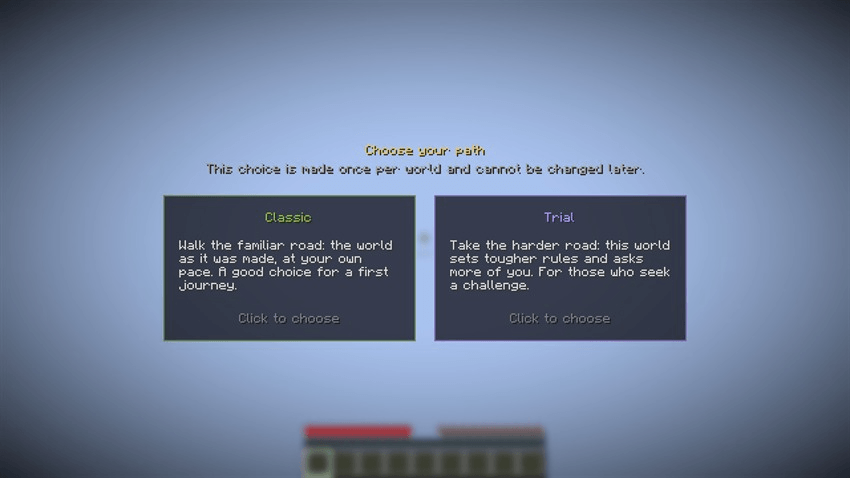 Pathbound out of the box: Classic and Trial.
config/pathbound/datapacks/, no extra jar needed./difficulty, scoreboard, functions).PathboundEvents.recipes('trial', e => ...) instead of ServerEvents.recipes and those recipes exist only in Trial worlds: add, remove or replace anything, per difficulty.defaultMode in the server config picks a difficulty for new worlds automatically and skips the screen.en_us, de_de, pt_br...), and the screen texts come from ordinary lang files, so you can translate everything yourself.Commands: /pathbound mode, /pathbound mode set <id|none>, /pathbound choose (show the screen again), /pathbound list. Changing the difficulty needs operator rights or the singleplayer world owner (cheats not required).
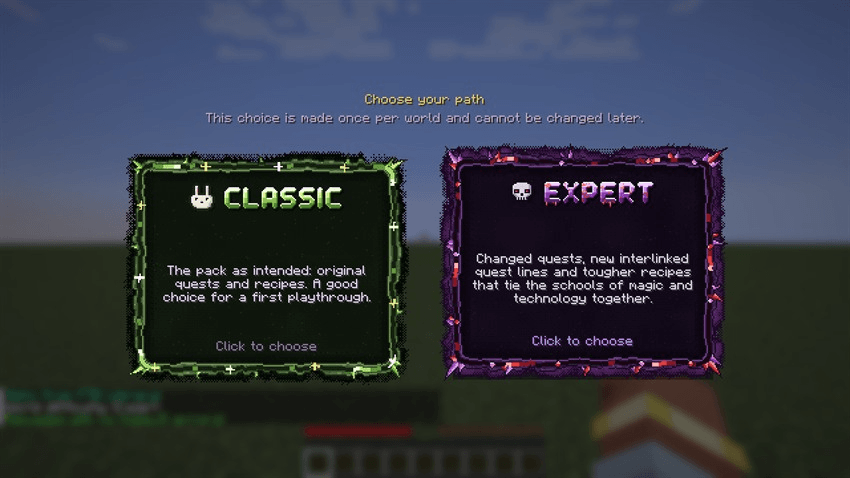
This is a customised setup from the Thaumaturge Renaissance modpack, not what Pathbound looks like by default. The frames, drawn titles and the rabbit and skull icons belong to the pack and are not included in the mod.
Custom version: animated pixel-art frames, drawn titles, icons and a hover glow from the pack's resources.What the pack does with Pathbound:
renames the two paths to Classic and Expert and writes its own descriptions;
gives each one a stage (
trq_normal/trq_hard): FTB Quests shows Expert-only quest lines only in Expert worlds;turns on an Expert recipe datapack from
config/pathbound/datapacks/trq_hardin Expert worlds only;replaces the plain cards with its own frames, titles and icons through
kubejs/assets.All of it is config and resources. The pack has no code of its own for this.
Make your own difficulties: a mini guide
1. Open the config. Start a world once, then open config/pathbound/difficulties.json. Each entry is one card:
{
  "id": "trial",
  "name": { "en_us": "Trial", "de_de": "Prüfung" },
  "description": "Tougher recipes and no keepInventory.",
  "color": "#B48CFF",
  "icon": "minecraft:wither_skeleton_skull",
  "order": 1,
  "stages": ["mypack_trial"],
  "datapacks": ["config:trial_recipes"],
  "commands": ["gamerule keepInventory false"]
}
2. Rename or recolour. Change name, description (plain text, or one text per language like {"en_us": "...", "de_de": "..."}) and color. icon takes an item id or a texture.
3. Add or remove a difficulty. Copy an entry and give it a new id (lowercase letters, digits, _). Delete an entry to remove it. order sets the card order. "selectable": false hides a card but keeps the difficulty for commands.
4. Give it recipes or loot. Put a normal datapack (a folder with pack.mcmeta, or a .zip) into config/pathbound/datapacks/ and list it as "config:<name>" in datapacks. Pathbound enables it only in worlds with that difficulty.
5. Or give it recipes with KubeJS. In any file in kubejs/server_scripts/, use PathboundEvents.recipes instead of ServerEvents.recipes. Inside it works exactly the same, but only in worlds with that difficulty:
PathboundEvents.recipes('trial', e => {
  e.remove({ output: 'minecraft:torch' })
  e.shaped('2x minecraft:torch', ['C', 'S'], { C: '#minecraft:coals', S: 'minecraft:stick' })
  e.replaceInput({ output: 'minecraft:anvil' }, 'minecraft:iron_block', 'minecraft:netherite_ingot')
})

PathboundEvents.recipes('classic', e => {
  e.shapeless('minecraft:bundle', ['minecraft:leather', 'minecraft:string'])
})
Pathbound reloads the recipes by itself when a difficulty is chosen and when a world opens. Recipes in plain ServerEvents.recipes keep working for every difficulty.
6. Hook up quests and scripts. Use the difficulty's stage, for example a stage task mypack_trial in FTB Quests (it reads stages through KubeJS and FTB XMod Compat), or player.stages.has('mypack_trial') in KubeJS.
7. Run commands. Add them to commands. They run once, as the server, right after the datapacks and recipes reload.
8. Restyle the screen (optional). In a resource pack (or kubejs/assets/) add:
assets/<yourpack>/textures/gui/sprites/<path>.png (plus _hovered and _selected), then set "frame": "<yourpack>:<path>" on a difficulty;"banner" on a difficulty for a drawn title image, one per language if you like.9. Apply and test. Restart the world (or the server), then run /pathbound choose to see the screen again. /pathbound list shows what was loaded. For servers, set defaultMode = "trial" in config/pathbound-server.toml to skip the screen.
The full reference (every field, layout keys, animations, KubeJS events) is in the README on GitHub.
Project description from CurseForge.
Pick your setup
Choose the version and loader you play, then open the matching release.
Check the dependencies, then try the file in a copied instance before changing a world you care about.
Recent files
pathbound-1.1.1.jar
10 Nov 2026
pathbound-1.1.0.jar
1 Nov 2026
pathbound-1.0.0.jar
31 Oct 2026
Looking for an older file? The official CurseForge project page is in Resources.
 mod
Mod that aims to fix multiple issues with the Minecraft statistics.🤓
 mod
Browse, preview and share LittleTiles models inside Minecraft — download blueprints and upload your own builds.
 mod
Compatibility for EMI in some mods that doesnt have it.