Diorama Needed by Diorama Addons: Claims diorama-addons-claims-1.21.1-0.3.0.jar
requiredMatching file found Matched file: Diorama 0.9.0 for NeoForge 1.21.1
CurseForge · Minecraft mod
No longer updated: land claims are now built into Mochos Esenciales.
Quick answer
Diorama Addons: Claims diorama-addons-claims-1.21.1-0.3.0.jar targets 1.21.1 with NeoForge. The project page does not say whether this file belongs on the client, dedicated server, or both. All 1 required mods have matching files.
Where it goes
The project page does not say whether this file belongs on the client, dedicated server, or both.
The source does not explicitly classify this release as client-only or server-only.
diorama-addons-claims-1.21.1-0.3.0.jar. Change the file and its required mods may change too.
Install Diorama first. We found matching files for this game-version and loader setup.
We only count dependency files that match this setup. A file for another loader does not fill the gap.
Before you install it
Built for Diorama Addons: Claims diorama-addons-claims-1.21.1-0.3.0.jar. Pick another file and the loader, install side or required mods may change.
Use diorama-addons-claims-1.21.1-0.3.0.jar. It targets 1.21.1 with NeoForge; another release may have different loader, side or dependency requirements.
Install Diorama first. We found matching files for this game-version and loader setup.
The project page does not say whether this file belongs on the client, dedicated server, or both.
Use the “Get this file” button beside diorama-addons-claims-1.21.1-0.3.0.jar. It opens that exact file at the source.
About this project
This mod is discontinued. Everything it did —and much more— is now built into Mochos Esenciales, where development continues.
👉 Download Mochos Esenciales instead.
The same protected land claims, now with their own tab:
Plus: players and friend groups, homes and warps, an economy with a bank and a shop, a new chat, help pages and a full admin panel, all with real screens instead of commands.
mods folder (on the server and the clients). They can't be installed together.The versions published here will stay available for anyone who needs them, but there will be no new versions, fixes or support. If you find a problem or have an idea, report it on Mochos Esenciales.
Thanks to everyone who used this addon! 💚
Protect your land chunk by chunk, share it with your friends and decide exactly what each of them can do — from a real in-game screen.
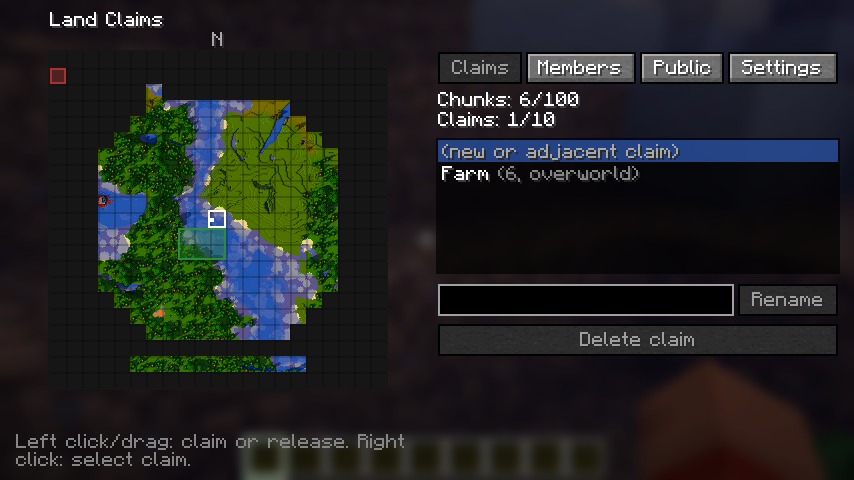
Claims is a land protection mod for NeoForge 1.21.1 servers. Players claim the chunks they live in, invite friends and set permissions one by one or with ready-made templates. Everything works from a graphical screen when the mod is on the client, and from commands when it is not, so vanilla players can still join and play.
/claims menu) to see the real terrain around you, drawn in the style of the Diorama map, with every claim's colour and border on top. Click or drag to claim or release.| Where | Needed? |
|---|---|
| Server | Required |
| Client | Optional — only for the claim screen. Without it, use the commands. |
Requires Minecraft 1.21.1 and NeoForge 21.1.265 or newer. No other mods needed.
| Command | What it does |
|---|---|
/claim [name] · /unclaim |
Claim or release the chunk you stand in |
/claims menu |
Open the claim screen (client mod) |
/claims list · /claims info |
Your claims and limits · the claim you stand in |
/claims rename <name> · /claims delete |
Edit the claim you stand in |
| `/claims trust <player> [visitor\ | member\ |
| `/claims permission public <permission> <true\ | false>` |
| `/claims permission member <player> <permission> <true\ | false>` |
/claims permission template &lt;player&gt; &lt;template&gt; |
Apply a template to a friend |
| `/claims admin bypass\ | list [player]\ |
Permissions: break blocks, place blocks, interact with blocks (doors, buttons, levers), open containers, use items, interact with entities, damage animals, trample farmland. Claim settings: PvP, explosions, fire spread, mob griefing.
Server config: serverconfig/dioaddons_claims-server.toml inside the world folder. Full reference: permissions and commands.
Each mod works alone; together they share claims automatically.
Diorama Addons is an unofficial, community-made set of addons inspired by the Diorama map mod. It is not affiliated with or endorsed by the Diorama authors.
Open source under the MIT license — source code and issues on GitHub.
Project description from CurseForge.
Pick your setup
Choose the version and loader you play, then open the matching release.
Check the dependencies, then try the file in a copied instance before changing a world you care about.
Recent files
3 Nov 2026
1 Nov 2026
Looking for an older file? The official CurseForge project page is in Resources.
 mod
View all Resource Pack Renames in a new anvil GUI catalog!
 mod
Adds a customizable, progression-based, vanilla-friendly recipe book for modded Minecraft.
 mod
Adds few cool features and mechanics