Minecraft version
Back to mods 
CurseForge · Minecraft mod
Inventory Backups
Records every inventory change. Roll back any moment, find any item and see who took it, even for offline players.
Choose a version Pick your version below, then grab the matching file.
Quick answer
Which Inventory Backups release matches 1.18?
Best match for your filters InventoryLogger-1.18.2-1.1.2
Game version 1.18.1, 1.18.2, 1.18
Loader Forge
Inventory Backups InventoryLogger-1.18.2-1.1.2 targets 1.18.1, 1.18.2, 1.18 with Forge. The project page does not say whether this file belongs on the client, dedicated server, or both. No extra mods listed for this file.
Where it goes
Is Inventory Backups required on the client, server, or both?
The project page does not say whether this file belongs on the client, dedicated server, or both.
Client Source doesn’t say
Dedicated server Source doesn’t say
Loader for this release Forge
Required install it here Optional supported, not mandatory Not supported do not install here Source doesn’t say do not assume
The source does not explicitly classify this release as client-only or server-only.
What else does Inventory Backups InventoryLogger-1.18.2-1.1.2 need?
InventoryLogger-1.18.2-1.1.2 on 1.18. Every mod below is checked against that same setup.
This file does not list any required mods. Do not add a library just because a different file uses it.
This file does not list any required or optional mods.
Before you install it
Add Inventory Backups without breaking your instance.
Built for Inventory Backups InventoryLogger-1.18.2-1.1.2 on 1.18. Pick another file and the loader, install side or required mods may change.
- 01
Stick to this file
Use InventoryLogger-1.18.2-1.1.2. It targets 1.18.1, 1.18.2, 1.18 with Forge; another release may have different loader, side or dependency requirements.
- 02
Bring the mods it needs
This file does not list any required mods. Do not add a library just because a different file uses it.
- 03
Put it on the correct side
The project page does not say whether this file belongs on the client, dedicated server, or both.
- 04
Pick the file you checked
Use the “Get this file” button beside InventoryLogger-1.18.2-1.1.2. It opens that exact file at the source.
About this project
What does Inventory Backups add?
Inventory Backups
Every inventory change of every player, recorded - roll back any moment with one click, find any item and see who took it, online or offline.
📦 Requires NeoForge 1.21.1 or Forge 1.20.1 · on the server; admins who want the timeline screen also put it on their client
✨ Features
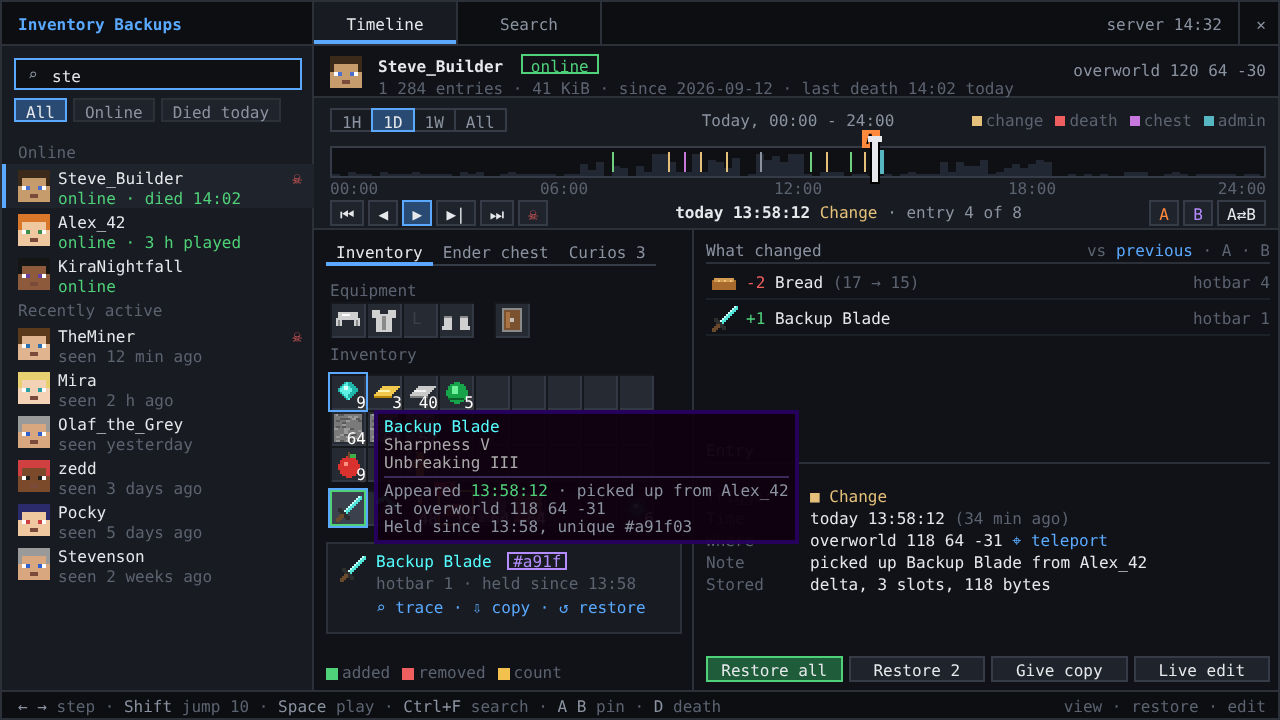
- 📼 Every change recorded - inventory, armor, offhand, ender chest and mod slots, merged into one entry per burst; about 100 bytes per change and 0.005 ms per player and tick.
- 🕒 A timeline with context - deaths with cause and place (recorded before the items drop), joins, quits, chests used, restores and edits by admins. Optional death alerts in the admins' chat with preview, restore and teleport buttons.
- ↩️ Restore in one click - a whole moment or only some slots, with undo; or give yourself a copy and leave the player's items alone.
- 🔍 Find any item - who has it now, who had it and when, by id, name, enchantment or one exact stack, with its trail through drops, death loot and chests;
/invsearch containershows who emptied a chest. - 🖥️ Admin screen - scrub the timeline, play it back, compare two moments, see what changed and where every item came from (
Ctrl+I, needs the mod on the admin's client). - 💤 Offline players too - restore and edit players who are not online; the change goes into their save file. Commands suggest their names too.
- 🎒 Mod slots - Curios, Accessories, Cosmetic Armor, Traveler's Backpack, Tool Belt and Backpacked are backed up and restored with the rest.
- 🗜️ Small and safe storage - compact day files written in the background, thinned with age instead of cut off, with disk budgets; a crash loses seconds at most.
- 🔐 Permissions - separate view, restore, edit and search nodes for LuckPerms; operators without one. Works for vanilla clients through clickable chat.
🎮 Controls
Ctrl+I opens the admin screen. Without the client mod: /inventory list <player> for a clickable timeline, /inventory set|undo|copy|player, /enderchest ... the same for the ender chest, /invsearch <item> for the item search. All commands are listed in the README.
⚙️ Configuration
config/inventory/InventoryBackups.toml or Mods > Inventory Backups > Config: what is recorded, how long it is kept, disk budgets, permission level. 2.x configs and backups are taken over on the first start.
🤝 Compatibility
 ✅ Curios API (optional) - every curio slot, cosmetic slots included, is recorded, shown on the Mod slots tab, restored with the inventory and editable live.
 ✅ Accessories (optional) - accessory and cosmetic slots are recorded and restored the same way; with the Curios compatibility layer each slot is recorded once.
 ✅ Cosmetic Armor Reworked (optional) - the cosmetic armor slots are recorded and restored.
 ✅ Traveler's Backpack (optional) - the worn backpack and everything in it is recorded and restored, also when it is placed on the ground at death.
 ✅ Tool Belt (optional) - the belt slot and the tools on the belt are recorded and restored.
 ✅ Backpacked (optional) - the equipped backpacks and their contents are recorded and restored.
 ✅ LuckPerms (optional) - grant
 inventorybackups.view, .restore, .edit, .search and .ui per group instead of operator status.
📸 Screenshots
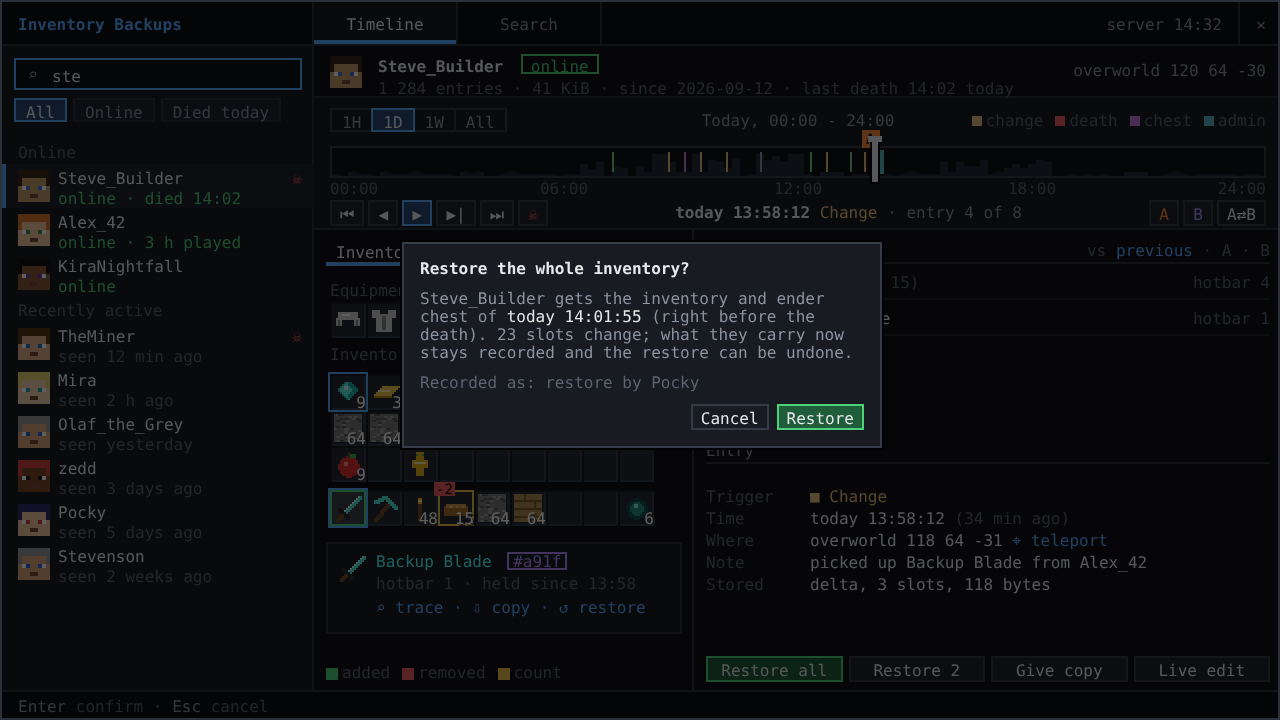
Restoring selected slots
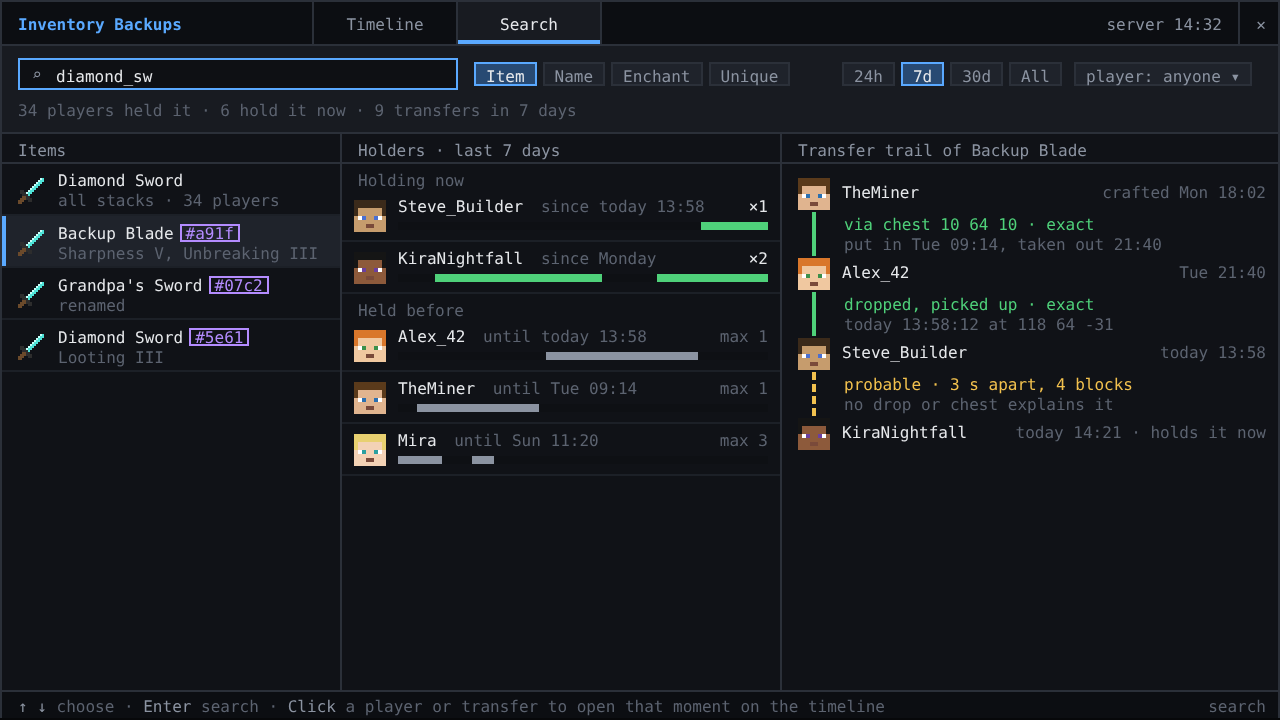
Item search with holders and the transfer trail
💛 Credits
Made by Pocky · source code · the earlier Minecraft 1.20.1 Forge and Fabric versions (2.0) by DjJewl · special thanks to PiglinMine.com.
More mods by Pocky
🌦️ Weather & nature
 Hoarfrost: Snow & Blizzards - seven kinds of snowfall, a living wind and soft snow on the land
 Petrichor: Rain & Storms - realistic rain, puddles, drips and branching lightning
 Rustling Leaves - falling leaves and leaf piles you can wade through and rake, client-side
💡 Light
 Lumen Rigs - aimable spotlights and floodlights with colored light and visible beams
 Neon Glowsticks - throwable glowsticks that bounce, roll and light up the dark
🎨 Graphics & performance
 Turbo for Distant Horizons - Distant Horizons terrain generated several times faster
 Pocky Shaders - a cosy, natural shader pack that shows the weather of these mods
⚔️ Gear & gameplay
 Holy Staff - a healing staff with three skills and flying heal numbers
 Rancher's Vacpack - a Slime Rancher vacuum gun for items and small mobs
🔮 Magic
 HexTale - hextech magic to research, distil and bind with runes, inspired by Arcane and Thaumcraft
⚡ Tech & energy
 Mekanism Advanced Generators - nine tiers of solar panels, big solar generators, cubes and cables for Mekanism
Project description from CurseForge.
Pick your setup
Inventory Backups by Minecraft version and loader
Choose the version and loader you play, then open the matching release.
Minecraft version
1.20.1
3 loader buildsMinecraft version
1.20
2 loader buildsMinecraft version
1.19.2
1 loader buildMinecraft version
1.19.1
1 loader buildMinecraft version
1.19
1 loader buildMinecraft version
1.18.2
1 loader buildMinecraft version
1.18.1
1 loader buildMinecraft version
1.18
1 loader buildMinecraft version
1.16.5
1 loader buildMinecraft version
1.16.4
1 loader buildMinecraft version
1.16.3
1 loader buildShowing the newest 12 of 15 game versions. Older files are in the list below.
Check the dependencies, then try the file in a copied instance before changing a world you care about.
Recent files
Inventory Backups versions and loaders
InventoryLogger-1.18.2-1.1.2
InventoryLogger-1.18.2-1.1.2.jar
30 Mar 2023
Client Source doesn’t say Server Source doesn’t say Dependencies No extras listed Listed on Release listing
Check the 1.18 · Forge setup 1.18.11.18.2Forge1.18 release
InventoryLogger-1.1.1
InventoryLogger-1.1.1.jar
13 Mar 2023
Client Source doesn’t say Server Source doesn’t say Dependencies No extras listed Listed on Release listing
Check the 1.18 · Forge setup 1.18.11.18.2Forge1.18 release
InventoryLogger-1.1.jar
13 Mar 2023
Client Source doesn’t say Server Source doesn’t say Dependencies No extras listed Listed on Release listing
Check the 1.18 · Forge setup 1.18.11.18.2Forge1.18 release
InventoryLogger-1.0.jar
11 Mar 2023
Client Source doesn’t say Server Source doesn’t say Dependencies No extras listed Listed on Release listing
Check the 1.18 · Forge setup 1.18.11.18.2Forge1.18 release
Looking for an older file? The official CurseForge project page is in Resources.