Mod Menu Optional for SuperFancyClouds: Refabricated 2.9.4.2+26.1-fabric
optionalMatching file found Matched file: 18.0.1

Modrinth · Minecraft mod
A vanilla style mod that makes clouds fancier and more dynamic.
Quick answer
SuperFancyClouds: Refabricated 2.9.4.2+26.1-fabric targets 26.1, 26.1.1, 26.1.2 with Fabric. Installation on the client is optional. Installation on the dedicated server is optional. All 1 required mods have matching files.
Where it goes
Installation on the client is optional. Installation on the dedicated server is optional.
The source marks this as usable on both the client and server.
2.9.4.2+26.1-fabric. Change the file and its required mods may change too.
Install Fabric API first. We found matching files for this game-version and loader setup. 1 comes through another mod in the chain.
1 extra mod was pulled in by another dependency. Indented rows show who needs each one. We only count dependency files that match this setup. A file for another loader does not fill the gap.
Before you install it
Built for SuperFancyClouds: Refabricated 2.9.4.2+26.1-fabric. Pick another file and the loader, install side or required mods may change.
Use 2.9.4.2+26.1-fabric. It targets 26.1, 26.1.1, 26.1.2 with Fabric; another release may have different loader, side or dependency requirements.
Install Fabric API first. We found matching files for this game-version and loader setup. 1 comes through another mod in the chain.
Installation on the client is optional. Installation on the dedicated server is optional.
Use the “Get this file” button beside 2.9.4.2+26.1-fabric. It opens that exact file at the source.
About this project
This is an unofficial continuation of SuperFancyClouds original by ami-wishes.
A client/server side mod makes your Minecraft sky full of more stereoscopic and dynamic clouds.
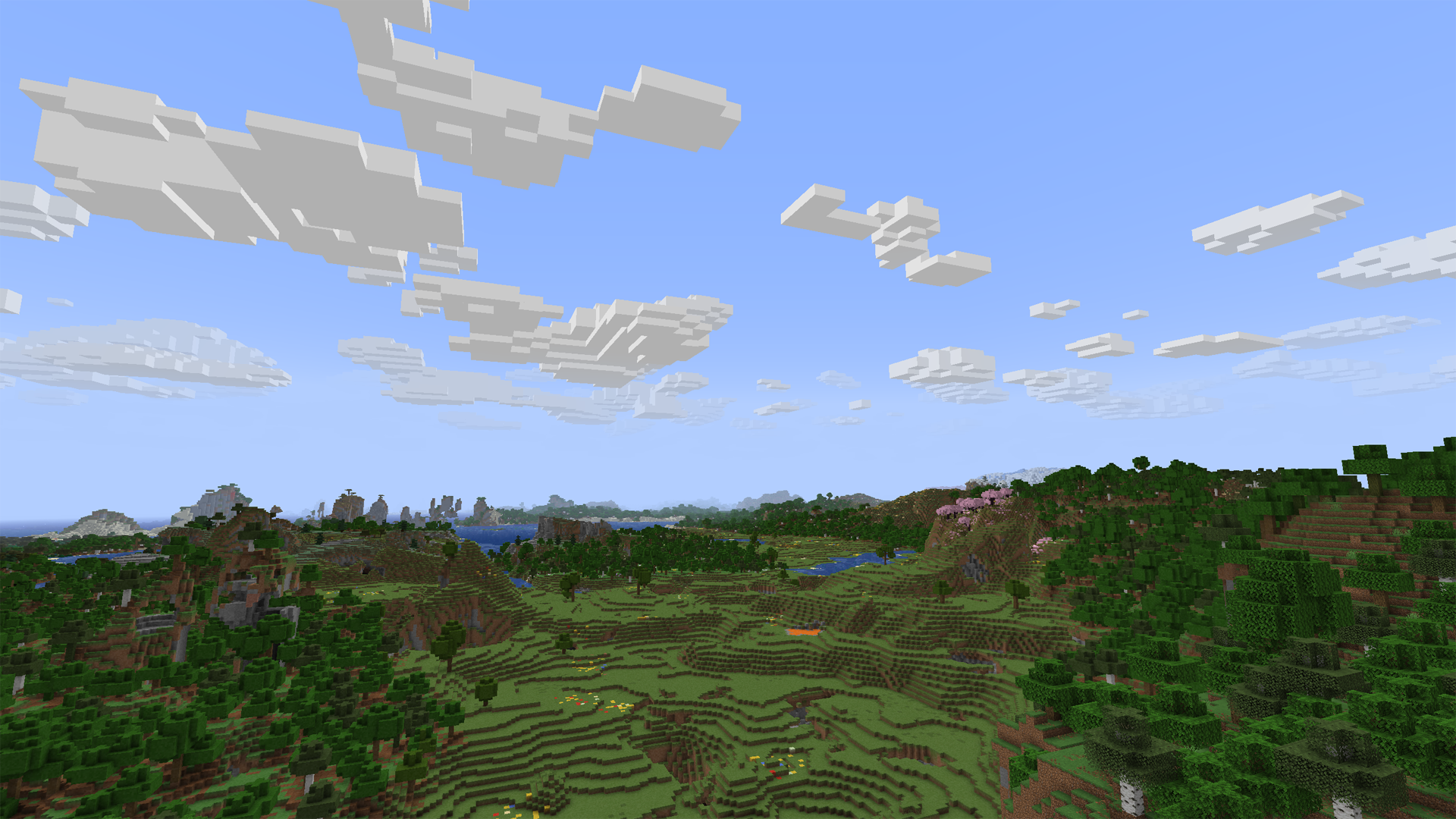
Tap the Images on navigator bar for more preview.
Obviously incompatible with most mod who modified cloud render system. Include Cull Clouds, Extended Clouds and the others. If you put SFCR with it together, they will throw some issue even crash.
mixin.features.render.world.clouds=false to .minecraft/config/sodium-mixins.propertiesIt's maybe normal due to cloud noise sampler and dynamic density feature. You can decrease sample steps, biome affect, and increase common density in config screen to let the sampler generating more clouds. (The density curve is not straight but like a stair. You may need to move larger range on density slider to make it effect.)
Fog may also cover the clouds. You can disable it to check the clouds amounts.
If you set a high value of biome affect and play in desert or savanna, there may not be a cloud in the sky. Its based on biome downfall value and times with cloud density.
Client side only is OK. But if it have both side installed and enable server function in config, SFCR can make every player have same shape of clouds.
On dedicated server, there is a command list for its administrators to control SFCR feature & config remotely. Simply type in "/sfcr help" then enter in chat bar you'll see it.
This mod now maintained in:
Free to use under MIT License.
You can submit your suggestion or issue on Github.
Or, also 
Project description from Modrinth.
Pick your setup
Choose the version and loader you play, then open the matching release.
Showing the newest 12 of 22 game versions. Older files are in the list below.
Check the dependencies, then try the file in a copied instance before changing a world you care about.
Recent files
sfcr-2.9.4.2+26.1.2-fabric.jar
21 Sept 2026
sfcr-2.9.4.2+26.2-fabric.jar
21 Sept 2026
sfcr-2.9.4.2+1.21.11-fabric.jar
21 Sept 2026
sfcr-2.9.4.2+26.3-neoforge.jar
21 Sept 2026
sfcr-2.9.4.2+26.2-neoforge.jar
21 Sept 2026
sfcr-2.9.4.2+1.21.11-neoforge.jar
21 Sept 2026
sfcr-2.9.4.2+26.1.2-neoforge.jar
21 Sept 2026
sfcr-2.9.4.2+26.3-fabric.jar
21 Sept 2026
sfcr-1.9.4.2+1.16.5-fabric.jar
21 Sept 2026
sfcr-1.9.4.2+1.16.5-forge.jar
21 Sept 2026
sfcr-1.9.4.2+1.19.2-forge.jar
21 Sept 2026
sfcr-1.9.4.2+1.19.2-fabric.jar
21 Sept 2026
Looking for an older file? The official Modrinth project page is in Resources.
 mod
modFarming automation mod. Planters and raised beds grow your crops and trees for you.
 mod
modThis mod added more Tier of Tools, Armors and Weapons to Minecraft. The highest tier is indestructible.
 mod
mod✏️ Allows changing the fuel burn time in furnaces globally via a config modifier.