Syncmatica Optional for Litematica Material HUD & Chest Finder 1.0.35+26.3
optionalMatching file found Matched file: 0.3.20

Modrinth · Minecraft mod
Displays a list of materials and the chests in which they are located
Quick answer
Litematica Material HUD & Chest Finder 1.0.35+26.3 targets 26.3 with Fabric. It must be installed on the client. Do not install it on the dedicated server. All 3 required mods have matching files.
Where it goes
It must be installed on the client. Do not install it on the dedicated server.
This file is marked client-only.
1.0.35+26.3. Change the file and its required mods may change too.
Install Fabric API, Litematica, MaLiLib first. We found matching files for this game-version and loader setup. 15 come through another mod in the chain.
15 extra mods were pulled in by other dependencies. Indented rows show who needs each one. We only count dependency files that match this setup. A file for another loader does not fill the gap.
Before you install it
Built for Litematica Material HUD & Chest Finder 1.0.35+26.3. Pick another file and the loader, install side or required mods may change.
Use 1.0.35+26.3. It targets 26.3 with Fabric; another release may have different loader, side or dependency requirements.
Install Fabric API, Litematica, MaLiLib first. We found matching files for this game-version and loader setup. 15 come through another mod in the chain.
It must be installed on the client. Do not install it on the dedicated server.
Use the “Get this file” button beside 1.0.35+26.3. It opens that exact file at the source.
About this project
The all-in-one mod for building from schematics in survival on a server.
It shows what the build needs and which chests hold it, checks your work, and adds a schematic library, a placement editor, material sheets for your team and Easy Place fixes. Everything you need is in one place.
Fully client-side: nothing to install on the server, Litematica's protocol untouched, so no server setup is needed.

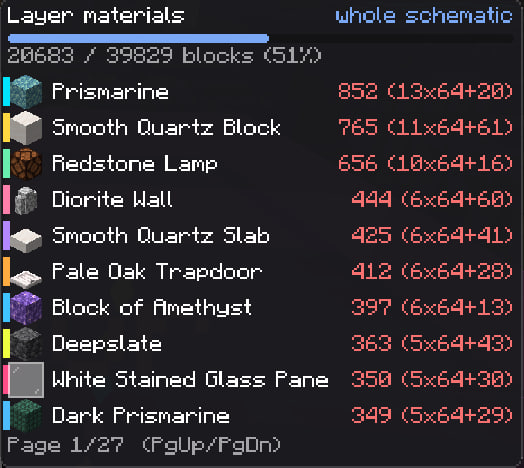
The list for the current layer, with a progress bar and counts in blocks, stacks and shulker boxes. Place a block and it drops off the list. Names are 🟢 enough · 🟡 some · 🔴 none. Flip pages with Page Up / Page Down, even with a chest open.
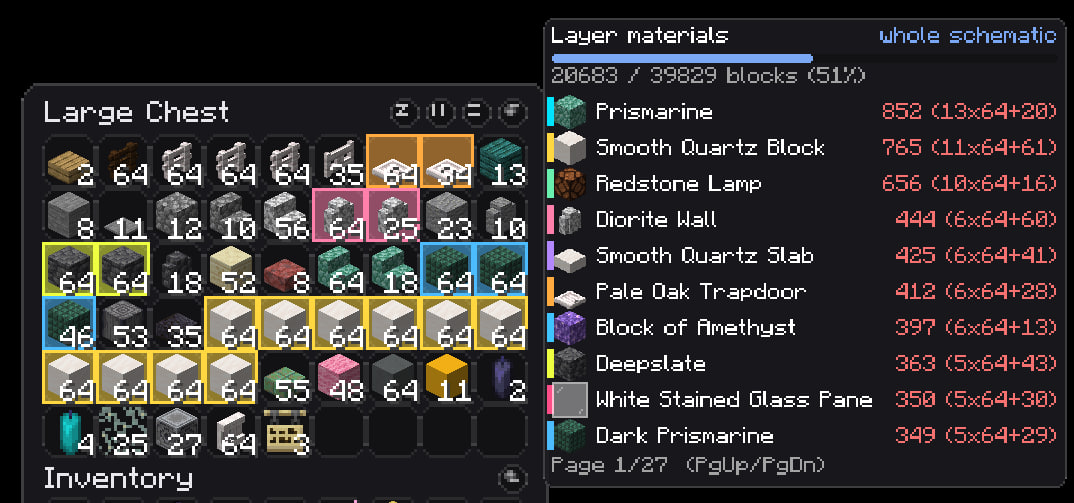
The mod remembers what is in every container you open, per world and server, and item frames on containers count too. Press U and storages within 96 blocks (up to 256) that hold something you need light up through walls, in the same colors as the HUD. Open a chest and the matching slots glow, shulker boxes and bundles included. Items you already carry enough of are skipped.

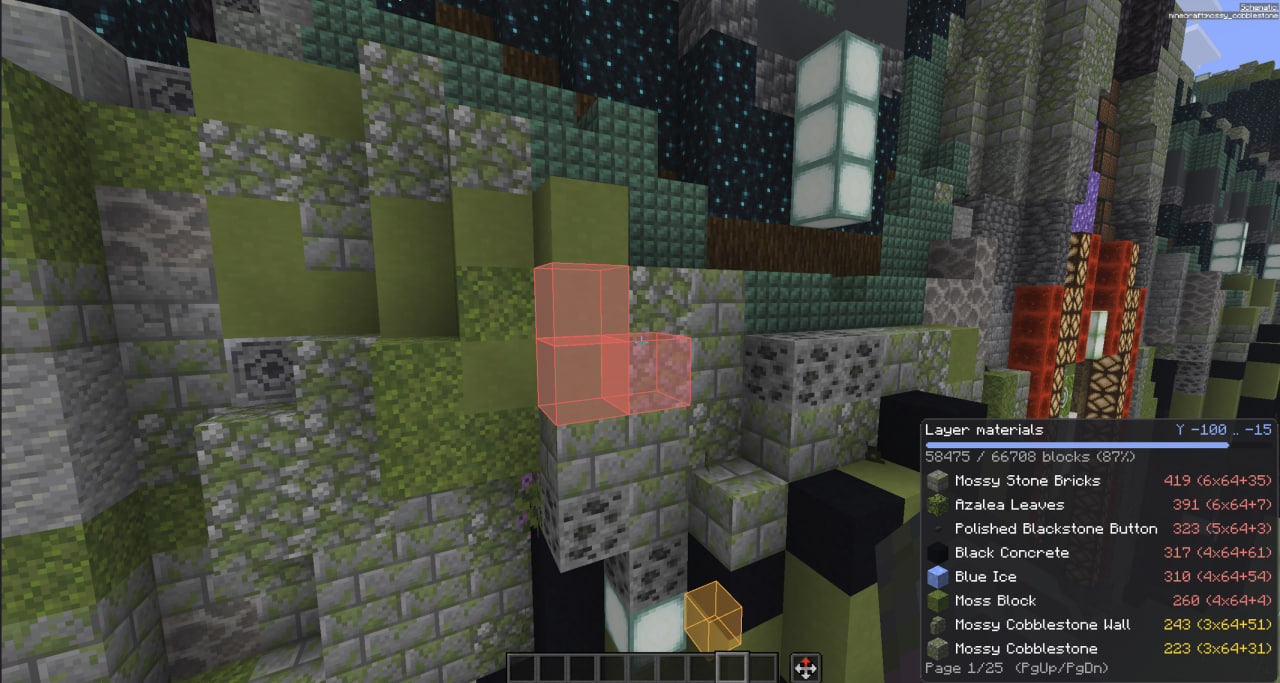
Finds wrong blocks even through walls: 🔴 missing · 🟠 wrong block · 🟡 wrong state (stair direction, repeater delay, door) · 🔵 extra. A draw range and a box cap keep FPS steady on huge builds.
Everything about your schematics in one screen. Open it from the Schematics › tab in the settings or the Material HUD button in Litematica's main menu.


The block is replaced in the schematic itself, not only in the list. Click a block's name in Materials, pick another one (here dirt becomes dark oak planks) and every such block changes in the loaded schematic: the holograms in the world, the material list and Easy Place all use the new block from then on. Facing, slab half and similar properties are kept.
Your schematic file on disk is not touched. The change is remembered after a restart, and the arrow next to the row restores the original block with one click.

Files are named after the schematic and never overwrite each other.

Deleting a schematic in the Library moves it to the Trash tab for 30 days. Restore it with one click or delete it for good.
| Key | Action |
|---|---|
| Y | Show / hide the list |
| Page Up / Page Down | Flip pages |
| U | Mark storage with needed blocks |
| Ctrl + B | Verification |
| Ctrl + Y | Settings |
| Alt + Y | Move panels with the mouse |
| unbound | Open the Schematics menu |
Open with Ctrl + Y, the Material HUD button on Litematica's screens, or Mod Menu. There is a search box, a reset button on every row and colors that match what a setting controls in the world. The Ghost Alpha and Easy Place tabs show up when you don't have those standalone mods.

Litematica Zone Focus narrows a schematic to the part you are building. Together, the list and chest marks follow that zone, and both mods share one settings screen.

| Minecraft | 26.3 (older mod versions for 26.2 · 26.1.x · 1.21.11 stay in Versions) |
| Fabric Loader | 0.18.2+ |
| Java | 25+ |
| Required | Litematica · malilib · Fabric API |
| Optional | Mod Menu |
💬 Questions, bugs or ideas? Join the Discord
Project description from Modrinth.
Pick your setup
Choose the version and loader you play, then open the matching release.
Check the dependencies, then try the file in a copied instance before changing a world you care about.
Recent files
litematica-material-hud-1.0.35+26.3.jar
24 Nov 2026
litematica-material-hud-1.0.34+1.21.11.jar
23 Nov 2026
litematica-material-hud-1.0.34+26.2.jar
23 Nov 2026
litematica-material-hud-1.0.34+26.3.jar
23 Nov 2026
litematica-material-hud-1.0.33+1.21.11.jar
21 Nov 2026
litematica-material-hud-1.0.33+26.2.jar
21 Nov 2026
litematica-material-hud-1.0.33+26.3.jar
21 Nov 2026
litematica-material-hud-1.0.32+1.21.11.jar
20 Nov 2026
litematica-material-hud-1.0.32+26.2.jar
20 Nov 2026
litematica-material-hud-1.0.32+26.3.jar
20 Nov 2026
litematica-material-hud-1.0.31+1.21.11.jar
19 Nov 2026
litematica-material-hud-1.0.31+26.2.jar
19 Nov 2026
Looking for an older file? The official Modrinth project page is in Resources.
 mod
This is a stacking mod with configurable settings. You may set custom stack sizes, and it maintains compatibility with the majority of mods. Have fun!
 mod
Adds a quest system designed to make info conveyance in modpacks far more intuitive!
 mod
A mod that adds some new tools for Tinkers' Construct.