MidnightLib Needed by Hudify 1.2.0+1.21.3__for_CH_v4
requiredMatching file found Matched file: MidnightLib 1.6.4 - Fabric 1.21.3

Modrinth · Minecraft mod
Addon for CustomHud to display Spotify info
Quick answer
Hudify 1.2.0+1.21.3__for_CH_v4 targets 1.21.2, 1.21.3 with Fabric. It must be installed on the client. Do not install it on the dedicated server. 2 required mods need a matching file.
Where it goes
It must be installed on the client. Do not install it on the dedicated server.
This file is marked client-only.
1.2.0+1.21.3__for_CH_v4. Change the file and its required mods may change too.
Install MidnightLib, CustomHud, Fabric API, Fabric API first, but 2 required mods have no matching file for this setup. Do not mix loader builds to force a match. 4 come through another mod in the chain.
4 extra mods were pulled in by other dependencies. Indented rows show who needs each one. We only count dependency files that match this setup. A file for another loader does not fill the gap.
Before you install it
Built for Hudify 1.2.0+1.21.3__for_CH_v4. Pick another file and the loader, install side or required mods may change.
Use 1.2.0+1.21.3__for_CH_v4. It targets 1.21.2, 1.21.3 with Fabric; another release may have different loader, side or dependency requirements.
Install MidnightLib, CustomHud, Fabric API, Fabric API first, but 2 required mods have no matching file for this setup. Do not mix loader builds to force a match. 4 come through another mod in the chain.
It must be installed on the client. Do not install it on the dedicated server.
Use the “Get this file” button beside 1.2.0+1.21.3__for_CH_v4. It opens that exact file at the source.
About this project


Display your Spotify info on your hud and control your music using ingame keybinds.
You'll need to create a Spotify developer app to use this mod.
Why? In short, because it's easier for everyone. Since Spotify's API ratelimits are per app, not per user,
if everyone has their own app, Hudify can poll the API much more frequently without worrying about hitting ratelimits.
This allows Hudify to display far more accurate info, with much less risk of getting desynchronized.
Note: Playback controls are locked behind a Spotify Premium subscription, which is out of my control.
The CustomHud variables work fine without a subscription.
http://localhost:8001/callback. .minecraft/config/hudify.json. To uninstall, also be sure to also disconnect the app from https://www.spotify.com/us/account/apps
This process is very easy, only takes ~5 minutes, and does not cost any money nor require a Premium subscription. If you're still not interested, I suggest you try the mod Blockify, which doesn't require this process.
=if: sp_track=
{sp_track}
{sp_album}
{sp_artists}
{sp_progress} / {sp_duration}
{{sp_context_name, "Playing from {sp_context_name} ({sp_context_type})"}}

Shuffle: {sp_shuffle}
Repeat: {sp_repeat}

{{sp_message, "{sp_msg} {sp_msg_dur}"}}
=endif=
The config above produced this HUD: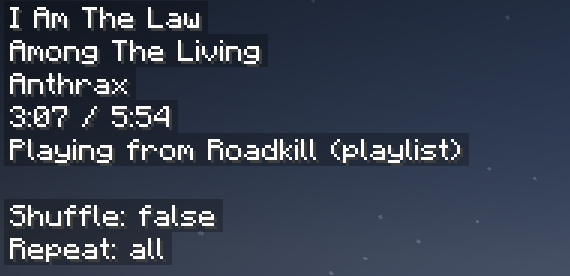
Credit: A huge thank you to erruqie's Blockify and Jakob's CustomHud for their fantastic work, this wouldn't have been possible without them.
Disclaimer: This project is not affiliated with or endorsed by Spotify, Blockify, or CustomHud.
Pro tip: if you like the Hudify playback control keybinds, and want them to work everywhere on your computer, check out Microsoft PowerToys. You can use Keyboard Manager to rebind unused keys to Next Track, Previous Track, and Play/Pause Media.
Project description from Modrinth.
Pick your setup
Choose the version and loader you play, then open the matching release.
Check the dependencies, then try the file in a copied instance before changing a world you care about.
Recent files
hudify-1.2.0-beta+1.21.10__for_CH_v4.jar
20 Oct 2025
hudify-1.2.0+1.21.3__for_CH_v4.jar
20 Oct 2025
hudify-1.0.2__1.21.1.jar
2 Sept 2024
hudify-1.0.0+1.21.1__for_ch3.jar
21 Aug 2024
hudify-1.0.0__for_customhud_v3.jar
26 May 2024
Looking for an older file? The official Modrinth project page is in Resources.
 mod
A data-driven enchantment component and utility library.
 mod
Adds world effect shaders to Wynncraft and manages LODs for Voxy and Distant Horizons when outside the Wynn map.
 mod
Fully heal Bosses when all nearby players are defeated, add bossbars to Bosses that lack one... And more!