Attribute Rendering Library Needed by Window Display Lib 1.0.2
requiredNo matching file Version asked for: 3.1.0
Vintage Story Mod DB · Vintage Story mod
Window Display Lib A complete overhaul of Window Storage Lib Free item placement, animation, lighting, particles, weather and block swapping Usable by modders for their own display blocks Required Mods Required Attribute Rendering Library 3.1.0+ You will
Quick answer
Window Display Lib 1.0.2 targets 1.22.0, 1.22.1, 1.22.2. It must be installed on the client. Installation on the dedicated server is optional. 1 required mod needs a matching file.
Where it goes
It must be installed on the client. Installation on the dedicated server is optional.
This release supports both sides, but the source does not require it on the server.
1.0.2 on 1.22.4. Every mod below is checked against that same setup.
Install Attribute Rendering Library first, but 1 required mod has no matching file for this setup. Do not mix loader builds to force a match.
We only count dependency files that match this setup. A file for another loader does not fill the gap.
Before you install it
Built for Window Display Lib 1.0.2 on 1.22.4. Pick another file and the loader, install side or required mods may change.
Use 1.0.2. It targets 1.22.0, 1.22.1, 1.22.2; another release may have different loader, side or dependency requirements.
Install Attribute Rendering Library first, but 1 required mod has no matching file for this setup. Do not mix loader builds to force a match.
It must be installed on the client. Installation on the dedicated server is optional.
Use the “Get this file” button beside 1.0.2. It opens that exact file at the source.
About this project
A complete overhaul of Window Storage Lib
Free item placement, animation, lighting, particles, weather and block swapping
Usable by modders for their own display blocks
Required
You will also want
The Patches mod is what switches on particles and makes items work that have no display data of their own.
psurface0-w16-h16-d7-windowdisplay. Width, height, depth and category all read straight out of the name, and a shape can hold as many as you like.surfaceFacingDeg if you need something unusual.B to bring them back for a moment when you want to line something up precisely. It is not saved, so you go back to your normal setup next time.displayable.windowdisplay → displayable.shelf → shelvable → windowdisplayable. You only need a patch for items nobody ever authored, or where the vanilla size is wrong for a sill.onWindowDisplayTransform. It reads and writes the same entry a patch uses, so you can tune by eye and copy the numbers straight out.particleOffset, so only items somebody has actually tuned will emit.RoomSafeOpening if you would rather not think about it.animatedElements.canOpen makes a style that stays shut. isWindow: false animates a pane without touching the open/closed state, for interior doors and display flaps.linkedOpen moves a stacked window as one piece instead of each segment starting a moment apart.animOpen / animClose and openFrameBox / closedFrameBox, plus arrayed staticFrameBoxes for parts that never move.showSurfacesWhenStacked.placeWith and pairedWith: "below" build multi-block windows from a single item. 2-high and 3-high go down together, break together and drop one item. If the space above is blocked it refuses to place rather than half-building.wrenchSwapTo converts a placed window into another style or its edge-mounted version with Sprint and a wrench. It understands {variant} placeholders and works across a whole tall stack at once.You can do all of this with something in your hand. Placing, taking and opening never fight each other.
Right Click the frame or pane to open and close the windowRight Click anywhere on the sill to place the held item thereRight Click a placed item to take it backSprint + Mouse Wheel on the sill turns the item you are about to placeSprint + Mouse Wheel on a placed item turns that item, either waySprint + Wrench + Right Click the frame swaps the window to its next style or edge versionB shows the outline boxes temporarily, whatever your config says. RebindableRotation steps by whatever you set as Slot Rotation Degrees, starting from the item's own resting angle rather than snapping to zero. A pending turn clears once you place the item, or if you switch to something else in your hotbar.
Settings live in Window Display Lib. I highly recommend installing Config Lib and Auto Config Lib so you can change them in game.
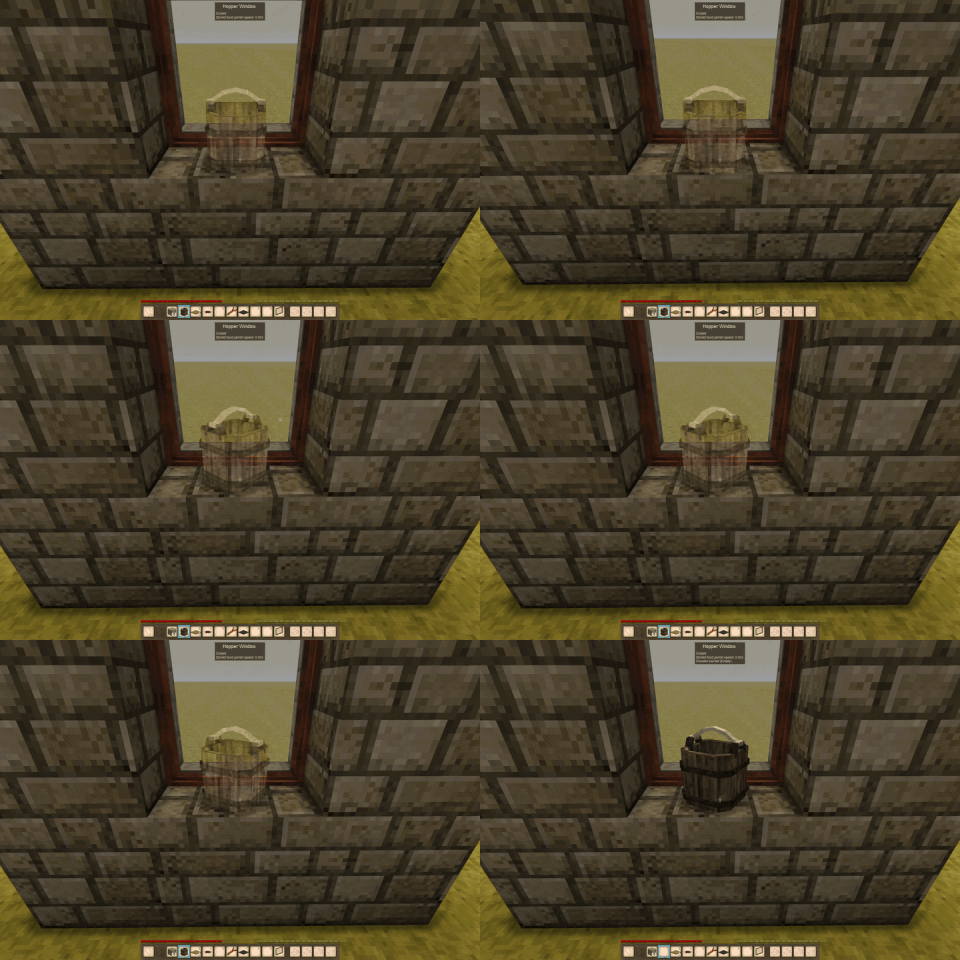
The ghost preview - the item shown where it will land, red when it will not fit.

Sprint and scroll to turn an item, before or after placing it.

Free placement with the outline boxes turned off.
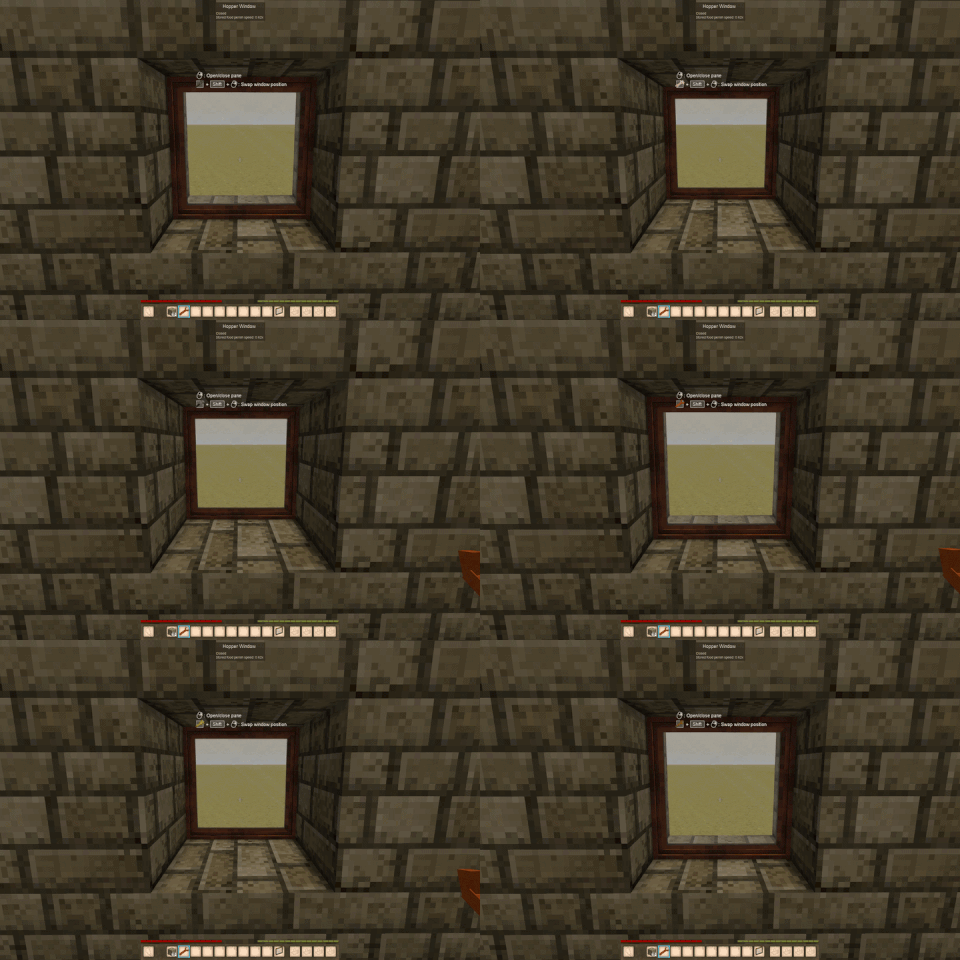
Sprint and a wrench cycles a window through its styles and edge versions.
Most items need nothing: anything with a vanilla displayable.shelf entry is inherited as is. Patch only when an item has no display data at all, or is too big for a sill. An override replaces vanilla's entry wholesale, so restate behavior if you want stacking.
"displayable": {
    "windowdisplay": {
        "size":     { "width": 3, "height": 4, "length": 3 },
        "behavior": "Stacking",
        "randYRotAngle": 0,
        "particleOffset": { "x": 0, "y": 0, "z": 0 },
        "transform": {
            "translation": { "x": 0, "y": 0, "z": 0 },
            "rotation":    { "x": 0, "y": 0, "z": 0 },
            "origin":      { "x": 0.5, "y": 0, "z": 0.5 },
            "scale": 1
        }
    }
}
size is the footprint in voxels – bounds, collision, selection box and stack pitch. transform is visuals only, and nothing keeps the two in step. Any key here also takes a ByType suffix for per-variant values.
Width and length, and why 6 is the number to remember. An item is centred on the spot you click, so it reaches half its width to each side and half its length front and back, and it has to fit entirely inside the surface. Positions are whole voxels. A main window sill is 16 wide by 7 deep, so a 7-deep item would need to sit at 3.5 and there is nowhere to put it – keep length at 6 or under. Going over is a perfectly good way to make something edge-window only, if that is what you are after.
Height is the stack pitch, so it decides clipping. It is not just how tall the item is allowed to be – it is how far up the next one sits when you stack them. Declare it shorter than the item really renders and copies sink into each other; declare it taller and they float with a gap. If you scale an item down with transform you have to scale size with it or you get exactly that – a clay bowl at scale 0.85 with its original height left a visible gap under every bowl in the pile.
Height is also checked against the surface: anything over 7 is refused outright on the shallower surfaces like the display unit and the pane shelf. That is occasionally worth taking on purpose – the vanilla hammer is declared at 6 against a taller model, which lets it go on those surfaces at the cost of stacked hammers overlapping slightly.
behavior is what allows stacking at all. Set it to "Stacking" and items of that type can be piled on each other. Leave it out and it defaults to no stacking, which catches people out when they override an item that vanilla had already set – the override replaces the whole entry, so if you do not restate it you have quietly turned stacking off.
randYRotAngle is how crooked an item is allowed to sit. It is the full spread of the random resting angle, so the item lands within half of it either way – the default of 30 means anything up to 15 degrees off square in either direction. Set it to 0 and the item always sits perfectly straight, which is what you want for something that is meant to look deliberately placed. A small value like 7 is useful when an item has a front, or when its particleOffset is measured against a particular side – the vanilla oil lamp uses that, so its flame stays on the wick instead of swinging away from it. This is per item and sits underneath the player's config switch, so somebody who has turned jitter off gets square items regardless.
particleOffset is optional and switches on flame or smoke particles for that item, in voxels from the top of its box.
Easiest way to get the numbers: place the item, open the in-game transform editor on the Window tab, nudge it until it looks right, and copy the values out.
canOpen – whether panes can be toggled at allframeBoxGroups[] – one per pane: animOpen, animClose, openFrameBox, closedFrameBox, staticFrameBoxes, isWindowcollisionBoxGroups[] – the same, for collision. Independent of the frame boxesanimatedElements[] – shape elements the animator drives; everything else stays chunk-batchedwrenchSwapTo – string or array, with {variant} placeholders. Build cycles across blocks, each pointing at the nextplaceWith / pairedWith – multi-block stackslinkedOpen – stacked windows toggle as oneshowSurfacesWhenStacked[] – surfaces that stay usable when stacked. Absent means all hiddensurfaceFacingDeg – override the derived item facing, keyed by surface indexnoPlacementJitter – kills the random resting angle for that block, for surfaces holding something the player lined up by handdisableRainSound – silence the rain for one styledropsAs – name the block this one drops, with {variant} substitutionA block with no frame boxes at all still works. Sprint and a wrench will use any box except a placed item, so something fully chiselled or otherwise frameless can still be swapped.
Made with the help of Claude Code.
Project description from Vintage Story Mod DB.
Pick your setup
Choose the version and loader you play, then open the matching release.
Check the dependencies, then try the file in a copied instance before changing a world you care about.
Recent files
windowdisplaylib_1.0.2.zip
1 Aug 2026
windowdisplaylib_1.0.1.zip
31 Jul 2026
windowdisplaylib_1.0.0.zip
26 Jul 2026
Looking for an older file? The official Vintage Story Mod DB project page is in Resources.