Place On Slabs Needed by Terrain Slabs 1.0.17
requiredNo matching file Version asked for: 1.1.3
Vintage Story Mod DB · Vintage Story mod
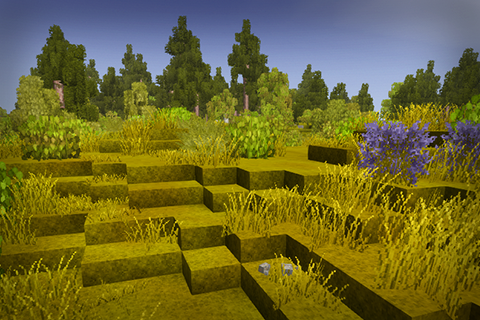
Requires PlaceOnSlabs mod Never again shall we have to jump around like monkeys just to walk places Description This mod adds an additional pass in world generation which smoothes terrain by replacing edge blocks with slab variants. Simple as that. This mo
Quick answer
Terrain Slabs 1.0.17 targets 1.22.2, 1.22.3. It must be installed on the client. Installation on the dedicated server is optional. 1 required mod needs a matching file.
Where it goes
It must be installed on the client. Installation on the dedicated server is optional.
This release supports both sides, but the source does not require it on the server.
1.0.17 on 1.22.3. Every mod below is checked against that same setup.
Install Place On Slabs first, but 1 required mod has no matching file for this setup. Do not mix loader builds to force a match.
We only count dependency files that match this setup. A file for another loader does not fill the gap.
Before you install it
Built for Terrain Slabs 1.0.17 on 1.22.3. Pick another file and the loader, install side or required mods may change.
Use 1.0.17. It targets 1.22.2, 1.22.3; another release may have different loader, side or dependency requirements.
Install Place On Slabs first, but 1 required mod has no matching file for this setup. Do not mix loader builds to force a match.
It must be installed on the client. Installation on the dedicated server is optional.
Use the “Get this file” button beside 1.0.17. It opens that exact file at the source.
About this project
This mod adds an additional pass in world generation which smoothes terrain by replacing edge blocks with slab variants. Simple as that.
This mod uses PlaceOnSlabs mod, you can place some stuff on slabs and they will be offset, so you don't have to stare at floating grass.
Slabs drop regular blocks, so your inventory space won't suffer. You can craft slabs for your landforming desires.
Generated structures and story locations are unaffected by this mod to avoid any potential issues
You can choose generation mode:
I won't add support to ConfigLib until it authors fix its memory leaks. I don't have time to fix them myself right now.
Should be compatible with most mods that affect world generation (like BetterRuins, Terra Prety, VanillaPlus Worldgen etc)
Should be compatible with all mods that add vegetation (Wildgrass, Floral Zones, Wildcraft etc)
Can be incompatible with mods that interact with surface blocks (like Trail Mod)
The changes are revertable, so you can try this mod in your existing worlds. I would still recommend to backup your world, though.
If you want to smooth your existing chunks, run this command: /ts s c 500 (range is adjustable). It will update only loaded chunks nearby, so you might want to repeat this command for far/unloaded chunks. I haven't implemented a way to fully smooth your whole world at once.
If you want to remove this mod midsave:
1) Disable world generation pass by running this command /ts g s None
2) Run /ts us c 500 to unsmooth your terrain (ew)
Bug hunters:
Project description from Vintage Story Mod DB.
Pick your setup
Choose the version and loader you play, then open the matching release.
Showing the newest 12 of 18 game versions. Older files are in the list below.
Check the dependencies, then try the file in a copied instance before changing a world you care about.
Recent files
terrainslabs_1.0.17.zip
8 Jul 2026
Looking for an older file? The official Vintage Story Mod DB project page is in Resources.
 mod
modAdds some people npc's into the game
 mod
modHides minimap, coordinates hud and chat while zooming.
Twenty-one trades, Novice to Grandmaster, earned by the work of your hands, not by grinding.