
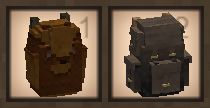
Vintage Story version
Back to mods 
Vintage Story Mod DB · Vintage Story mod
Immersive Backpacks
Immersive Backpacks Giving your character's spine the break it desperately deserves. This mod overhauls backpacks in Vintage Story, making them more realistic and immersive. Visible Bags & Items All back slot bags and equippable items now visibly appear on
Choose a version Pick your version below, then grab the matching file.
Quick answer
Which Immersive Backpacks release matches 1.22.4?
Best match for your filters 1.3.3
Game version 1.22.0, 1.22.1, 1.22.2
Loader Built-in Vintage Story mod system
Immersive Backpacks 1.3.3 targets 1.22.0, 1.22.1, 1.22.2. It must be installed on the client. Installation on the dedicated server is optional. No extra mods listed for this file.
Where it goes
Is Immersive Backpacks required on the client, server, or both?
It must be installed on the client. Installation on the dedicated server is optional.
Client Required
Dedicated server Optional
Loader for this release Built-in Vintage Story mod system
Required install it here Optional supported, not mandatory Not supported do not install here Source doesn’t say do not assume
This release supports both sides, but the source does not require it on the server.
What else does Immersive Backpacks 1.3.3 need?
1.3.3 on 1.22.4. Every mod below is checked against that same setup.
This file does not list any required mods. Do not add a library just because a different file uses it.
This file does not list any required or optional mods.
Before you install it
Add Immersive Backpacks without breaking your instance.
Built for Immersive Backpacks 1.3.3 on 1.22.4. Pick another file and the loader, install side or required mods may change.
- 01
Stick to this file
Use 1.3.3. It targets 1.22.0, 1.22.1, 1.22.2; another release may have different loader, side or dependency requirements.
- 02
Bring the mods it needs
This file does not list any required mods. Do not add a library just because a different file uses it.
- 03
Put it on the correct side
It must be installed on the client. Installation on the dedicated server is optional.
- 04
Pick the file you checked
Use the “Get this file” button beside 1.3.3. It opens that exact file at the source.
About this project
What does Immersive Backpacks add?
Immersive Backpacks
Giving your character's spine the break it desperately deserves.
This mod overhauls backpacks in Vintage Story, making them more realistic and immersive.
Visible Bags & Items
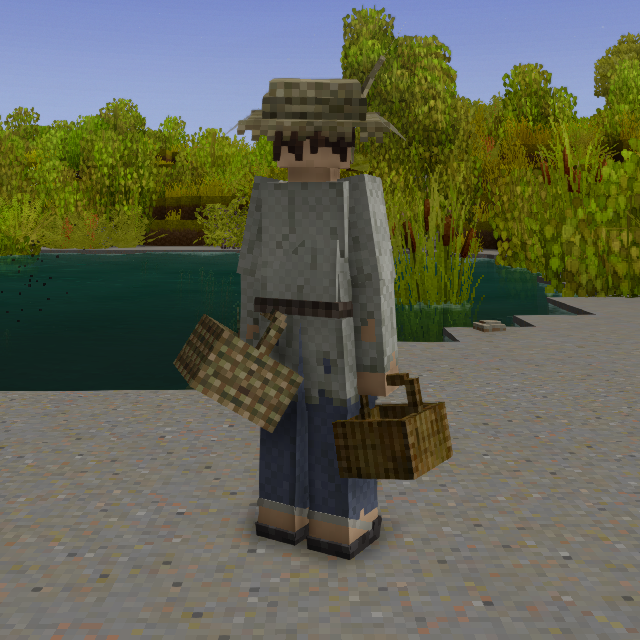
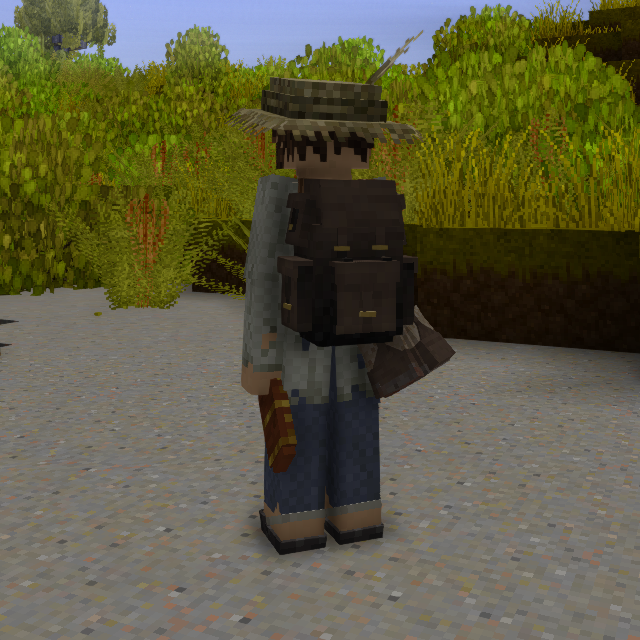
All back slot bags and equippable items now visibly appear on the player's back!
When a player selects the bag slot an item is in to hold it in the hand, the mod will hide from their back.
Model placement is customizable and is derived from the slot the item is carried in.
For example, bags placed in the left most bag slot will actually render on the left side.
 |
 |
The New Bag Slots
There are now three bag slots, a middle slot and two side-slots.

The middle slot is reserved for your large backpacks and heavy carried items like animal traps and skeps.
All modded items that fit in vanilla bag slots also fit here by default, unless a mod has its own side-slot compatibility.
Side-slots are reserved for smaller footprint or lighter items that can be easily hung on the sides or legs of the character, like baskets, bags and the quiver.
Some modded items, like Wildcraft: Trees and Shrubs baskets and Ithania Backpacks leg pouches I have patched to work in the side-slots as well.
Side-Slot Bag Items
|
Middle Slot Bag Items
|
Configuration
The mod creates ImmersiveBackpacksConfig.json with an EnableDebugLogging option, which is set to false by default and is intended to be used for troubleshooting.
Known Issues
- Right side-bags become undefined items with no contents when the mod is uninstalled. Switching them to the left side reverses this behavior allowing safe uninstallation.
- Right side-bags also currently lack shelf and cabinet placement flags. Switching them to the left side reverses this behavior.
(This issue is extremely minor, but I will find a way to fix it eventually.)
Supported Mods
- Hunter's Quiver is supported and it's quiver recipe replaces mine when it is installed.
- Immersive Inventory Slots and Modular Backpacks have their own support built in by their authors.
- Wilderlands Onus Moderatus and Salty’s One Hand are both supported. Immersive backpacks takes ownership of the bag slot behavior and cleans up the hotbar layout to fit the new slots.
- Player Model Lib should work with most models that preserve vanilla-compatible body-part names, like Humans, but heavily custom models may require additional patches or bag model repositioning.
Roadmap / Future Plans
- Butchering corpse middle slot model support.
Currently work in progress! - Floral Zones basket side-slot support.
- New screenshots showcasing full mod capability and cross-mod support options.
I tweaked models, added many mod-compats, trap and skep rendering since those screenshots were taken. - Configuration to enable changing bag capacities.
Still not sure if I would stretch this to bags from other mods or not. - Larger middle slot backpack variants.
For now, I recommended Ithania Backpacks for larger early game middle slot backpacks. - SpecializedBags Revived support.
- Tweaks to make some models attachments more believable.
For example, skeps and traps having straps to hang on the back properly.
Compatibility Notes
- Player Inventory Lib is incompatible and may cause ghost inventory slots and loss of items.
- Bag capacity changing mods which modify any side-slot bag, including bags in supported mods, will need additional capacity patches for Immersive Backpacks’ right-side variants of those items. A capacity mismatch may cause a loss of items when switching said bag between sides.
For Mod Authors: Adding Side-Slot Support
Mod authors can add Immersive Backpacks support by marking their bag items as valid side-slot items and providing left/right variants.
The left-side variant can usually be the normal item. The right-side variant should be a separate mirrored technical item so the model can face the correct direction.
Add this to the item’s attributes:
"immersiveBackpacksAllowedSideSlot": true,
"immersiveBackpacksSideSlotVariants": {
	"leftPrefix": "yourmod:yourbag",
	"rightPrefix": "yourmod:yourbag-right"
}
leftPrefix is the item code prefix used in the left side slot.
rightPrefix is the item code prefix used in the right side slot.
Immersive Backpacks converts between these prefixes when an item is moved into the left or right side slot. Any suffix after the prefix is preserved.
For example:
yourmod:yourbag-red        -> yourmod:yourbag-right-red
yourmod:yourbag-blue       -> yourmod:yourbag-right-blue
Stack attributes are preserved during conversion, so bag contents should carry over as long as both variants use compatible held-bag or backpack behavior.
The left-side item should use the left attachment category:
"wearableAttachment": true,
"attachableToEntity": {
	"categoryCode": "leftpack",
	"attachedShape": {
		"base": "yourmod:item/bag/yourbag-attached-left"
	}
}
The right-side technical item should use the right attachment category:
"wearableAttachment": true,
"attachableToEntity": {
	"categoryCode": "rightpack",
	"attachedShape": {
		"base": "yourmod:item/bag/yourbag-attached-right"
	}
}
Right-side technical items should be hidden from the handbook, recipes, loot tables, and traders unless players are meant to obtain them directly.
Recommended:
"handbook": {
	"exclude": true
}
Slot behavior:
slot 0 = left side bag
slot 1 = normal back slot
slot 2 = right side bag
slot 3 = hidden/unused safety slot. items placed here will be ejected.
Example vanilla-left to right-side mappings used by this mod:
game:basket-*          -> immersivebackpacks:basket-right-*
game:hunterbackpack    -> immersivebackpacks:hunterbackpack-right
game:linensack         -> immersivebackpacks:linensack-right
game:miningbag         -> immersivebackpacks:miningbag-right
game:miningbagsturdy   -> immersivebackpacks:miningbagsturdy-right
game:quiver            -> immersivebackpacks:quiver-right
Left and right variants can use the same base texture files, but their shape texture keys should be separate, or else the left-side technical item's textures will leak into the right.
For example, a normal left-side basket shape might use the texture key basket:
"textures": {
	"basket": {
		"base": "game:item/bag/basket/reed"
	}
}
while the mirrored right-side basket shape might use the texture key basketright:
"textures": {
	"basketright": {
		"base": "game:item/bag/basket/reed"
	}
}
In the case of the basket, without these differentiated texture keys a player with a reed basket in the left slot and a papyrus basket in the right would notice them both having reed basket textures.
The important rule is that the texture key referenced inside the shape file must match the key provided by the itemtype or shape texture map.
For example, if the right-side shape references #basketright, then the right-side itemtype or shape texture map must provide a basketright texture key. That key can still point to the same base texture file as the left-side item. It is just the key that must be different.
For items with multiple variants, such as reed and papyrus baskets, the left and right item codes should preserve the same suffix:
game:basket-normal-reed      -> immersivebackpacks:basket-right-normal-reed
game:basket-normal-papyrus   -> immersivebackpacks:basket-right-normal-papyrus
This lets each right-side variant keep the correct material texture while using a mirrored right-side model.
If you want any further help attempting to add side-slot support that the above documentation doesn't suffice, click the Homepage link at the top to come to my personal modding Discord server, I'd be happy to help you out!
About
This mod was originally authored for a work-in-progress server project called Vardemia. Feel free to visit if you are interested in a heavily cooperative multiplayer homesteading experience.
I owe my thanks to the authors of Immersive Backpack Overhaul (liv_on, pictma) and Visible Bags (Reverhaus) for inspiring the creation of this mod. Show them some love!
Sidenote
If you got any really good looking screenshots, send them to my on my Discord, I have a not-so-great computer but would love to gather a better quality compilation of screenshots for this page.
Keywords: immersivebackpacks, immersive backpacks, backpack mod, backpacks mod, bag mod, bags mod, visible backpack mod, visible backpacks, visible bags, wearable backpack mod, wearable backpacks, wearable bags, side backpack mod, side backpacks, side bags, left backpack slot, right backpack slot, extra backpack slots, backpack slots mod, equipment slot mod, inventory mod, storage mod, bag storage mod, backpack storage mod, carrying mod, wearable storage, visible storage, immersive storage, character equipment mod, player equipment mod, player model equipment, player model backpack, third person backpack, multiplayer backpack mod, multiplayer visible backpacks, visible equipment mod, wearable equipment mod, vintage story backpack mod, vintage story bags, vintage story inventory mod, vintage story storage mod, vintage story equipment mod, vintage story wearable backpacks, hand basket mod, basket mod, visible basket, hunter backpack mod, hunter bag mod, linen sack mod, mining bag mod, sturdy mining bag mod, quiver mod, wearable quiver, visible quiver, side quiver, PlayerModelLib compatibility, Humans compatibility, backpack compatibility, bag compatibility, immersive gear, survival storage mod, roleplay equipment mod, cosmetic backpack mod, visual backpack mod, better backpacks, improved backpacks, enhanced backpacks, expanded backpack slots, backpack visuals, bag visuals, equipment visuals
Project description from Vintage Story Mod DB.
Pick your setup
Immersive Backpacks releases for each Vintage Story version.
Choose the version and loader you play, then open the matching release.
Vintage Story version
1.22.5
1 loader buildVintage Story version
1.22.4
1 loader buildVintage Story version
1.22.3
1 loader buildVintage Story version
1.22.2
1 loader buildVintage Story version
1.22.1
1 loader buildVintage Story version
1.22.0
1 loader buildCheck the dependencies, then try the file in a copied instance before changing a world you care about.
Recent files
Immersive Backpacks versions and loaders
1.3.3
ImmersiveBackpacks_1.3.3.zip
31 Jul 2026
Client Required Server Optional Dependencies No extras listed Listed on Release listing
Check the 1.22.4 setup 1.22.01.22.11.22.21.22.3 release
1.3.2
ImmersiveBackpacks_1.3.2.zip
24 Jul 2026
Client Source doesn’t say Server Source doesn’t say Dependencies No extras listed Listed on Release listing
Check the 1.22.4 setup 1.22.01.22.11.22.21.22.3 release
1.3.1
ImmersiveBackpacks_1.3.1.zip
23 Jul 2026
Client Source doesn’t say Server Source doesn’t say Dependencies No extras listed Listed on Release listing
Check the 1.22.4 setup 1.22.01.22.11.22.21.22.3 release
1.3.0
ImmersiveBackpacks_1.3.0.zip
20 Jul 2026
Client Source doesn’t say Server Source doesn’t say Dependencies No extras listed Listed on Release listing
Check the 1.22.4 setup 1.22.01.22.11.22.21.22.3 release
1.2.0
ImmersiveBackpacks_1.2.0.zip
12 Jul 2026
Client Source doesn’t say Server Source doesn’t say Dependencies No extras listed Listed on Release listing
Check the 1.22.4 setup 1.22.01.22.11.22.21.22.3 release
Looking for an older file? The official Vintage Story Mod DB project page is in Resources.
 mod
mod Vintage Story
Brighter Blueberries
Adds vibrant blue back to ripe blueberry bushes.
 mod
mod Vintage Story
Seamless Windows
An addon for Unleaded Windows that matching window panes into seamless surfaces.
 mod
mod Vintage Story
Stowage: Slots Capacity Management
A reliable and configurable slot capacity system for Vintage Story.