Cybernetics Optional for Cyber_Spells cyberspells-1.21.1-1.4.jar
optionalMatching file found Matched file: createcybernetics-0.5.2-neoforge-1.21.1-HOTFIX.jar

CurseForge · Minecraft mod
The compatibility between Cyberware and Iron's Spells Book
Quick answer
Cyber_Spells cyberspells-1.21.1-1.4.jar targets 1.21.1 with NeoForge. The project page does not say whether this file belongs on the client, dedicated server, or both. All 4 required mods have matching files.
Where it goes
The project page does not say whether this file belongs on the client, dedicated server, or both.
The source does not explicitly classify this release as client-only or server-only.
cyberspells-1.21.1-1.4.jar. Change the file and its required mods may change too.
Install Iron's Spells 'n Spellbooks, playerAnimator, Iron's Lib, Curios API first. We found matching files for this game-version and loader setup. 21 come through another mod in the chain.
21 extra mods were pulled in by other dependencies. Indented rows show who needs each one. We only count dependency files that match this setup. A file for another loader does not fill the gap.
Before you install it
Built for Cyber_Spells cyberspells-1.21.1-1.4.jar. Pick another file and the loader, install side or required mods may change.
Use cyberspells-1.21.1-1.4.jar. It targets 1.21.1 with NeoForge; another release may have different loader, side or dependency requirements.
Install Iron's Spells 'n Spellbooks, playerAnimator, Iron's Lib, Curios API first. We found matching files for this game-version and loader setup. 21 come through another mod in the chain.
The project page does not say whether this file belongs on the client, dedicated server, or both.
Use the “Get this file” button beside cyberspells-1.21.1-1.4.jar. It opens that exact file at the source.
About this project
(Forge 1.20.1 will not be actively updated except for bug fixes.)+

CyberSpells is the bridge between the arcane arts and cybernetic enhancement. This mod allows you to channel the power of magical runes directly into your physical form through specialized cybernetic implants.
Integrating Iron431's Iron's Spells 'n Spellbooks with Love_Vivi's Cyberware for Forge 1.20.1 and perigrine333's ***cybernetics***For Neoforge 1.21.1, this mod introduces new rúnic components that serve as powerful containers for your magical essence:
A dedicated workstation featuring a custom cyberpunk-themed interface. Use the Rune Infuser to safely slot and manage runes within your cybernetic parts.
Every rune attribute and bonus can be fine-tuned via the cyberspells-common.toml configuration file, allowing for perfect integration into any modpack.
Ensure you have the following mods installed:
Start by crafting the Rune Infuser. This block is essential for managing your runic containers.
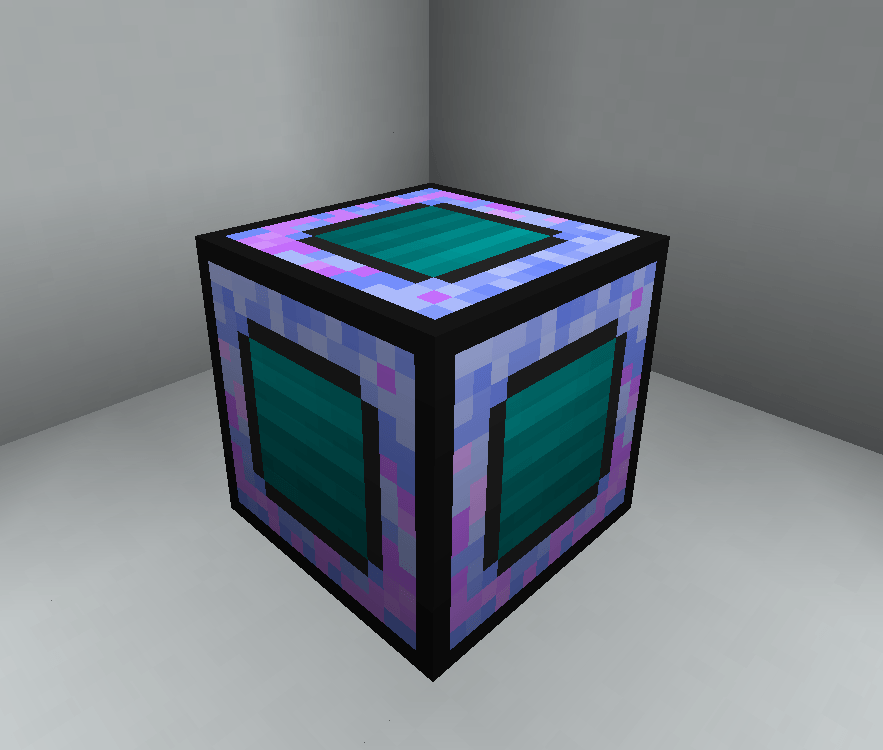
Next, craft the cybernetic part you wish to upgrade (Heart, Arm, or Leg).
Open the Rune Infuser GUI. Place your CyberSpells component in the main slot and your desired Iron's Spells runes in the available sub-slots. Watch as the magical energy is integrated into the metallic frame.
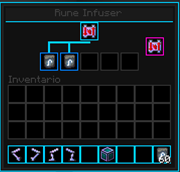
Once infused, take your modified component to a Surgery Table. Undergo the procedure to replace your biological (or cybernetic) parts with your new CyberSpells rúnic upgrades.
Once the surgery is complete, the bonuses from your runes will be active. Check your attributes and feel the surge of arcane power through your circuits!
Project description from CurseForge.
Pick your setup
Choose the version and loader you play, then open the matching release.
Check the dependencies, then try the file in a copied instance before changing a world you care about.
Recent files
14 Aug 2026
20 May 2026
19 May 2026
4 May 2026
27 Feb 2026
26 Feb 2026
25 Feb 2026
18 Feb 2026
15 Feb 2026
Looking for an older file? The official CurseForge project page is in Resources.
 mod
modSpill blood for power. Altars that consume life, sigils that bend the world, custom demons in an endless dungeon, sentient armor that drinks souls, a shield that pays your damage in essentia. Datapack-driven from the ground up.
 mod
modRadioactive hazards into Minecraft
 mod
modA magic mod, inspired by occultism, botania, and thaumcraft.