Tycoon Calendar Needed by Tycoon Retail 0.1.6
requiredMatching file found Matched file: Tycoon Calendar 0.1.3
CurseForge · Minecraft mod
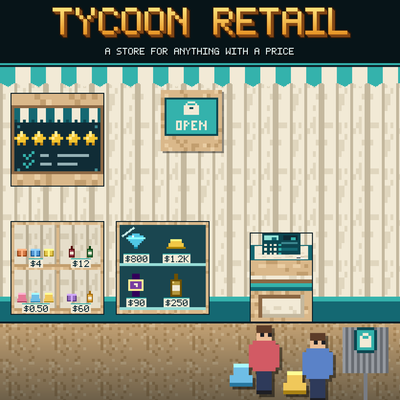
Open a real shop: put up a shop sign, a register and shelves, fill them with goods, and customers arrive, browse, queue and pay. Sells anything other mods give a price.
Quick answer
Tycoon Retail 0.1.6 targets 1.21.1 with NeoForge. The project page does not say whether this file belongs on the client, dedicated server, or both. All 3 required mods have matching files.
Where it goes
The project page does not say whether this file belongs on the client, dedicated server, or both.
The source does not explicitly classify this release as client-only or server-only.
Tycoon Retail 0.1.6. Change the file and its required mods may change too.
Install Tycoon Calendar, Tycoon Citizens, Money - Cash, ATM & Accounts first. We found matching files for this game-version and loader setup.
We only count dependency files that match this setup. A file for another loader does not fill the gap.
Before you install it
Built for Tycoon Retail 0.1.6. Pick another file and the loader, install side or required mods may change.
Use Tycoon Retail 0.1.6. It targets 1.21.1 with NeoForge; another release may have different loader, side or dependency requirements.
Install Tycoon Calendar, Tycoon Citizens, Money - Cash, ATM & Accounts first. We found matching files for this game-version and loader setup.
The project page does not say whether this file belongs on the client, dedicated server, or both.
Use the “Get this file” button beside Tycoon Retail 0.1.6. It opens that exact file at the source.
About this project
A store for anything with a price.
Tycoon Retail lets you open a real shop in Minecraft. Put up a Shop Sign in a closed room with a door, add a Register and some shelves, fill them with goods - and customers get off the Customer Bus Stop, browse, queue at your till and pay. You stand at the register, right-click, and the money lands in your Money account. Price too high and they leave grumbling; run a good store and the word gets around.
Tycoon Retail has no goods of its own: it sells what other mods offer with a daily price (see Requirements). Without such a mod there is nothing to sell.
Five kinds, from pocket money to rich, each with a budget and a different chance of buying - plus rare patrons who buy pieces that are too dear even for the rich. They browse, queue, pay - and say what they think of your prices.
The price list of the whole store in one screen: every kind of goods with its market price today, your own price (click to change, Shift and Ctrl for bigger steps), the chance a customer buys at that price, and what is in stock - and in storage. Search by name or category. At the bottom set one percentage for everything without a price of its own: "All: market + X %".
Hang a Store Rating Terminal on a wall. Your store earns up to 100 points - range (kinds, categories, stock, price classes, showpieces), ambience (furniture, lighting, decoration, floor space, tidiness) and service (fair prices, full shelves, registers, satisfied customers) - which turn into up to five stars.
More stars bring more customers. Collectors and well-off customers come from two stars, the rich and patrons from three. Right-click the terminal to see every point and what would earn more.
A Stock Room Sign turns a second closed room with a door into your stock room. Chests, barrels, storage racks and other mods' storage blocks inside count. The sign shows what the goods are worth today. Flip the switch and the shelves of your nearby store are refilled from the stock room.
store.* and rating.*).tycoonretail:decoration - add or remove blocks. Customers are Tycoon Citizens roles (tycoonretail:customer, tycoonretail:rich_customer).RetailAPI lets your mod put goods on the shelf: register a provider that recognises a stack, gives its daily price, name and category, and gets told when it was sold. You can also register your own furniture as sales floor and your own storage blocks as stock room storage.
Goods come from other mods that offer them to the store, none of them required: Tycoon Market (any item at its market price), Tycoon Vault (watches, wine, whisky), Tycoon Collectibles (memorabilia) and TCG Packs (cards and packs).
Works in singleplayer and multiplayer: stores, customers and payments are all kept on the server.
This mod was built with substantial help from AI. The design decisions, the playtesting and the direction are mine; a large share of the code, the textures and this text was written with an AI assistant. I would rather say that plainly than have you wonder.
Questions, bug reports, ideas, or just want to show what you built? Join the Discord - that is where I answer fastest, and where the next version gets shaped.
Project description from CurseForge.
Pick your setup
Choose the version and loader you play, then open the matching release.
Check the dependencies, then try the file in a copied instance before changing a world you care about.
Recent files
tycoonretail0.1.6.jar
2 Nov 2026
tycoonretail0.1.5.jar
18 Oct 2026
Looking for an older file? The official CurseForge project page is in Resources.
 mod
Create your own sound system for raves , festivals or nightclubs in Minecraft with realistic sound and features !
 mod
15× faster JEI ingredient filter build — drastically reduces "Joining world..." wait time on big modded servers.
 mod
Computers and robots for automating things via in-game scripting.