CraftTweaker Needed by Groves 0.2
requiredMatching file found Matched file: CraftTweaker2-1.12-4.1.20.718.jar
CurseForge · Minecraft mod
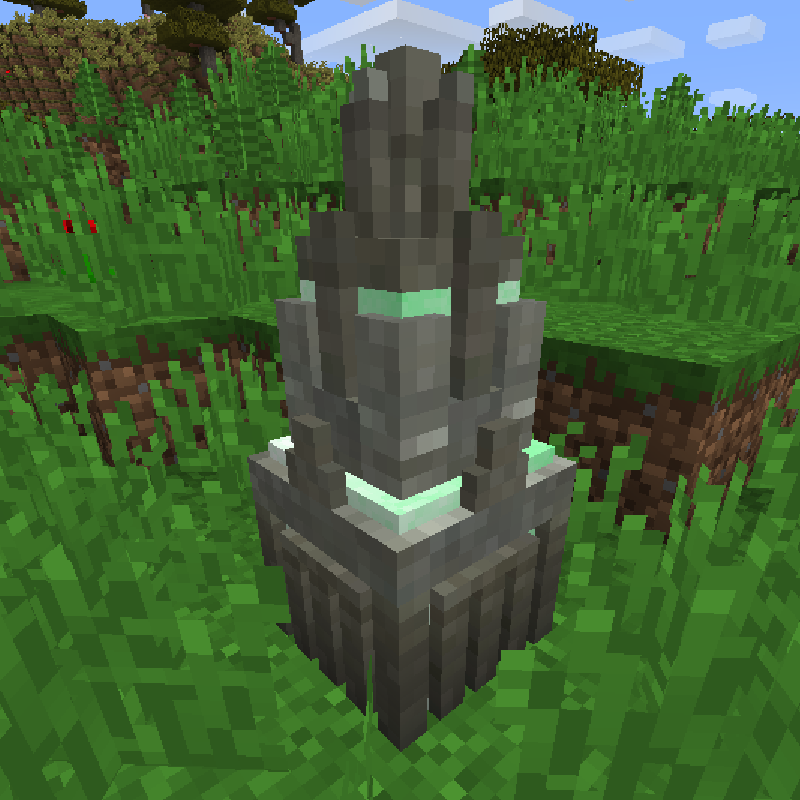
Spawn entities and items by seeding the world!
Quick answer
Groves 0.2 targets 1.12.2. The project page does not say whether this file belongs on the client, dedicated server, or both. All 1 required mods have matching files.
Where it goes
The project page does not say whether this file belongs on the client, dedicated server, or both.
The source does not explicitly classify this release as client-only or server-only.
Groves 0.2. Change the file and its required mods may change too.
Install CraftTweaker first. We found matching files for this game-version and loader setup.
We only count dependency files that match this setup. A file for another loader does not fill the gap.
Before you install it
Built for Groves 0.2. Pick another file and the loader, install side or required mods may change.
Use Groves 0.2. It targets 1.12.2; another release may have different loader, side or dependency requirements.
Install CraftTweaker first. We found matching files for this game-version and loader setup.
The project page does not say whether this file belongs on the client, dedicated server, or both.
Use the “Get this file” button beside Groves 0.2. It opens that exact file at the source.
About this project
 |
|---|
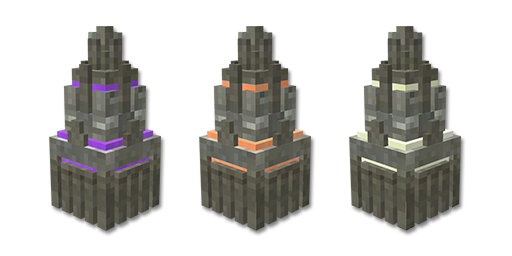
| Groves Official webpage How it works: This mod adds a simple customizable block called a grove. A grove can be placed anywhere and will, from time to time, check the surrounding area for specific blocks. If its requirements are satisfied, it may spawn entities or items on the ground. Crafttweaker This mod is designed around CraftTweaker. It adds a couple of simple methods to add custom groves and choose the blocks it requires. It requires two different scripts, one for creating the grove blocks, and another one to add the requirements and results. *** example groves file - requires a custom loader <br><br> #loader groves<br> <br> mods.groves.createGrove("Birch Grove", //name<br> 16, // radius in blocks<br> 500, // nr of uses<br> 200, // spawn cooldown in ticks<br> 200, // total minumum value<br> 00FFAA // grove color<br> );<br><br>example recipe file <br><br> #modloaded minecraft<br><br> mods.groves.addActivationItem("Birch Grove", <minecraft:cobblestone>);<br><br> mods.groves.addBlock("Birch Grove", <minecraft:grass>, 1);<br> mods.groves.addBlock("Birch Grove", <minecraft:leaves:2>, 1);<br> mods.groves.addBlock("Birch Grove", <minecraft:log:2>, 2);<br> mods.groves.addStackSpawn("Birch Grove", <minecraft:leather>, 0.5);<br> mods.groves.addEntitySpawn("Birch Grove", "minecraft:donkey", 0.5);<br><br> |
 |
|---|
** **Feel free to join the discord and share your ideas and feedback! |
Sponsored by BISECT HOSTING Dedicated to make your Minecraft server hosting experience as easy and affordable as it can possibly be. Get 25% off your first month for any gaming server with the code "wolforce". |
| MCTCG | Mega Builds | Simple Shops | Player Tabs | Support me! | ||||||||
|---|---|---|---|---|---|---|---|---|---|---|---|---|
 |
 |
 |
 |
 |
||||||||
| Hearth Well | Vaultopic | Mechanics | Pristeel | Groves | Miner Golems | |||||||
 |
 |
 |
 |
 |
 |
Project description from CurseForge.
Pick your setup
Choose the version and loader you play, then open the matching release.
Check the dependencies, then try the file in a copied instance before changing a world you care about.
Recent files
groves-0.2.jar
16 Jul 2019
groves-0.1.jar
16 Jul 2019
groves-0.0.jar
16 Jul 2019
Looking for an older file? The official CurseForge project page is in Resources.
 mod
Learn magic and create spells from scratch. The only limit is your creativity!
 mod
Create your own Minecraft Void Realm! Build floating islands, transfer structures, connect bridges, manage NPC shops, complete RPG quests, and trade with other players.
 mod
The original Third Life Plus experience, ported to Fabric , with permission from the original author, supermj767.